
Poke Mcp
What is Poke Mcp
PokeMCP is an MCP (Modular Command Platform) server that provides detailed Pokémon information by integrating with the PokeAPI. It allows users to fetch comprehensive data about any Pokémon, including base stats, types, abilities, moves, and evolution chains.
Use cases
Use cases for PokeMCP include creating Pokémon-related applications, developing educational games that teach about Pokémon, and integrating Pokémon data into websites or mobile apps for fans.
How to use
To use PokeMCP, clone the repository from GitHub, install the required dependencies using the ‘uv’ tool, and run the server with the command ‘uv run mcp dev server.py’. You can then access Pokémon information via the API tool ‘get_pokemon_info’.
Key features
Key features of PokeMCP include fetching Pokémon base stats, types, and abilities with effect descriptions, retrieving up to 10 moves per Pokémon, providing full evolution chains, and graceful error handling with informative messages.
Where to use
PokeMCP can be used in various fields such as game development, educational tools, and applications that require Pokémon data for research or entertainment purposes.
Clients Supporting MCP
The following are the main client software that supports the Model Context Protocol. Click the link to visit the official website for more information.





Overview
What is Poke Mcp
PokeMCP is an MCP (Modular Command Platform) server that provides detailed Pokémon information by integrating with the PokeAPI. It allows users to fetch comprehensive data about any Pokémon, including base stats, types, abilities, moves, and evolution chains.
Use cases
Use cases for PokeMCP include creating Pokémon-related applications, developing educational games that teach about Pokémon, and integrating Pokémon data into websites or mobile apps for fans.
How to use
To use PokeMCP, clone the repository from GitHub, install the required dependencies using the ‘uv’ tool, and run the server with the command ‘uv run mcp dev server.py’. You can then access Pokémon information via the API tool ‘get_pokemon_info’.
Key features
Key features of PokeMCP include fetching Pokémon base stats, types, and abilities with effect descriptions, retrieving up to 10 moves per Pokémon, providing full evolution chains, and graceful error handling with informative messages.
Where to use
PokeMCP can be used in various fields such as game development, educational tools, and applications that require Pokémon data for research or entertainment purposes.
Clients Supporting MCP
The following are the main client software that supports the Model Context Protocol. Click the link to visit the official website for more information.
Content
PokeMCP
PokeMCP is an MCP (Modular Command Platform) server that provides detailed Pokémon information by integrating with the PokeAPI. It exposes a tool to fetch comprehensive data about any Pokémon, including base stats, types, abilities (with effects), moves (with effects), and evolution chain.
Features
- Fetches Pokémon base stats, types, and abilities (with effect descriptions)
- Retrieves up to 10 moves per Pokémon, including move effects
- Provides the full evolution chain for a given Pokémon
- Handles errors gracefully and returns informative error messages
Requirements
- Python 3.11.4+
- httpx (for async HTTP requests)
- mcp.server.fastmcp (for MCP server framework)
Installation
- Clone this repository:
git clone https://github.com/ChiragAgg5k/poke-mcp.git cd poke-mcp - Install dependencies using uv:
uv sync
Usage
Development Server
Run the server using uv (ensure you have the required MCP infrastructure):
uv run mcp dev server.py
Connecting with Claude
Run the following command to connect with Claude:
uv run mcp install server.py
Result should look like this:
Added server 'poke-mcp' to Claude config
Successfully installed poke-mcp in Claude app
Now you can use the poke-mcp MCP tools in Claude:
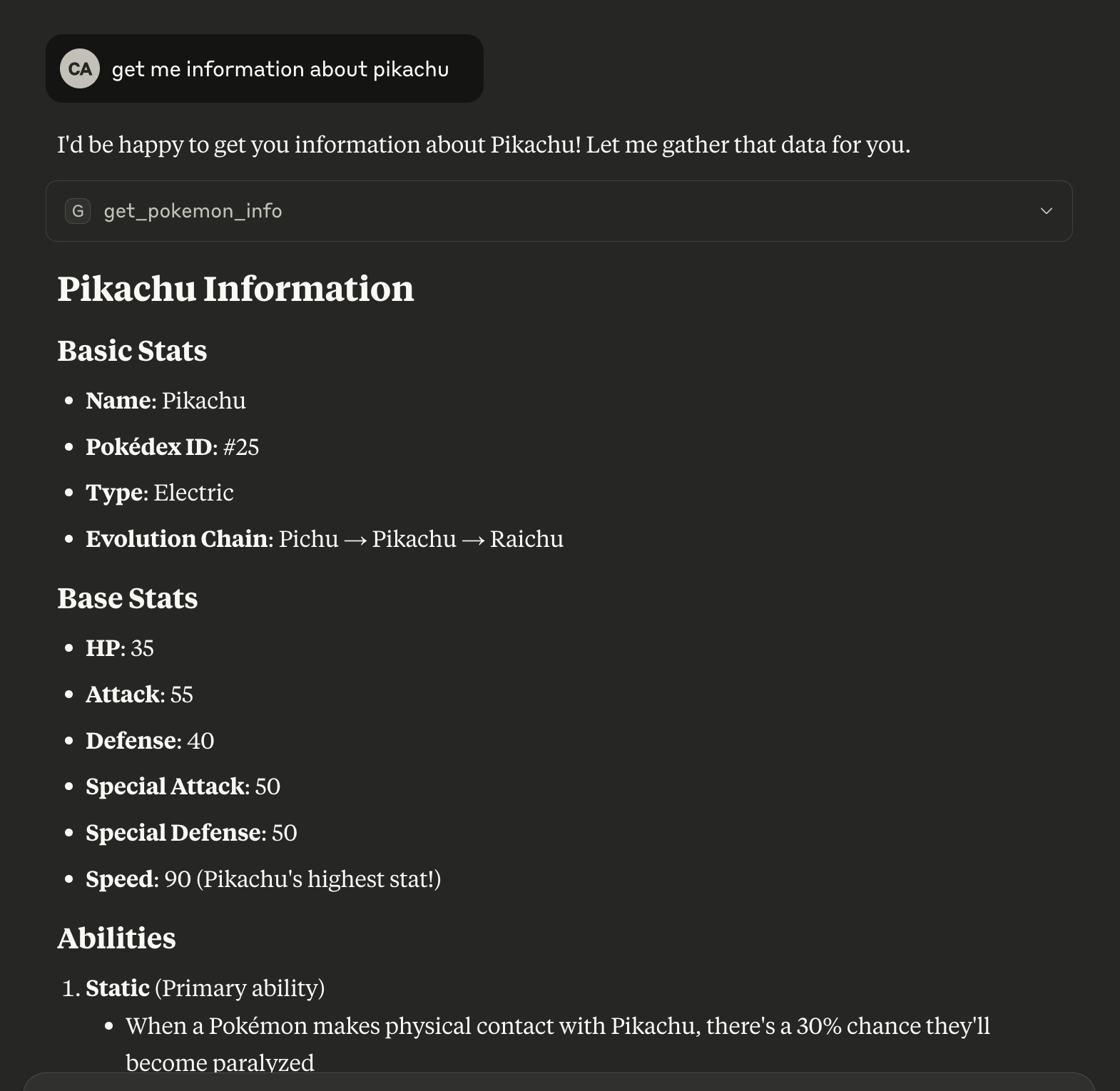
Get Pokemon Info
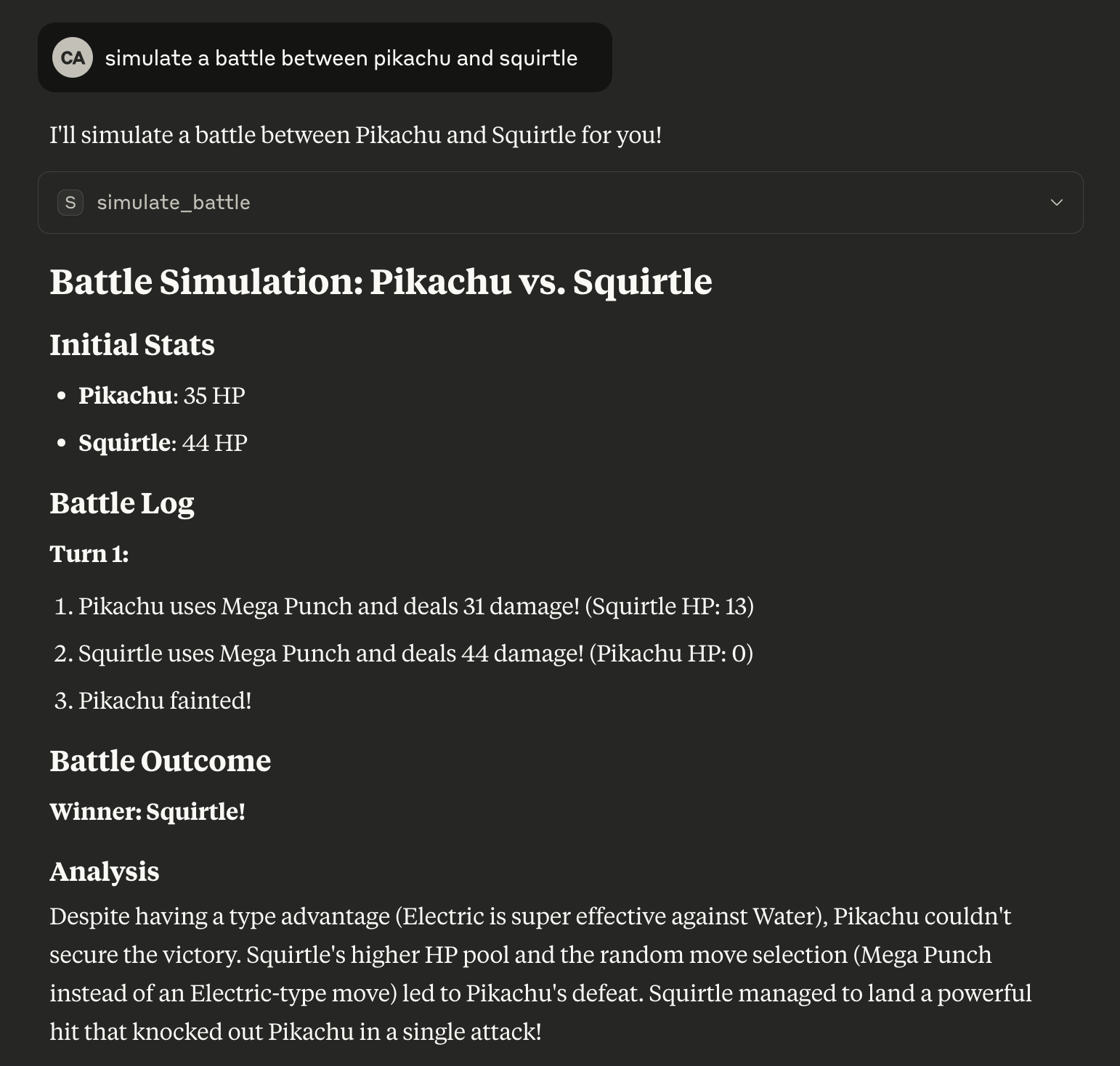
Simulate Battle
Learn how to connect the server with other MCP clients like Cursor here.
API
Tool: get_pokemon_info
Fetches detailed information about a Pokémon.
Arguments
pokemon_name(str): The name of the Pokémon (case-insensitive)
Returns
A dictionary with the following structure:
Error Handling
If the Pokémon is not found or there is a network error, the response will include an error key with a descriptive message.
Tool: simulate_battle
Simulates a Pokémon battle between two Pokémon using core mechanics (stats, type, and status effects).
Arguments
pokemon1(str): Name of the first Pokémon (case-insensitive)pokemon2(str): Name of the second Pokémon (case-insensitive)
Returns
A dictionary with the following structure:
{
  "pokemon1": "pikachu",
  "pokemon2": "charizard",
  "initial_hp": {
    "pikachu": 35,
    "charizard": 78
  },
  "battle_log": [
    "Turn 1:",
    "charizard uses mega-punch and deals 75 damage! (pikachu HP: 0)",
    "pikachu fainted!",
    "Winner: charizard!"
  ],
  "winner": "charizard"
}
Error Handling
If either Pokémon is not found or there is a network error, the response will include an error key with a descriptive message.
License
This project uses the PokeAPI and is intended for educational and non-commercial use.
Dev Tools Supporting MCP
The following are the main code editors that support the Model Context Protocol. Click the link to visit the official website for more information.







