
Pokemon Mcp
What is Pokemon Mcp
pokemon-mcp is a server integration that demonstrates how to connect the Pokemon API functionality with Claude using the Model Context Protocol (MCP). It serves as a proof of concept for integrating external APIs with Claude.
Use cases
Use cases for pokemon-mcp include developing chatbots that provide Pokemon information, creating educational apps that teach users about Pokemon, and integrating Pokemon data into gaming platforms.
How to use
To use pokemon-mcp, compile the Go application to create the MCP server binary, then configure your Claude desktop by adding the MCP server configuration to the ‘claude_desktop_config.json’ file, specifying the path to the binary.
Key features
Key features of pokemon-mcp include seamless integration of the Pokemon API with Claude, built using Go for robust networking, and customizable server names and binary locations.
Where to use
pokemon-mcp can be used in applications that require interaction with the Pokemon API, such as gaming applications, educational tools, or any software that benefits from Pokemon-related data.
Clients Supporting MCP
The following are the main client software that supports the Model Context Protocol. Click the link to visit the official website for more information.





Overview
What is Pokemon Mcp
pokemon-mcp is a server integration that demonstrates how to connect the Pokemon API functionality with Claude using the Model Context Protocol (MCP). It serves as a proof of concept for integrating external APIs with Claude.
Use cases
Use cases for pokemon-mcp include developing chatbots that provide Pokemon information, creating educational apps that teach users about Pokemon, and integrating Pokemon data into gaming platforms.
How to use
To use pokemon-mcp, compile the Go application to create the MCP server binary, then configure your Claude desktop by adding the MCP server configuration to the ‘claude_desktop_config.json’ file, specifying the path to the binary.
Key features
Key features of pokemon-mcp include seamless integration of the Pokemon API with Claude, built using Go for robust networking, and customizable server names and binary locations.
Where to use
pokemon-mcp can be used in applications that require interaction with the Pokemon API, such as gaming applications, educational tools, or any software that benefits from Pokemon-related data.
Clients Supporting MCP
The following are the main client software that supports the Model Context Protocol. Click the link to visit the official website for more information.
Content
Pokemon MCP Integration Guide
Overview
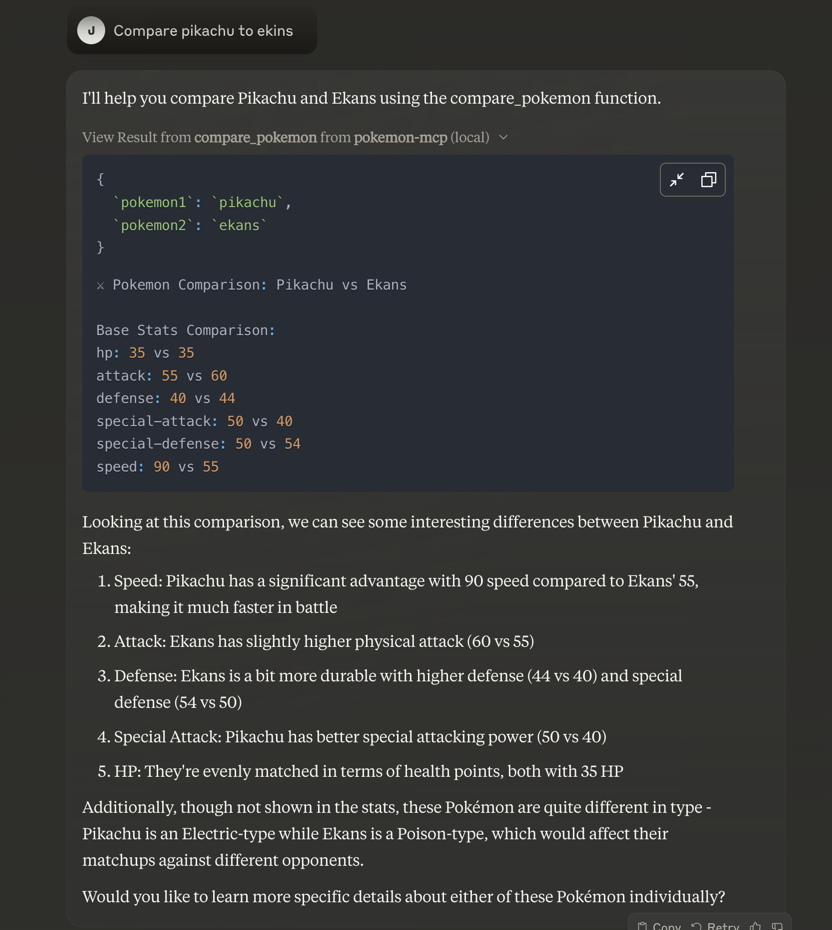
This guide demonstrates how to integrate Pokemon API functionality into Claude using the Model Context Protocol (MCP). The implementation serves as a proof of concept for MCP methodologies, showcasing how easily external APIs can be integrated with Claude.
Implementation Details
The integration is built in Go, leveraging its robust built-in networking capabilities. The resulting binary acts as a bridge between Claude and the Pokemon API.
Installation Steps
-
Compile the Binary
- Build the Go application to create the MCP server binary
- Store the binary in a location that will be referenced by your Claude desktop configuration
-
Configure Claude Desktop
Add the MCP server configuration to your Claude desktop config file (claude_desktop_config.json):{ "mcpServers": { "pokemon-mcp": { "command": "/tmp/pokemon-mcp" } } }
Further Resources
For more detailed information about MCP integration, refer to the MCP Quick Start Guide
Notes
- The binary location (
/tmp/pokemon-mcp) should be adjusted according to your system setup - Ensure the binary has appropriate execution permissions
- The MCP server name (
pokemon-mcp) can be customized as needed
Results
Dev Tools Supporting MCP
The following are the main code editors that support the Model Context Protocol. Click the link to visit the official website for more information.







