
Pp Mcp Adk
What is Pp Mcp Adk
pp_mcp_adk is a commerce-centric demonstration that showcases the integration of PayPal’s Agent Toolkit with Google’s Agent Development Kit (ADK) via MCP server. It was presented live at PayPal Dev Days 2025.
Use cases
Use cases for pp_mcp_adk include pre-sales customer engagement through conversational interfaces, managing online orders and shipments, and handling subscriptions for recurring services.
How to use
To use pp_mcp_adk, developers need to register at developer.paypal.com to create multiple apps, each with its own Client ID and Secret Key. They can then utilize the available APIs for transactions, orders, and subscriptions through the MCP server.
Key features
Key features of pp_mcp_adk include a set of merchant-centric APIs, support for various transaction types (orders, shipments, subscriptions), and the ability to integrate external agents for enhanced customer interactions.
Where to use
pp_mcp_adk is primarily used in e-commerce and online retail environments where businesses need to manage transactions, customer engagements, and subscriptions effectively.
Clients Supporting MCP
The following are the main client software that supports the Model Context Protocol. Click the link to visit the official website for more information.





Overview
What is Pp Mcp Adk
pp_mcp_adk is a commerce-centric demonstration that showcases the integration of PayPal’s Agent Toolkit with Google’s Agent Development Kit (ADK) via MCP server. It was presented live at PayPal Dev Days 2025.
Use cases
Use cases for pp_mcp_adk include pre-sales customer engagement through conversational interfaces, managing online orders and shipments, and handling subscriptions for recurring services.
How to use
To use pp_mcp_adk, developers need to register at developer.paypal.com to create multiple apps, each with its own Client ID and Secret Key. They can then utilize the available APIs for transactions, orders, and subscriptions through the MCP server.
Key features
Key features of pp_mcp_adk include a set of merchant-centric APIs, support for various transaction types (orders, shipments, subscriptions), and the ability to integrate external agents for enhanced customer interactions.
Where to use
pp_mcp_adk is primarily used in e-commerce and online retail environments where businesses need to manage transactions, customer engagements, and subscriptions effectively.
Clients Supporting MCP
The following are the main client software that supports the Model Context Protocol. Click the link to visit the official website for more information.
Content
A commerce-centric demo featuring Agent Development Kit with Paypal Agent Toolkit via MCPs
This 4 minutes demo shows a quick conversational pre-sales engagement using PayPal’s Agent Toolkit via MCP, and Google’s Agent Development Kit.
Paypal Sandbox
When you register with developer.paypal.com, you can set up multiple Apps, each with will come with its own:
- Client ID and Secret Key for applications calling the APIs.
- A sandbox account with emails and passwords that can log into sandbox.paypal.com.
- The sandbox account has test credit cards, addresses and bank details that can be used to test transactions.
Notes on using the Paypal APIs
Available APIs
The collection of APIs are primarily merchant centric. There are a total of 25 APIs spanning:
- disputes
- invoices
- orders
- subscriptions
- tracking
- transactions
In this demo
This demo only obtain the following APIs, they are tested and found functional.
Only orders and shipment are part of the demo:
- ‘orders.create’,
- ‘orders.get’,
- ‘orders.capture’,
- ‘shipment.create’,
- ‘shipment.get’,
- ‘subscriptions.create’,
- ‘subscriptions.show’,
- ‘subscriptions.cancel’
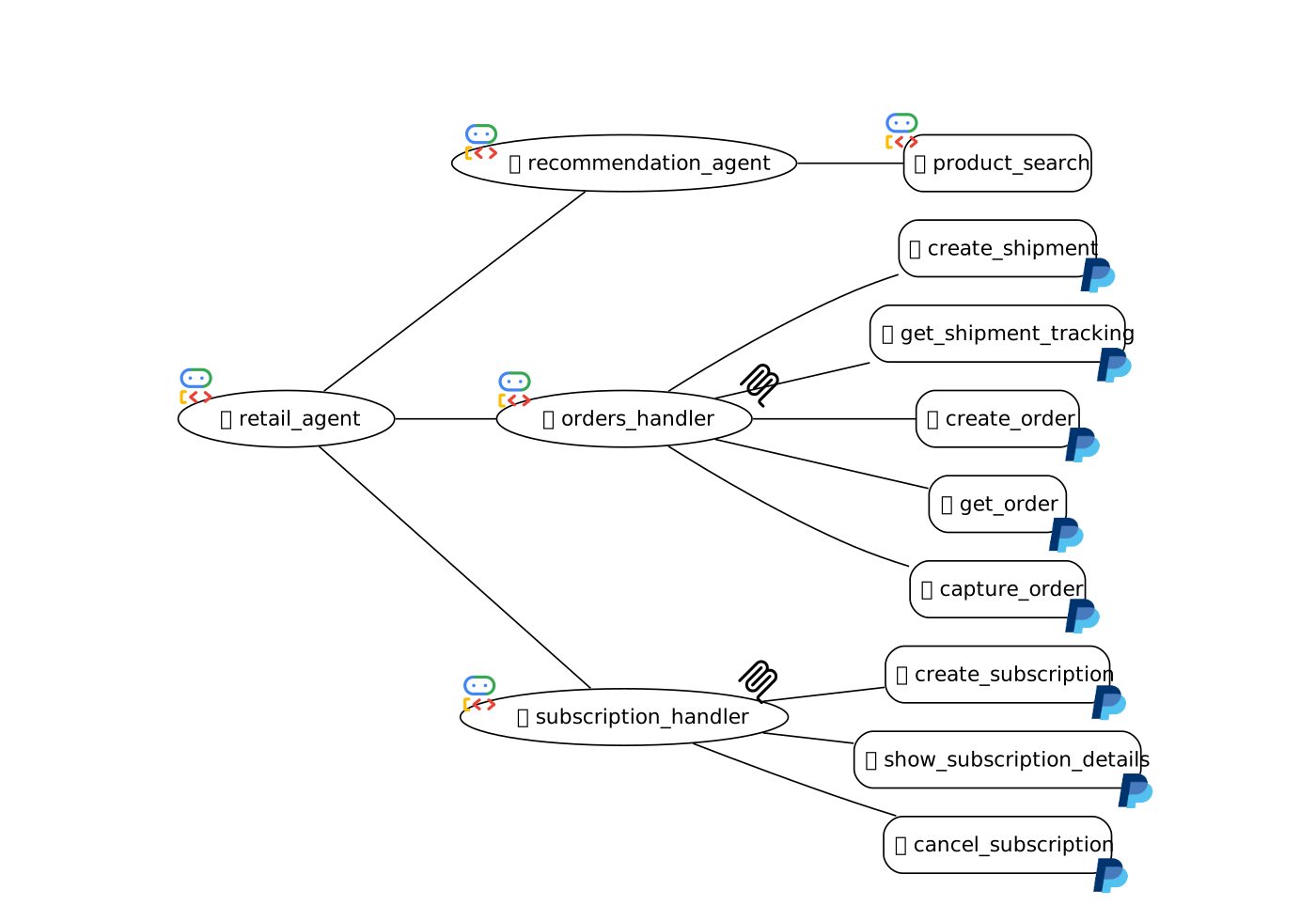
See arch/paypal_mcp_adk_a2a.svg for where remote agents are mentioned at the end of the demo.
Such external agents can be defined and their code lives else where, but via A2A, your agents can make use of the intelligence of these external agents for your customers, without needing to know how they were made.
API Interdependencies
Here are a list of API interdependencies and operational matters:
- Create order returns a payment URL for the human to log in and pay manually.
- Calling order capture will only be successful once the consumer has completed the transaction.
- A human must create a dispute first in the sandbox environment before a merchant can call accept dispute claim.
- A subscription can only be created if there is a previously created product and a subscription plan.
- There is a delay in list_transactions showing the latest.
Set up
Python Packages
Requires Google ADK 0.3.0+:
python3 -m venv ~/.ppmcp_adk
source ~/.ppmcp_adk/bin/activate
pip install "google-adk==0.3.0"
pip install "google-cloud-aiplatform==1.90.0"
or if poetry is preferred:
poetry install
For the MCP Client
Set up nodejs and npx from Node.js website
Making sure you have something similar, that node and npx are in your PATHs:
$ which node
/Users/USERNAME/.nvm/versions/node/v22.14.0/bin/node

$ which npx
/Users/USERNAME/.nvm/versions/node/v22.14.0/bin/npx
Configuration
COPY ‘env.example’ into ‘.env’ and set up the '.env` file:
- Fill in either: your Google API Key, or your Google Cloud Project ID and Location
- Find and fill in Paypal Sandbox
PAYPAL_CLIENT_IDandPAYPAL_SECRET
Insert orders info that actually exists in your Paypal sandbox:
- In function
load_user_profile()withinpaypal_mcp_agent/util.py. - Modify the
user_profileandordersdictionaries.
They are loaded duringbefore_agent_callback.
Run ADK Developer UI
- Run
adk web, in the working directorypp_mcp_adk, where the.envfile is. - It will display
INFO: Uvicorn running on http://0.0.0.0:8000 (Press CTRL+C to quit) - Point your browser to http://localhost:8000/dev-ui?app=paypal_mcp_agent
Sample Interaction
[User]: Where is the dog toy I ordered?
[Agent]: [calls get_shipment_tracking API]
[Agent]: Your Dido Dog Toy order (ID: 2RH052419P314283P) has been shipped via UPS with tracking number 1Z1234567890123456 on 2025-04-24.
[User]: how about show me the order information too?
[Agent]: [calls get_order API]
[Agent]: Here is the information for your order:
- Order ID: 2RH052419P314283P
- Status: COMPLETED
- Item: Dido Dog Toy
- Quantity: 3
- Total Amount: 30.00 USD
- Shipping Address: 1 Main St, San Jose, CA 95131, US
[User]: (Manually click on the paperclip icon to the left of the chatbox, load the green dress image into the chat box. The image is under ./paypal_mcp_agent/images, followed by…) recommend something more formal in the same style.
[Agent]: Okay, I understand. You’re looking for something more formal, but in a similar style to the dress in the image you sent.
…The dress in the image has the following characteristics:
[Agent]: [calls product_search tool]
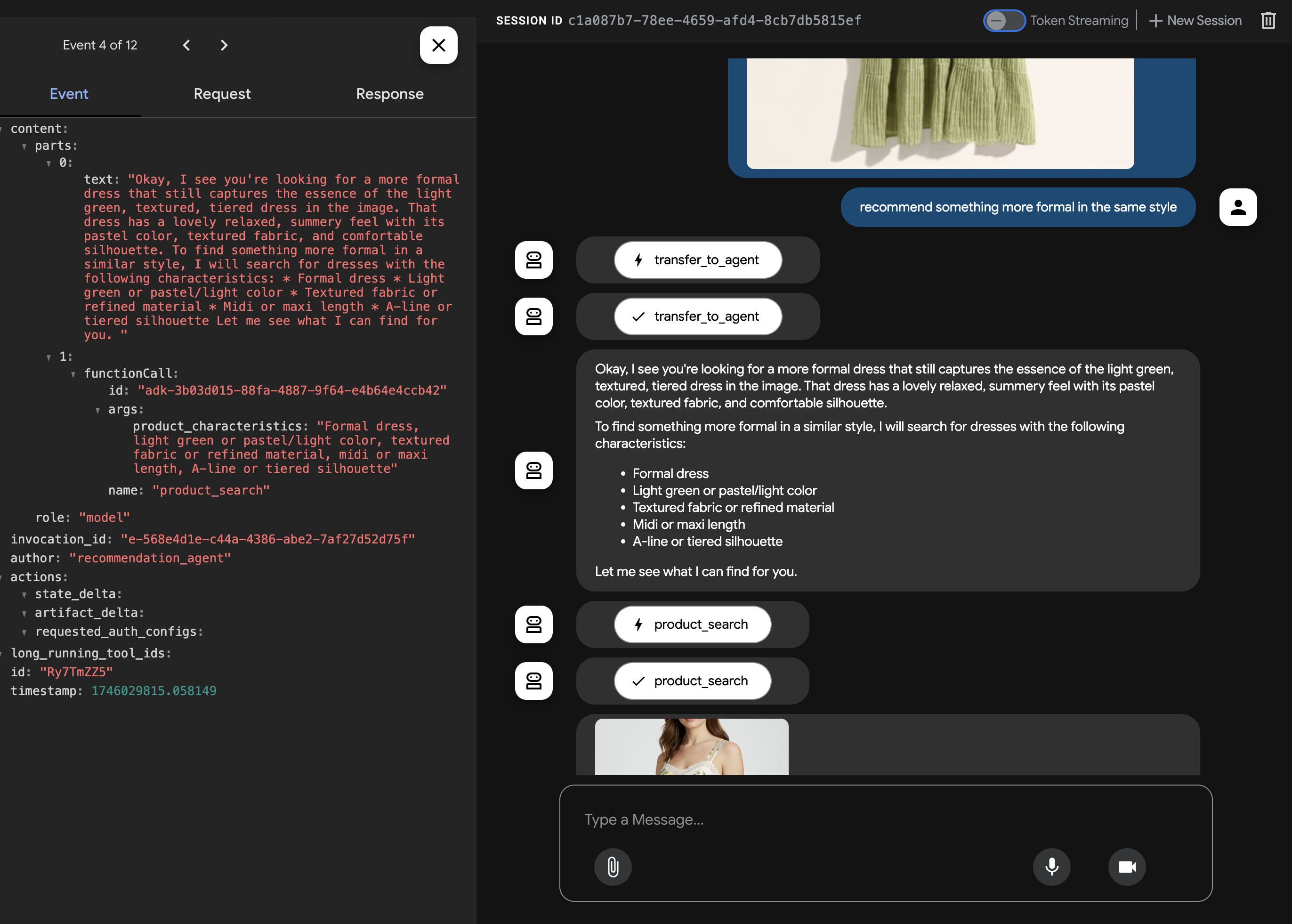
…
[Agent]: I found three dresses that might interest you:
…
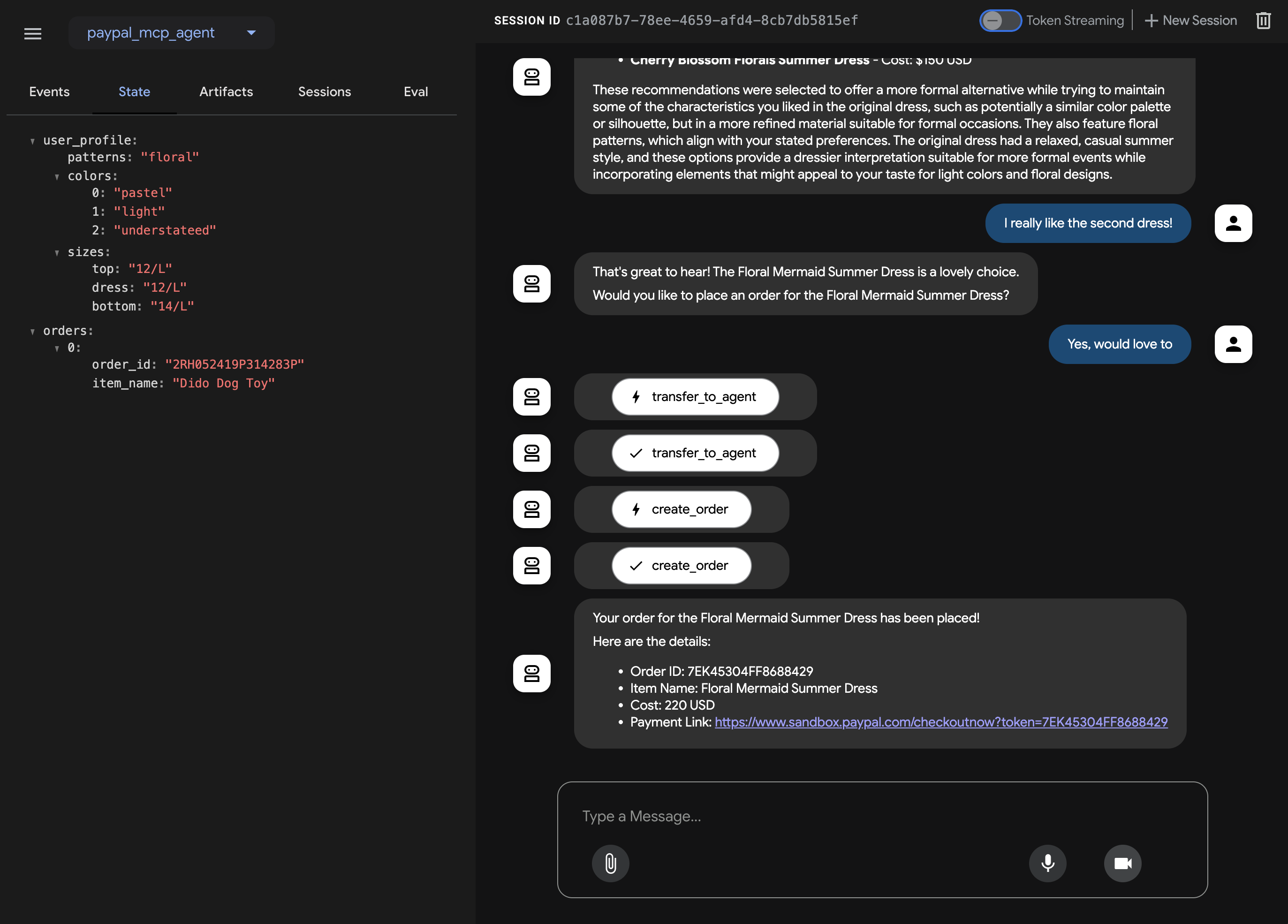
[User]: I like the second dress!
[Agent]: Great… would you like to order it?
[User]: Yes, let’s do it.
[Agent]: [calls create_order API]
[Agent]: Your order for the Floral Mermaid Summer Dress has been placed!
Here are the details:

Order ID: 7EK45304FF8688429
Item Name: Floral Mermaid Summer Dress
Cost: 220 USD
Payment Link: https://www.sandbox.paypal.com/checkoutnow?token=7EK45304FF8688429
Dev Tools Supporting MCP
The following are the main code editors that support the Model Context Protocol. Click the link to visit the official website for more information.







