
Pyhub Mcptools
What is Pyhub Mcptools
pyhub-mcptools is a tool that enables real-time collaboration on Excel files using the MCP platform, allowing multiple users to edit the same document simultaneously.
Use cases
Use cases for pyhub-mcptools include team projects requiring simultaneous data entry, educational settings for group assignments, and any situation where quick updates and collaboration on Excel documents are needed.
How to use
To use pyhub-mcptools, follow the installation instructions provided in the official documentation at https://mcp.pyhub.kr. Once installed, users can collaborate on Excel files in real-time with tools like Claude/Cursor.
Key features
Key features of pyhub-mcptools include real-time editing of Excel files, the ability to read unsaved changes in memory, and direct communication with the Excel program, enhancing collaborative efforts.
Where to use
pyhub-mcptools is primarily used in collaborative work environments, educational settings, and any scenario where multiple users need to work on Excel files together in real-time.
Clients Supporting MCP
The following are the main client software that supports the Model Context Protocol. Click the link to visit the official website for more information.





Overview
What is Pyhub Mcptools
pyhub-mcptools is a tool that enables real-time collaboration on Excel files using the MCP platform, allowing multiple users to edit the same document simultaneously.
Use cases
Use cases for pyhub-mcptools include team projects requiring simultaneous data entry, educational settings for group assignments, and any situation where quick updates and collaboration on Excel documents are needed.
How to use
To use pyhub-mcptools, follow the installation instructions provided in the official documentation at https://mcp.pyhub.kr. Once installed, users can collaborate on Excel files in real-time with tools like Claude/Cursor.
Key features
Key features of pyhub-mcptools include real-time editing of Excel files, the ability to read unsaved changes in memory, and direct communication with the Excel program, enhancing collaborative efforts.
Where to use
pyhub-mcptools is primarily used in collaborative work environments, educational settings, and any scenario where multiple users need to work on Excel files together in real-time.
Clients Supporting MCP
The following are the main client software that supports the Model Context Protocol. Click the link to visit the official website for more information.
Content
pyhub-mcptools
설치 방법
공식 문서를 참고해주세요.
지원 도구
엑셀 MCP 도구
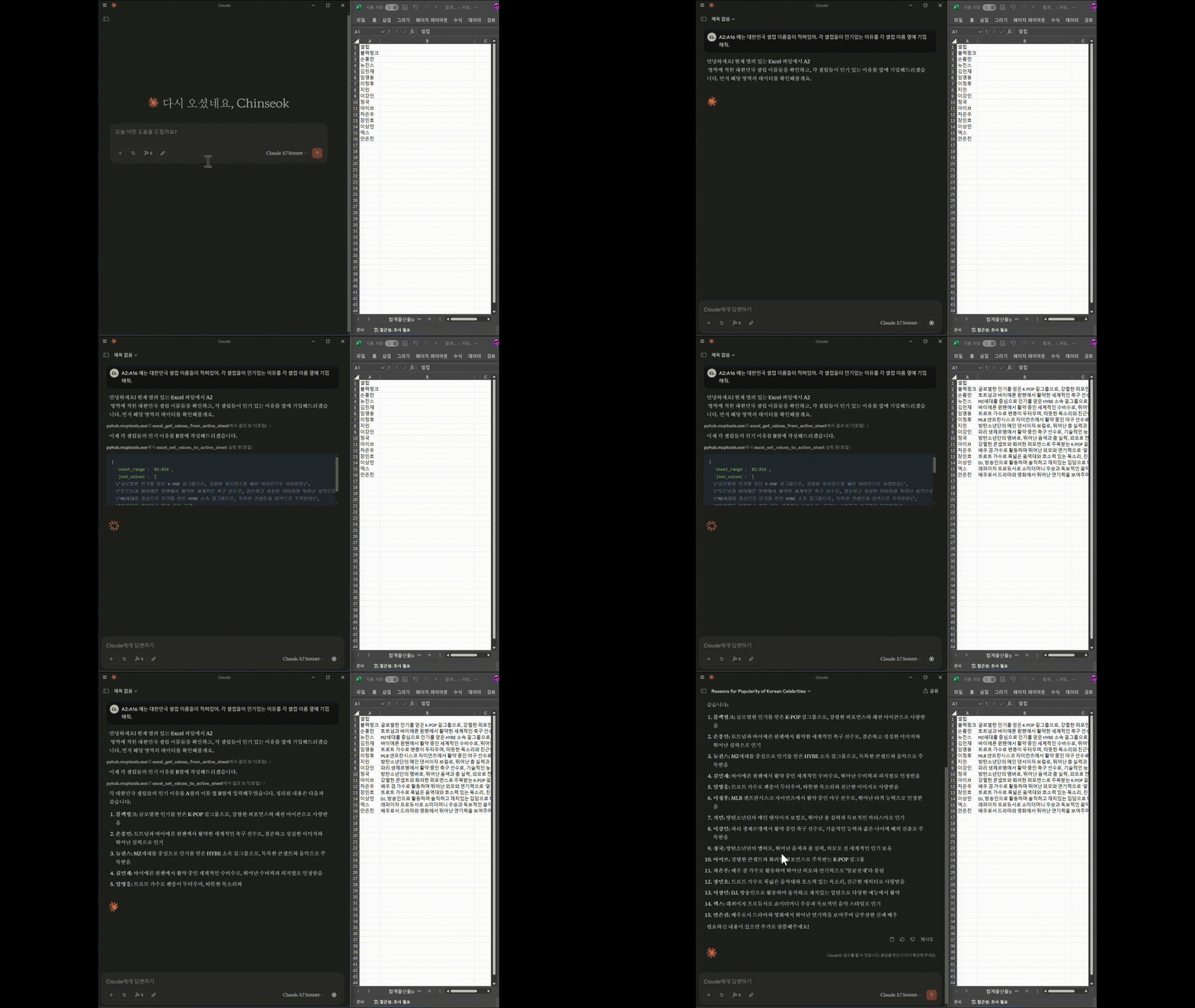
Claude/Cursor와 함께 엑셀 화면을 같이 보며, 함께 읽고 수정할 수 있습니다.
다른 엑셀 도구는 엑셀 파일에 대한 읽고 쓰기를 지원합니다.
그래서 엑셀 프로그램이 없어도 수행이 가능하다는 장점이 있지만, 실시간으로 엑셀 프로그램의 변경사항을 감지할 수 없고
파일 단위로만 작업이 가능하다는 제한이 있어서 MCP와 동시에 같은 파일을 편집할 수는 없습니다.
본 엑셀 도구에서는 엑셀 프로그램과 직접 통신하는 방식을 사용하기 때문에,
사용자와 MCP가 동시에 같은 엑셀 파일을 실시간으로 편집할 수 있고, 아직 디스크에 저장하지 않은 메모리 상의
변경 내용까지도 도구에서 읽어갈 수 있습니다. 이를 통해 더욱 자연스럽고 효율적인 협업이 가능합니다.
문의
파이썬사랑방, 이진석 ([email protected])
Dev Tools Supporting MCP
The following are the main code editors that support the Model Context Protocol. Click the link to visit the official website for more information.







