
Qwiic Mcp4725 Py
What is Qwiic Mcp4725 Py
The qwiic_mcp4725_py is a Python package designed for the SparkFun Qwiic MCP4725 Digital to Analog Converter module, allowing users to easily integrate DAC capabilities into their projects using a simple Qwiic I2C interface.
Use cases
Use cases include controlling analog devices, generating audio signals, creating variable voltage outputs for sensors, and educational projects involving signal processing.
How to use
To use the qwiic_mcp4725_py package, install it via pip, connect the MCP4725 module to your compatible SparkFun board using a Qwiic cable, and utilize the provided functions to write voltage, output waveforms, and manage EEPROM.
Key features
Key features include easy integration with the SparkFun Qwiic ecosystem, support for Python, MicroPython, and CircuitPython, and functionalities such as writing voltage, generating waveforms, and EEPROM management.
Where to use
The qwiic_mcp4725_py package is suitable for applications in electronics projects, robotics, IoT devices, and any scenario requiring digital-to-analog conversion.
Clients Supporting MCP
The following are the main client software that supports the Model Context Protocol. Click the link to visit the official website for more information.





Overview
What is Qwiic Mcp4725 Py
The qwiic_mcp4725_py is a Python package designed for the SparkFun Qwiic MCP4725 Digital to Analog Converter module, allowing users to easily integrate DAC capabilities into their projects using a simple Qwiic I2C interface.
Use cases
Use cases include controlling analog devices, generating audio signals, creating variable voltage outputs for sensors, and educational projects involving signal processing.
How to use
To use the qwiic_mcp4725_py package, install it via pip, connect the MCP4725 module to your compatible SparkFun board using a Qwiic cable, and utilize the provided functions to write voltage, output waveforms, and manage EEPROM.
Key features
Key features include easy integration with the SparkFun Qwiic ecosystem, support for Python, MicroPython, and CircuitPython, and functionalities such as writing voltage, generating waveforms, and EEPROM management.
Where to use
The qwiic_mcp4725_py package is suitable for applications in electronics projects, robotics, IoT devices, and any scenario requiring digital-to-analog conversion.
Clients Supporting MCP
The following are the main client software that supports the Model Context Protocol. Click the link to visit the official website for more information.
Content
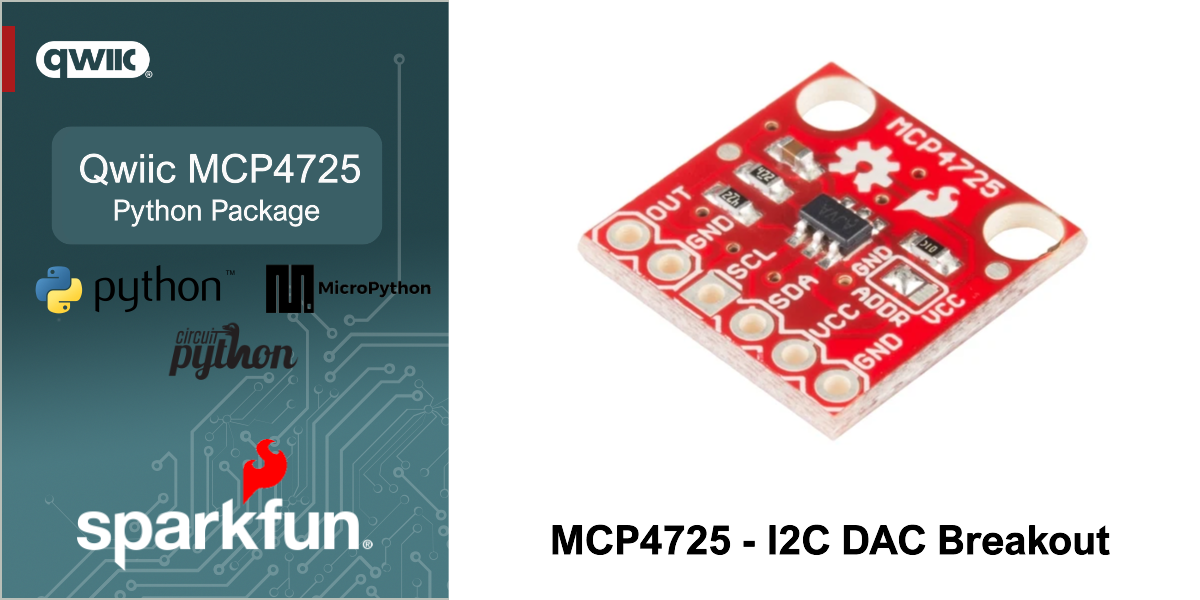
SparkFun Qwiic MCP4725 - Python Package




The SparkFun Qwiic Digital to Analog Converter MCP4725 Module provides a simple and cost effective solution for adding Digital to Analog Converter capabilities to your project. Implementing a SparkFun Qwiic I2C interface, these sensors can be rapidly added to any project with boards that are part of the SparkFun Qwiic ecosystem.
This repository implements a Python package for the SparkFun Qwiic MCP4725. This package works with Python, MicroPython and CircuitPython.
Contents
About the Package
This python package enables the user to access the features of the MCP4725 via a single Qwiic cable. This includes writing voltage, outputting a waveform, writing eeprom and more. The capabilities of the MCP4725 are each demonstrated in the included examples.
New to qwiic? Take a look at the entire SparkFun qwiic ecosystem.
Supported SparkFun Products
This Python package supports the following SparkFun qwiic products on Python, MicroPython and Circuit python.
Supported Platforms
| Python | Platform | Boards |
|---|---|---|
| Python | Linux | Raspberry Pi , NVIDIA Jetson Orin Nano via the SparkFun Qwiic SHIM |
| MicroPython | Raspberry Pi - RP2, ESP32 | SparkFun Pro Micro RP2350, SparkFun IoT RedBoard ESP32, SparkFun IoT RedBoard RP2350 |
| CircuitPython | Raspberry Pi - RP2, ESP32 | SparkFun Pro Micro RP2350, SparkFun IoT RedBoard ESP32, SparkFun IoT RedBoard RP2350 |
[!NOTE]
The listed supported platforms and boards are the primary platform targets tested. It is fully expected that this package will work across a wide variety of Python enabled systems.
Installation
The first step to using this package is installing it on your system. The install method depends on the python platform. The following sections outline installation on Python, MicroPython and CircuitPython.
Python
PyPi Installation
The package is primarily installed using the pip3 command, downloading the package from the Python Index - “PyPi”.
Note - the below instructions outline installation on a Linux-based (Raspberry Pi) system.
First, setup a virtual environment from a specific directory using venv:
python3 -m venv path/to/venv
You can pass any path as path/to/venv, just make sure you use the same one for all future steps. For more information on venv click here.
Next, install the qwiic package with:
path/to/venv/bin/pip3 install sparkfun-qwiic-mcp4725
Now you should be able to run any example or custom python scripts that have import qwiic_mcp4725 by running e.g.:
path/to/venv/bin/python3 example_script.py
MicroPython Installation
If not already installed, follow the instructions here to install mpremote on your computer.
Connect a device with MicroPython installed to your computer and then install the package directly to your device with mpremote mip.
mpremote mip install github:sparkfun/qwiic_mcp4725_py
If you would also like to install the examples for this repository, issue the following mip command as well:
mpremote mip install --target "" github:sparkfun/qwiic_mcp4725_py@examples
CircuitPython Installation
If not already installed, follow the instructions here to install CircUp on your computer.
Ensure that you have the latest version of the SparkFun Qwiic CircuitPython bundle.
circup bundle-add sparkfun/Qwiic_Py
Finally, connect a device with CircuitPython installed to your computer and then install the package directly to your device with circup.
circup install --py qwiic_mcp4725
If you would like to install any of the examples from this repository, issue the corresponding circup command from below. (NOTE: The below syntax assumes you are using CircUp on Windows. Linux and Mac will have different path seperators. See the CircUp “example” command documentation for more information)
circup example qwiic_mcp4725\qwiic_mcp4725_ex1_basic
circup example qwiic_mcp4725\qwiic_mcp4725_ex2_waveform
circup example qwiic_mcp4725\qwiic_mcp4725_ex3_write_eeprom
circup example qwiic_mcp4725\qwiic_mcp4725_ex4_read
circup example qwiic_mcp4725\qwiic_mcp4725_ex5_power_down
circup example qwiic_mcp4725\qwiic_mcp4725_ex6_fast_write
[!NOTE]
Example 2 requires a decent stack size in order to run (larger than the CircuitPython default). If you are interested in this example, in a file named “settings.toml” in the base directory on your CircuitPython board,
add the following line:CIRCUITPY_PYSTACK_SIZE=12288(increase this value as needed). If you don’t perform this step you will likely get “pystack exhausted” errors when trying to run that example.
Example Use
Below is a quickstart program to print readings from the MCP4725.
See the examples directory for more detailed use examples and examples/README.md for a summary of the available examples.
import qwiic_mcp4725
import sys
import time

def runExample():
	print("\nQwiic Template Example 1 - Basic\n")

	myDac = qwiic_mcp4725.QwiicMCP4725()

	if myDac.is_connected() == False:
		print("The device isn't connected to the system. Please check your connection", \
			file=sys.stderr)
		return

	myDac.begin()

	while True:


		print("Writing 0V to DAC")
		myDac.write_dac(0)  # ~0V if VDD = 3.3V

		time.sleep(2)

		print("Writing 1.65V to DAC")
		myDac.write_dac(2048)  # ~1.65 V if VDD = 3.3V

		time.sleep(2)

		print("Writing 3.3V to DAC")
		myDac.write_dac(4095)  # ~3.3 V if VDD = 3.3V

		time.sleep(2)


if __name__ == '__main__':
	try:
		runExample()
	except (KeyboardInterrupt, SystemExit) as exErr:
		print("\nEnding Example")
		sys.exit(0)
Dev Tools Supporting MCP
The following are the main code editors that support the Model Context Protocol. Click the link to visit the official website for more information.







