
Reaper Reapy Mcp
What is Reaper Reapy Mcp
reaper-reapy-mcp is a Python application designed for controlling the REAPER Digital Audio Workstation (DAW) using the Message Control Protocol (MCP).
Use cases
Use cases include creating and managing audio tracks, controlling FX parameters, adjusting project tempo, and automating tasks in REAPER for more efficient audio production.
How to use
To use reaper-reapy-mcp, install REAPER and the required Python packages, enable Python in REAPER, and start the MCP server. You can then utilize various MCP tools to manage tracks, FX, and project settings.
Key features
Key features include track management (create, rename, color), FX management (add, remove, parameter control), project tempo control, region and marker management, master track control, and MCP integration for remote control.
Where to use
reaper-reapy-mcp is primarily used in music production, audio engineering, and any environment where digital audio workstations are utilized for sound design and editing.
Clients Supporting MCP
The following are the main client software that supports the Model Context Protocol. Click the link to visit the official website for more information.





Overview
What is Reaper Reapy Mcp
reaper-reapy-mcp is a Python application designed for controlling the REAPER Digital Audio Workstation (DAW) using the Message Control Protocol (MCP).
Use cases
Use cases include creating and managing audio tracks, controlling FX parameters, adjusting project tempo, and automating tasks in REAPER for more efficient audio production.
How to use
To use reaper-reapy-mcp, install REAPER and the required Python packages, enable Python in REAPER, and start the MCP server. You can then utilize various MCP tools to manage tracks, FX, and project settings.
Key features
Key features include track management (create, rename, color), FX management (add, remove, parameter control), project tempo control, region and marker management, master track control, and MCP integration for remote control.
Where to use
reaper-reapy-mcp is primarily used in music production, audio engineering, and any environment where digital audio workstations are utilized for sound design and editing.
Clients Supporting MCP
The following are the main client software that supports the Model Context Protocol. Click the link to visit the official website for more information.
Content
Reaper and MCP or AI integration
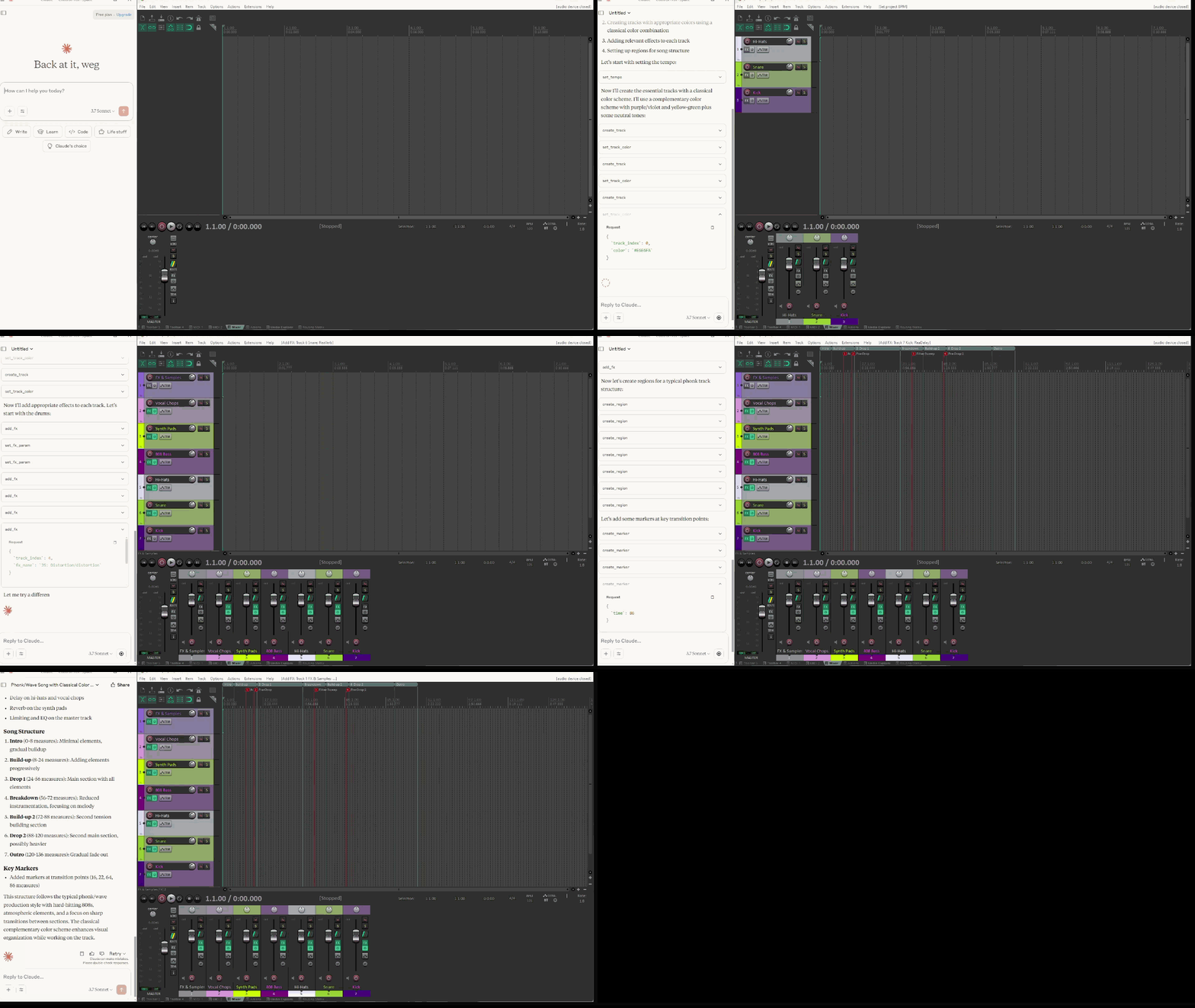
A Python application for controlling REAPER Digital Audio Workstation (DAW) using the MCP(Model context protocol).
Features
- Track management (create, rename, color)
- FX management (add, remove, parameter control)
- Project tempo control
- Region and marker management
- Master track control
- MIDI operations (create items, add notes, clear items)
- Audio item operations (insert, duplicate, modify)
- MCP (Message Control Protocol) integration for remote control
Requirements
- Python 3.7+
- REAPER DAW
python-reapyPython modulemcp[cli]package for MCP server- Internet connection (for downloading sample audio file)
Installation
- Install REAPER if you haven’t already
- Enable reapy server via REAPER scripting
add reaper_side_enable_server.py to reaper actions and run it inside reaper studio - Install current package:
- Enable python in REAPER
The wheel package includes all necessary dependencies and can be used in other Python projects that need REAPER integration. The project uses pyproject.toml for modern Python packaging configuration, which provides better dependency management and build system configuration.
Sample Audio File
The application uses a sample MP3 file for testing audio operations. The file will be automatically downloaded when needed from:
https://www2.cs.uic.edu/~i101/SoundFiles/StarWars3.mp3
This is a short Star Wars theme clip that’s commonly used for testing audio applications.
Running the Server
You can run the server using uv directly:
uv --directory <project_path> run -m src.run_mcp_server
For example, on Windows:
uv --directory C:\path\to\guitar_pro_mcp2 run -m src.run_mcp_server
Or using the Python module directly after installation:
python -m src.run_mcp_server
Use the MCP inspector to test the tools:
test_mcp.bat
Available MCP tools:
Track Management
test_connection: Verify connection to REAPERcreate_track: Create a new trackrename_track: Rename an existing trackset_track_color: Set track colorget_track_color: Get track color
FX Management
add_fx: Add an FX to a trackremove_fx: Remove an FX from a trackset_fx_param: Set FX parameter valueget_fx_param: Get FX parameter valueget_fx_param_list: Get list of FX parametersget_fx_list: Get list of FX on a trackget_available_fx_list: Get list of available FX pluginstoggle_fx: Toggle FX enable/disable state
Project Control
set_tempo: Set project tempoget_tempo: Get current tempocreate_region: Create a regiondelete_region: Delete a regioncreate_marker: Create a markerdelete_marker: Delete a marker
Master Track
get_master_track: Get master track informationset_master_volume: Set master track volumeset_master_pan: Set master track pantoggle_master_mute: Toggle master track mutetoggle_master_solo: Toggle master track solo
MIDI Operations
create_midi_item: Create an empty MIDI item on a trackadd_midi_note: Add a MIDI note to a MIDI itemclear_midi_item: Clear all MIDI notes from a MIDI item
Audio Item Operations
insert_audio_item: Insert an audio file as a media itemduplicate_item: Duplicate an existing itemget_item_properties: Get properties of a media itemset_item_position: Set the position of a media itemset_item_length: Set the length of a media itemdelete_item: Delete a media itemget_items_in_time_range: Get items within a time range
Item ID System
All item operations use a sequential index system (0…n) for item identification. This makes it easier to work with items in scripts and automation:
- Item IDs are zero-based indices
- Each track maintains its own sequence of item indices
- Indices are stable until items are deleted or reordered
- All item operations (MIDI, audio, properties) use the same indexing system
Claude configuration (with uv run):
{
  "mcpServers": {
    "reaper-reapy-mcp": {
      "type": "stdio",
      "command": "uv",
      "args": [
        "--directory",
        "<path to folder>",
        "run",
        "-m",
        "src.run_mcp_server"
      ]
    }
  }
}
Claude configuration direct:
{
  "mcpServers": {
    "reaper-reapy-mcp": {
      "type": "stdio",
      "command": "python",
      "args": [
        "<path to folder>\\src\\run_mcp_server.py"
      ]
    }
  }
}
Contributing
Contributions are welcome! Please feel free to submit a Pull Request.
License
This project is licensed under the MIT License - see the LICENSE file for details.
Dev Tools Supporting MCP
The following are the main code editors that support the Model Context Protocol. Click the link to visit the official website for more information.







