
Remote Mcp Azure Function
What is Remote Mcp Azure Function
remote-mcp-azure-function is a demonstration project that implements an Azure Function serving as a bridge between an Agent as a MCP Server and the AlphaVantage Financial API, enabling AI agents to access and analyze financial data.
Use cases
Use cases include developing AI-driven financial analysis tools, creating automated trading systems, and enhancing financial reporting applications with real-time data.
How to use
To use remote-mcp-azure-function, clone the repository, set up a virtual environment, install dependencies, configure your AlphaVantage API key in the local.settings.json file, and run the function locally. For deployment, log in to Azure and deploy the application using Azure Developer CLI.
Key features
Key features include access to various financial data endpoints such as Company Overview, Income Statement, Balance Sheet, Cash Flow, and Earnings Report, all exposed as MCP tools for AI agents.
Where to use
remote-mcp-azure-function can be used in financial services, investment analysis, and any application requiring real-time financial data access and analysis through AI agents.
Clients Supporting MCP
The following are the main client software that supports the Model Context Protocol. Click the link to visit the official website for more information.





Overview
What is Remote Mcp Azure Function
remote-mcp-azure-function is a demonstration project that implements an Azure Function serving as a bridge between an Agent as a MCP Server and the AlphaVantage Financial API, enabling AI agents to access and analyze financial data.
Use cases
Use cases include developing AI-driven financial analysis tools, creating automated trading systems, and enhancing financial reporting applications with real-time data.
How to use
To use remote-mcp-azure-function, clone the repository, set up a virtual environment, install dependencies, configure your AlphaVantage API key in the local.settings.json file, and run the function locally. For deployment, log in to Azure and deploy the application using Azure Developer CLI.
Key features
Key features include access to various financial data endpoints such as Company Overview, Income Statement, Balance Sheet, Cash Flow, and Earnings Report, all exposed as MCP tools for AI agents.
Where to use
remote-mcp-azure-function can be used in financial services, investment analysis, and any application requiring real-time financial data access and analysis through AI agents.
Clients Supporting MCP
The following are the main client software that supports the Model Context Protocol. Click the link to visit the official website for more information.
Content
AlphaVantage MCP Server with Azure Functions
This project implements an Azure Function that serves as a bridge between an Agent as a MCP Server and the AlphaVantage Financial API.
It allows AI agents to access financial data and perform financial analysis through tools exposed via MCP.
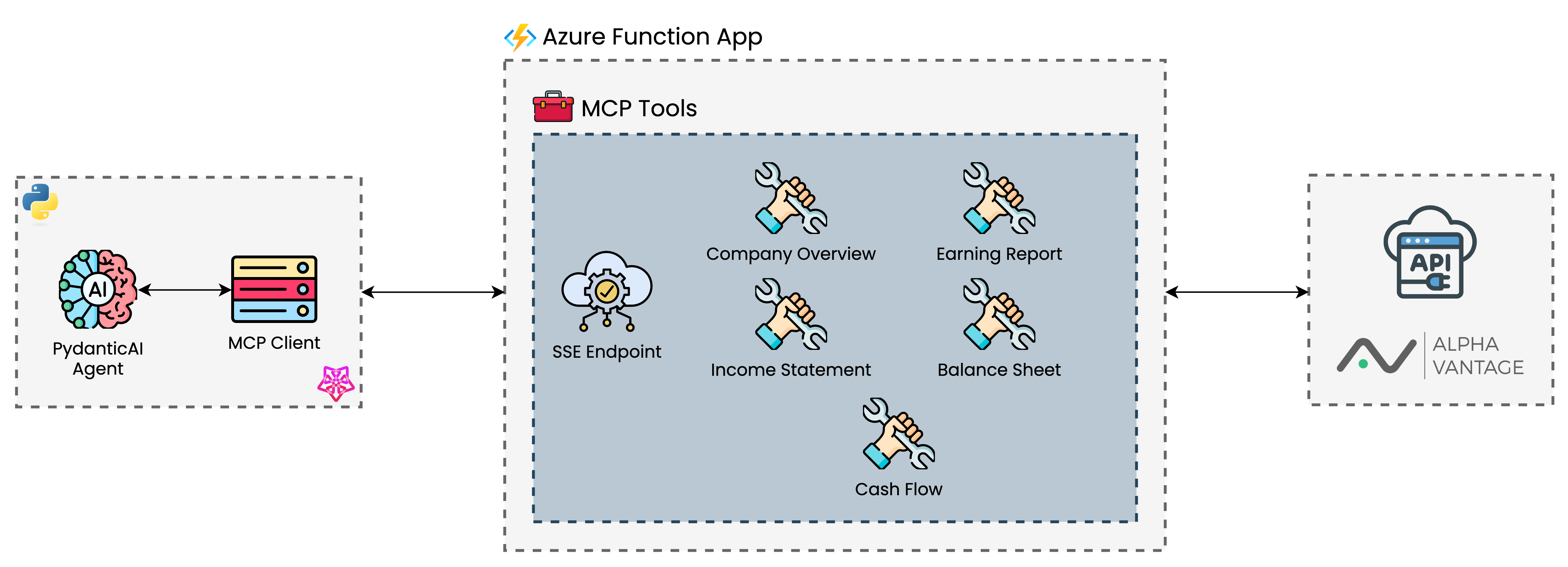
The Azure Function exposes the following financial data endpoints as MCP tools:
- Company Overview
- Income Statement
- Balance Sheet
- Cash Flow
- Earnings Report
There is a demo agent created with PydanticAI in the agent directory that can be used to test the MCP server. More information Demo Agent file.
Prerequisites
- An Azure subscription
- Azure Developer CLI (azd)
- Azure Functions Core Tools
- Python 3.11
- An AlphaVantage API key (see AlphaVantage)
Local Development
- Clone this repository
- Create a virtual environment and install dependencies:
uv sync --frozen
- Create a
local.settings.jsonfile in thesrcdirectory with your AlphaVantage API key:
{
  "IsEncrypted": false,
  "Values": {
    "FUNCTIONS_WORKER_RUNTIME": "python",
    "AzureWebJobsStorage": "UseDevelopmentStorage=true",
    "ALPHAVANTAGE_API_KEY": "your-alphavantage-api-key"
  }
}- Run the function locally:
cd src
func start
Deployment
- Log in to Azure:
azd auth login
- Deploy the application:
azd up
This will provision the necessary Azure resources and deploy the Function App.
Note: For setting up environment variables, refer to the Adding Environment Variables section.
Getting the MCP Endpoint URL
After deployment, retrieve your MCP extension system key:
az functionapp keys list \
  --resource-group <resource_group> \
  --name <function_app_name>
Your MCP endpoint URL will be:
https://<funcappname>.azurewebsites.net/runtime/webhooks/mcp/sse?code=<your-mcp-extension-system-key>
Adding Environment Variables
You can add environment variables to your Azure Function in two ways:
1. Using the parameters file (recommended for deployment)
Add your environment variables to the infra/main.parameters.json file:
Then deploy with:
azd up
2. Using Azure CLI (for updating existing deployments)
az functionapp config appsettings set \
  --name <function_app_name> \
  --resource-group <resource-group> \
  --settings ALPHAVANTAGE_API_KEY=<your-api-key>
Setting up VS Code for MCP Development
This project includes a .vscode/mcp.json configuration file that helps you connect to your MCP endpoint during development. This file contains:
-
Input definitions - Prompts for:
- The Azure Functions MCP Extension System Key (stored securely)
- Your Azure Functions App Name
-
Server configurations:
remote-mcp-function- Connects to your deployed Azure Function using the inputs abovelocal-mcp-function- Connects to a locally running function on port 7071
This allows you to test your MCP tools directly from VS Code during development, either against your local function app or your deployed Azure instance.
Demo Agent
The agent directory contains an example of how to use this MCP endpoint with an AI agent using the Agno framework. You can use this as a starting point for your own financial analysis agent.
Infrastructure Code Attribution
The infrastructure code for this project was adapted from Azure-Samples/remote-mcp-functions-python, which provides a template for deploying Python functions as remote MCP tools on Azure.
Dev Tools Supporting MCP
The following are the main code editors that support the Model Context Protocol. Click the link to visit the official website for more information.







