
Risken Mcp Server
What is Risken Mcp Server
The risken-mcp-server is an official Model Context Protocol (MCP) server developed by RISKEN, designed to facilitate seamless integration with RISKEN APIs for advanced automation and interaction capabilities.
Use cases
Use cases for the risken-mcp-server include automating RISKEN data fetching, extracting and analyzing RISKEN data, and developing AI tools that enhance interaction with the RISKEN ecosystem.
How to use
To use the risken-mcp-server, install Docker and ensure it is running. Then, configure your MCP server settings in Claude Desktop or Cursor with the provided JSON configuration, including your RISKEN Access Token and URL.
Key features
Key features of the risken-mcp-server include automation of data fetching and scanning, data extraction and analysis, and the ability to build AI-powered tools that interact with the RISKEN ecosystem.
Where to use
The risken-mcp-server can be utilized in various fields such as cybersecurity, data analysis, and application development, particularly where integration with RISKEN’s data and services is required.
Clients Supporting MCP
The following are the main client software that supports the Model Context Protocol. Click the link to visit the official website for more information.





Overview
What is Risken Mcp Server
The risken-mcp-server is an official Model Context Protocol (MCP) server developed by RISKEN, designed to facilitate seamless integration with RISKEN APIs for advanced automation and interaction capabilities.
Use cases
Use cases for the risken-mcp-server include automating RISKEN data fetching, extracting and analyzing RISKEN data, and developing AI tools that enhance interaction with the RISKEN ecosystem.
How to use
To use the risken-mcp-server, install Docker and ensure it is running. Then, configure your MCP server settings in Claude Desktop or Cursor with the provided JSON configuration, including your RISKEN Access Token and URL.
Key features
Key features of the risken-mcp-server include automation of data fetching and scanning, data extraction and analysis, and the ability to build AI-powered tools that interact with the RISKEN ecosystem.
Where to use
The risken-mcp-server can be utilized in various fields such as cybersecurity, data analysis, and application development, particularly where integration with RISKEN’s data and services is required.
Clients Supporting MCP
The following are the main client software that supports the Model Context Protocol. Click the link to visit the official website for more information.
Content
RISKEN MCP Server
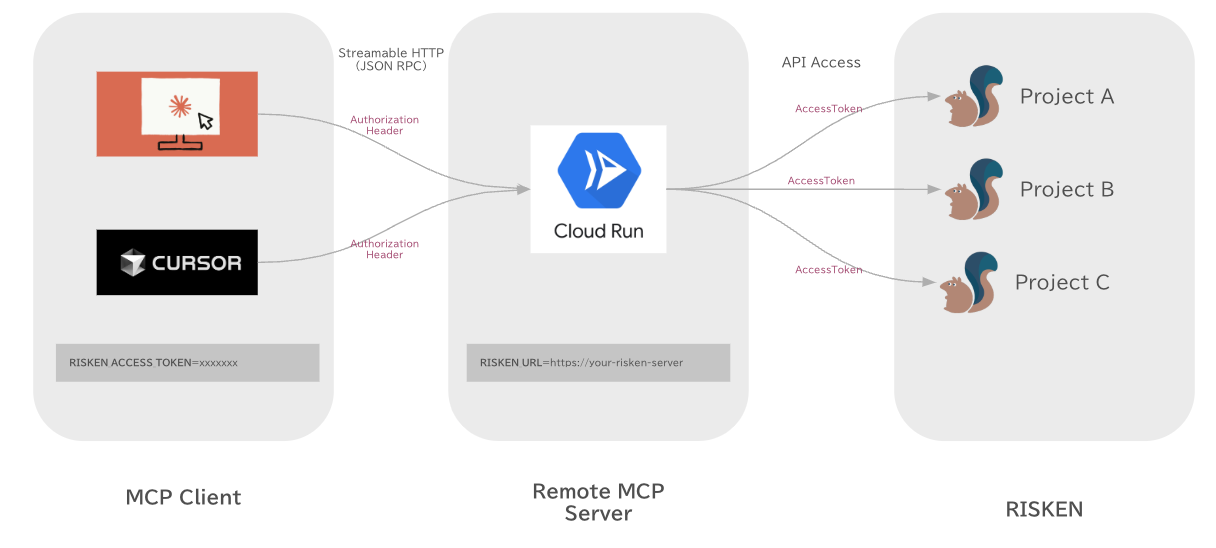
The RISKEN MCP Server is a Model Context Protocol (MCP) server that provides seamless integration with RISKEN APIs, enabling advanced automation and interaction capabilities for developers and tools.
Use Cases
By connecting the RISKEN MCP server to your everyday AI tools, you can perform various operations such as:
- Checking active alerts in RISKEN and monitoring their status.
- Searching, analyzing, and reviewing findings including their explanations and remediation steps.
- Archiving resolved findings to maintain a clean and organized security posture.
Prerequisites
- To run the server in a container, you will need to have Docker installed.
- Once Docker is installed, you will also need to ensure Docker is running.
- You will also need to have a RISKEN Access Token.
Local MCP Server
Please add the following MCP server configuration to your MCP Client (Claude Desktop or Cursor) settings.
{
  "mcpServers": {
    "risken": {
      "command": "docker",
      "args": [
        "run",
        "-i",
        "--rm",
        "-e",
        "RISKEN_ACCESS_TOKEN",
        "-e",
        "RISKEN_URL",
        "ghcr.io/ca-risken/risken-mcp-server",
        "stdio"
      ],
      "env": {
        "RISKEN_URL": "http://localhost:8000",
        "RISKEN_ACCESS_TOKEN": "your_access_token"
      }
    }
  }
}
Remote MCP Server
RISKEN MCP Server supports Streamable HTTP.
on Local
docker run -it --rm \
  -e RISKEN_URL=http://localhost:8000 \
  -e RISKEN_ACCESS_TOKEN=xxxxxx \
  -p 8080:8080 \
  ghcr.io/ca-risken/risken-mcp-server http
on Cloud Run
You can deploy the server on Google Cloud Run with Terraform.
-
Visit terraform/examples/googlecloud and deploy the server on Google Cloud Run with Terraform.
-
Add the following MCP server configuration to your MCP Client (Claude Desktop or Cursor) settings.
Note: Since most MCP clients only allow stdio connections, it is currently necessary to use mcp-remote as a proxy to connect to remote MCP servers.
Claude Desktop, Cursor …
{
  "mcpServers": {
    "risken": {
      "command": "npx",
      "args": [
        "mcp-remote",
        "http://localhost:8080/mcp",
        "--header",
        "RISKEN-ACCESS-TOKEN:${RISKEN_ACCESS_TOKEN}"
      ],
      "env": {
        "RISKEN_ACCESS_TOKEN": "xxxxxx"
      }
    }
  }
}
Third-Party Authorization (OAuth2.1)
RISKEN MCP Server supports Third-Party Authorization (OAuth2.1) that enables secure authentication through external Identity Providers (IdP).
Overview
The OAuth2.1 implementation follows the MCP Authorization specification with Third-Party Authorization Flow, where:
- MCP Client initiates OAuth flow with MCP Server
- MCP Server acts as authorization server and redirects user to IdP
- IdP authenticates user and returns to MCP Server
- MCP Server issues access token for MCP Client
- MCP Client uses access token for subsequent MCP requests
OAuth Flow
sequenceDiagram
    participant Browser as User Browser
    participant Client as MCP Client
    participant Server as MCP Server
    participant IdP as Identity Provider

    Client->>Server: POST /mcp (no auth)
    Server->>Client: 401 Unauthorized + WWW-Authenticate
    Client->>Server: GET /.well-known/oauth-authorization-server
    Server->>Client: Authorization metadata
    Client->>Server: POST /register (Dynamic Client Registration)
    Server->>Client: client_id
    Client->>Browser: Open authorization URL
    Browser->>IdP: User authentication
    IdP->>Server: Authorization callback
    Server->>IdP: Exchange code for token
    Server->>Client: Authorization complete
    Client->>Server: POST /mcp (with Bearer token)
    Server->>Client: MCP response
Configuration
MCP Server Configuration
The following environment variables are required for OAuth2.1 support:
| Variable | Required | Description | Example |
|---|---|---|---|
MCP_SERVER_URL |
✅ | Public URL of MCP server | http://localhost:8080 |
AUTHZ_METADATA_ENDPOINT |
✅ | IdP’s OAuth metadata endpoint | https://your-idp.com/.well-known/oauth-authorization-server |
CLIENT_ID |
✅ | OAuth client ID for IdP | your-client-id |
CLIENT_SECRET |
✅ | OAuth client secret for IdP | your-client-secret |
JWT_SIGNING_KEY |
✅ | Signing key for session JWT tokens | your-256-bit-secret |
Identity Provider Requirements
Your IdP must support the following OAuth features:
| Feature | Requirement | Description |
|---|---|---|
| Authorization Code Flow | ✅ REQUIRED | Standard OAuth authorization code grant |
| JWKS Endpoint | ✅ REQUIRED | JSON Web Key Set for JWT validation |
| Metadata Discovery | ✅ REQUIRED | RFC 8414 Authorization Server Metadata |
| PKCE (S256) | 🟡 OPTIONAL | Enhanced security, but not required for IdP |
Note: PKCE is REQUIRED between MCP Client and MCP Server (per MCP specification), but the MCP Server can use traditional OAuth 2.0 with the IdP.
Tools
Project
- get_project - Get RISKEN project.
Finding
-
search_finding - Search RISKEN findings.
finding_id- Search by finding ID.alert_id- Search by alert ID.data_source- Search by data source.resource_name- Search by resource name.from_score- Search by minimum score.0.0~0.3- Low0.3~0.6- Medium0.6~0.8- High0.8~1.0- Critical
status- Search by status.0- All1- Active (default)2- Pending
offset- Search by offset.limit- Search by limit.
-
archive_finding - Archive RISKEN finding.
finding_id- Archive by finding ID.note- Note.
Alert
- search_alert - Search RISKEN alert.
status- Search by status.1- Active2- Pending3- Deactive (already closed)
Resources
Finding Contents
- Get Finding Contents Retrieves the content of a specific finding.
- Template:
finding://{project_id}/{finding_id} - Parameters:
project_id: The ID of the project.finding_id: The ID of the finding.
- Template:
License
This project is licensed under the MIT License. See the LICENSE file for details.
Dev Tools Supporting MCP
The following are the main code editors that support the Model Context Protocol. Click the link to visit the official website for more information.







