
Runbook Mcp Server
What is Runbook Mcp Server
Runbook MCP Server is a tool that allows users to execute operational runbooks and manual test plans directly from Claude Desktop, facilitating automation and management of various tasks.
Use cases
Use cases include deploying applications, managing cloud resources like EC2 instances, and running integration tests, making it suitable for teams looking to streamline their operational workflows.
How to use
To use Runbook MCP Server, create a new runbook using the create_runbook tool with specified name and content. To run a runbook, attach it from MCP in Claude Desktop, select get_runbook_as_prompt, provide the runbook name, and submit the prompt for execution.
Key features
Key features include the ability to run ops runbooks for tasks such as deploying services and upgrading Kubernetes clusters, as well as executing manual test plans. Upcoming features will include a REST endpoint for managing runbooks and editing capabilities with versioning.
Where to use
Runbook MCP Server can be used in various fields such as DevOps, software development, and IT operations, where automation of repetitive tasks and management of deployment processes are essential.
Clients Supporting MCP
The following are the main client software that supports the Model Context Protocol. Click the link to visit the official website for more information.





Overview
What is Runbook Mcp Server
Runbook MCP Server is a tool that allows users to execute operational runbooks and manual test plans directly from Claude Desktop, facilitating automation and management of various tasks.
Use cases
Use cases include deploying applications, managing cloud resources like EC2 instances, and running integration tests, making it suitable for teams looking to streamline their operational workflows.
How to use
To use Runbook MCP Server, create a new runbook using the create_runbook tool with specified name and content. To run a runbook, attach it from MCP in Claude Desktop, select get_runbook_as_prompt, provide the runbook name, and submit the prompt for execution.
Key features
Key features include the ability to run ops runbooks for tasks such as deploying services and upgrading Kubernetes clusters, as well as executing manual test plans. Upcoming features will include a REST endpoint for managing runbooks and editing capabilities with versioning.
Where to use
Runbook MCP Server can be used in various fields such as DevOps, software development, and IT operations, where automation of repetitive tasks and management of deployment processes are essential.
Clients Supporting MCP
The following are the main client software that supports the Model Context Protocol. Click the link to visit the official website for more information.
Content

Runbook MCP Server
Runbook MCP Server enables you to run your own runbooks from Claude Desktop.
- Run ops runbooks (e.g., deploy a service, upgrade a Kubernetes cluster)
- Run manual test plans (e.g., create a new EC2 instance, ssh into the instance, and run the integration test there).
Please watch the demo video below to understand how it works!
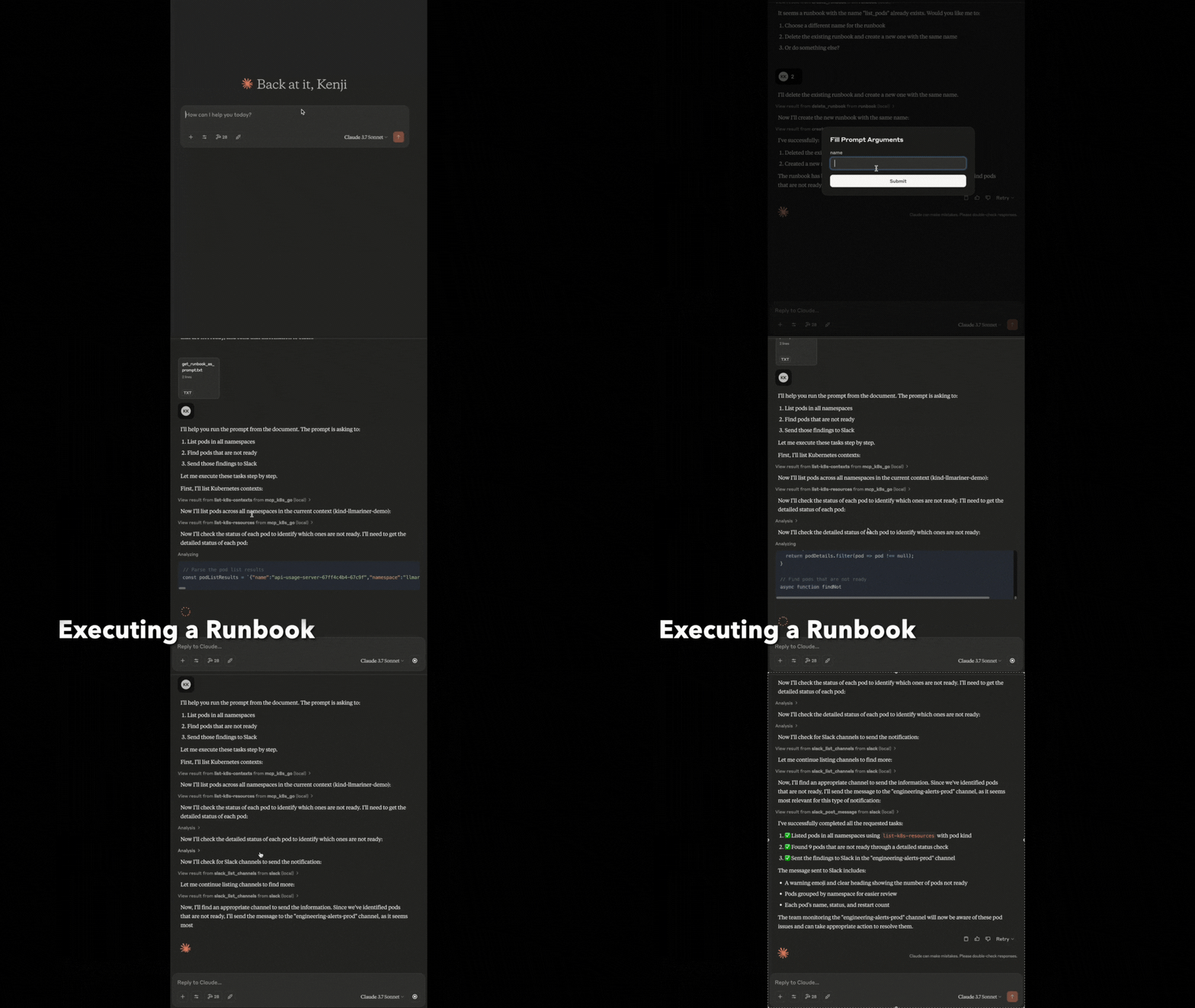
How to Use
Step 1. Start the MCP server with Claude Desktop.
Create config.yaml
Put the following configuration to claude_desktop_config.json.
{
  "mcpServers": {
    "runbook": {
      "command": "uv",
      "args": [
        "--directory",
        "<ABSOLUTE_PATH>/runbook-mcp-server",
        "run",
        "runbook_server.py"
      ]
    }
  }
}
Step 2. Create runbooks
You can use markdown files or text files as runbooks. See examples.
We support env/var substitution.
Define env.yaml.
env:
  key: value
{env[key]}is replaced withvalue.{var.name}is replaced with a variable value.
Rebuild the index when files are updated.
You can also create a new runbook, use the create_runbook tool. Here is an example prompt:
Example 1
Create a new runbook:

- name: list_pods
- content: List pods in all namespaces, find pods that are not ready, and send that to Slack.

You don't need to interpret the content. Please just pass it to the tool.
Step 3. Run runbooks
To run a runbook, take the following steps:
- Click “Attach from MCP” from Claude Desktop.
- Select
get_runbook_as_promptfrom the list of integrations. - Pass the name of the runbook you would like to execute. Also specify variables with a comma-separated list (e.g.,
var1=key1,var2=key2). - Submit the generated prompt.
Then Claude Desktop will talk to other MCP servers to run the runbook.
Example MCP Servers that can be used to Run Runbooks
- GitHub
- Slack
- DesktopCommanderMCP
- Web search and browser automation (link)
- Kubernetes. There are several implementations (e.g., mcp-k8s-go)
Development Plan
- Instead of saving the content of the runbook in the database, just save as a file. This helps easy editting. People can also
simply use GitHub for versioning. - Runbook template X that is instantiated with given inputs.
- Maybe this is not needed. A user just needs to put additional prompts when running the runbook.
- Save executing log (for auditting and refinement)
- Remove secrets
- Also pass a past log to the runbook prompt if this helps better execution
- Approval flow.
- Add a tool
request_approval. - This sends a slack message to a channel.
- Then the Runbook MCP server watches the channel. If someone responds (yes / no), it proceeeds or returns an error.
- Add a tool
- Better runbook search
- The exact name match is not great
- Registrtation to Smithery.
Potential Work Items where its Feasibility is not clear
Note: Claude Desktop does not support “Sampling”. This puts some limitations.
- Sub-runbook and reusable execution block
- Rest endpoint + frontend for managing runbooks.
- Be able to edit the runbook (with versioning)
- show an execution plan for runbook X (dry-run)
- Restrict MCP servers and tools
- convert a previous conversation into a runbook
- fine-tuning.
- Be able to refine a runbook. If there is a successful execution, save it as an example
and give it to Claude. - Periodic execution
- Be able to provision an environment (VM, docker) for running MCP servers.

Dev Tools Supporting MCP
The following are the main code editors that support the Model Context Protocol. Click the link to visit the official website for more information.







