
Scryfall Mcp
What is Scryfall Mcp
scryfall-mcp is a Model Context Protocol (MCP) server designed for interacting with the Scryfall Magic: The Gathering API, providing tools for looking up card details, rulings, and pricing information.
Use cases
Use cases include building a card search feature in a game, integrating card pricing into a trading application, or developing a bot that provides card rulings and interactions.
How to use
To use scryfall-mcp, you can run the server in standard stdio mode or Server-Sent Events (SSE) mode. Use the command ‘npx scryfall-mcp-server’ for stdio mode or ‘npx scryfall-mcp-server --sse’ for SSE mode. Connect to the server via the provided endpoints.
Key features
Key features include searching for cards, retrieving cards by ID or name, getting random cards, accessing official rulings, and fetching current pricing information in various currencies.
Where to use
scryfall-mcp can be used in applications that require Magic: The Gathering card data, such as game development, card trading platforms, or personal collection management tools.
Clients Supporting MCP
The following are the main client software that supports the Model Context Protocol. Click the link to visit the official website for more information.





Overview
What is Scryfall Mcp
scryfall-mcp is a Model Context Protocol (MCP) server designed for interacting with the Scryfall Magic: The Gathering API, providing tools for looking up card details, rulings, and pricing information.
Use cases
Use cases include building a card search feature in a game, integrating card pricing into a trading application, or developing a bot that provides card rulings and interactions.
How to use
To use scryfall-mcp, you can run the server in standard stdio mode or Server-Sent Events (SSE) mode. Use the command ‘npx scryfall-mcp-server’ for stdio mode or ‘npx scryfall-mcp-server --sse’ for SSE mode. Connect to the server via the provided endpoints.
Key features
Key features include searching for cards, retrieving cards by ID or name, getting random cards, accessing official rulings, and fetching current pricing information in various currencies.
Where to use
scryfall-mcp can be used in applications that require Magic: The Gathering card data, such as game development, card trading platforms, or personal collection management tools.
Clients Supporting MCP
The following are the main client software that supports the Model Context Protocol. Click the link to visit the official website for more information.
Content
Scryfall MCP Server
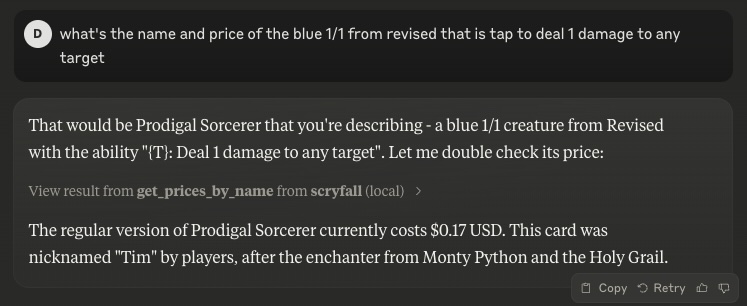
A Model Context Protocol (MCP) server for interacting with the Scryfall API. It provides tools to look up Magic: The Gathering card details, card rulings, and price information.
Features
- search_cards
Perform a text-based search on Scryfall. Returns a list of matching cards. - get_card_by_id
Retrieve a card directly via its Scryfall UUID. - get_card_by_name
Retrieve a card by exact English name. - random_card
Get a random card from the entire Scryfall database. - get_rulings
Retrieve official rulings for a card, which may clarify card interactions or rules. - get_prices_by_id
Retrieve current pricing information (USD, USD foil, EUR, TIX) for a given card by Scryfall ID. - get_prices_by_name
Retrieve current pricing information (USD, USD foil, EUR, TIX) for a given card by exact name.
Usage
The server can be run in two modes:
- Standard stdio mode (default)
- Server-Sent Events (SSE) mode with HTTP endpoints
Using NPX
If you have Node.js installed locally:
# Stdio mode
npx scryfall-mcp-server

# SSE mode
npx scryfall-mcp-server --sse
Connecting to the Server
Stdio Mode
Your application or environment (like Claude Desktop) can communicate directly via stdio with the server.
SSE Mode
When running in SSE mode (with --sse), you can connect using the MCP CLI:
npx @wong2/mcp-cli --sse http://localhost:3000/sse
The server will be available at:
- SSE endpoint:
http://localhost:3000/sse - Message endpoint:
http://localhost:3000/messages
Integration in claude_desktop_config.json
Example snippet for stdio mode:
{
  "mcpServers": {
    "scryfall": {
      "command": "docker",
      "args": [
        "run",
        "-i",
        "--rm",
        "mcp/scryfall"
      ]
    }
  }
}
Or with npx:
{
  "mcpServers": {
    "scryfall": {
      "command": "npx",
      "args": [
        "scryfall-mcp-server"
      ]
    }
  }
}
Building from Docker
docker build -t mcp/scryfall .
Then you can run in stdio mode:
docker run -i --rm mcp/scryfall
Or in SSE mode:
docker run -i --rm -p 3000:3000 mcp/scryfall --sse
License
Licensed under the MIT License.
Dev Tools Supporting MCP
The following are the main code editors that support the Model Context Protocol. Click the link to visit the official website for more information.







