
Sdv Mcp Demo
What is Sdv Mcp Demo
sdv-mcp-demo is a demonstration application that utilizes MQTT and AI to analyze software-defined vehicle data, focusing on driving behavior, location, and weather information.
Use cases
Use cases include analyzing driving behavior for insurance purposes, correlating weather data with vehicle performance, and generating reports for fleet management and safety assessments.
How to use
To use sdv-mcp-demo, set up a local environment by creating a .env file with necessary API keys, initialize the environment, and run the required services including the MQTT broker and the weather and vehicle analysis servers.
Key features
Key features include real-time data collection from vehicles, parsing of location and weather information, integration of various data types, and the generation of Usage-Based Insurance (UBI) reports using large language models.
Where to use
sdv-mcp-demo can be used in automotive industries, insurance companies, and smart city applications where vehicle data analysis is crucial for improving services and decision-making.
Clients Supporting MCP
The following are the main client software that supports the Model Context Protocol. Click the link to visit the official website for more information.





Overview
What is Sdv Mcp Demo
sdv-mcp-demo is a demonstration application that utilizes MQTT and AI to analyze software-defined vehicle data, focusing on driving behavior, location, and weather information.
Use cases
Use cases include analyzing driving behavior for insurance purposes, correlating weather data with vehicle performance, and generating reports for fleet management and safety assessments.
How to use
To use sdv-mcp-demo, set up a local environment by creating a .env file with necessary API keys, initialize the environment, and run the required services including the MQTT broker and the weather and vehicle analysis servers.
Key features
Key features include real-time data collection from vehicles, parsing of location and weather information, integration of various data types, and the generation of Usage-Based Insurance (UBI) reports using large language models.
Where to use
sdv-mcp-demo can be used in automotive industries, insurance companies, and smart city applications where vehicle data analysis is crucial for improving services and decision-making.
Clients Supporting MCP
The following are the main client software that supports the Model Context Protocol. Click the link to visit the official website for more information.
Content
Architecture
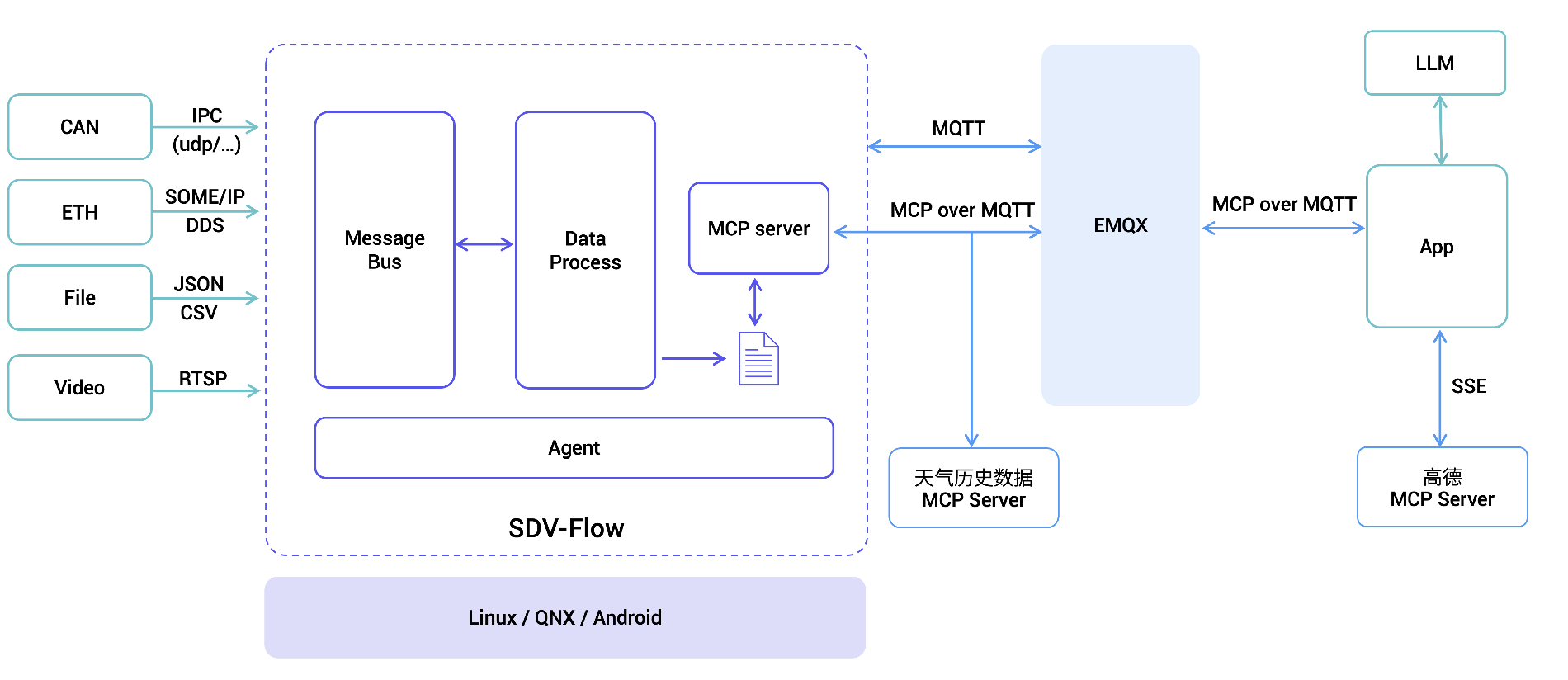
Application Flow Description
Data Collection
- Obtain vehicle driving behavior data (Sample data)
- Development environment: Using simulated data
- Production environment: Generated in real-time by sdv-flow and stored locally on the vehicle
Data Processing
-
Location Information Parsing
- Extract latitude and longitude coordinates from driving behavior data
- Parse corresponding administrative division information through Gaode MCP service
-
Weather Information Correlation
- Based on administrative division information
- Obtain real-time weather data at the time of the event through MCP Server which encapsulates third-party API services
Report Generation
- Integrate processed data (driving behavior, location, weather)
- Use large language models to analyze and generate UBI (Usage-Based Insurance) driving behavior reports
Running
Create Local .env File
# You could get the JuHe API key at https://www.juhe.cn/docs/api/id/277
JUHE_API_KEY=

# You could get the GaoDe API key at https://lbs.amap.com/api/mcp-server/create-project-and-key
GAODE_KEY=

# Silicon Flow API
SFAPI_KEY=

# Model Name
MODEL_NAME=Pro/deepseek-ai/DeepSeek-V3

# MQTT broker address
MQTT_BROKER=127.0.0.1
Initialize Environment
uv sync

source .venv/bin/activate
Execution
- Start emqx
docker run -d --name emqx -p 1883:1883 -p 8083:8083 -p 8084:8084 -p 8883:8883 -p 18083:18083 emqx/emqx:latest
- Run Weather MCP Server
uv run weather.py
- Run Vehicle Driving Behavior Analysis MCP Server
uv run vehicle.py
- Run Report Generation Script
uv run app.py
After executing app.py, a sample report will be generated.
Dev Tools Supporting MCP
The following are the main code editors that support the Model Context Protocol. Click the link to visit the official website for more information.







