
Semantic Kernel Playwright Mcp
What is Semantic Kernel Playwright Mcp
The semantic-kernel-playwright-mcp is a demonstration application that integrates Microsoft Semantic Kernel with the Model Context Protocol (MCP) server using Playwright. It enables AI-driven browsing and summarization capabilities, leveraging Azure OpenAI and automatic browser interactions.
Use cases
Use cases include summarizing AI news articles, automating web interactions for data extraction, and providing insights from online content through AI-driven analysis.
How to use
To use the semantic-kernel-playwright-mcp, clone the repository, install the necessary dependencies, configure Azure OpenAI settings in the Program.cs file, ensure Playwright MCP is installed, and run the application using ‘dotnet run’.
Key features
Key features include the use of Semantic Kernel for AI function interaction, Playwright MCP server for simulating browser capabilities, automatic function calling, and the ability to summarize AI-related news from Bing by navigating and extracting content.
Where to use
The semantic-kernel-playwright-mcp can be used in fields such as AI development, web automation, news aggregation, and any application requiring automated content summarization and browsing.
Clients Supporting MCP
The following are the main client software that supports the Model Context Protocol. Click the link to visit the official website for more information.





Overview
What is Semantic Kernel Playwright Mcp
The semantic-kernel-playwright-mcp is a demonstration application that integrates Microsoft Semantic Kernel with the Model Context Protocol (MCP) server using Playwright. It enables AI-driven browsing and summarization capabilities, leveraging Azure OpenAI and automatic browser interactions.
Use cases
Use cases include summarizing AI news articles, automating web interactions for data extraction, and providing insights from online content through AI-driven analysis.
How to use
To use the semantic-kernel-playwright-mcp, clone the repository, install the necessary dependencies, configure Azure OpenAI settings in the Program.cs file, ensure Playwright MCP is installed, and run the application using ‘dotnet run’.
Key features
Key features include the use of Semantic Kernel for AI function interaction, Playwright MCP server for simulating browser capabilities, automatic function calling, and the ability to summarize AI-related news from Bing by navigating and extracting content.
Where to use
The semantic-kernel-playwright-mcp can be used in fields such as AI development, web automation, news aggregation, and any application requiring automated content summarization and browsing.
Clients Supporting MCP
The following are the main client software that supports the Model Context Protocol. Click the link to visit the official website for more information.
Content
Semantic Kernel + Playwright MCP Server Demo
🚀 Welcome to the MCP + Semantic Kernel Demo App!
This project demonstrates how to combine Microsoft Semantic Kernel with the Model Context Protocol (MCP) server using Playwright to enable AI-driven browsing and summarization capabilities.
It uses:
- Azure OpenAI (GPT-4)
- Semantic Kernel Function Calling
- Playwright MCP Server
- Automatic browser interaction
- Bing News summarization using AI
🔧 Features
- Uses Semantic Kernel to interact with AI functions
- Leverages Playwright MCP server to simulate browser-like capabilities
- Demonstrates automatic function calling
- Summarizes AI-related news from Bing by navigating and extracting content
🧠 Prerequisites
Ensure you have the following:
- .NET 8.0 SDK or newer
- Azure OpenAI resource (with deployed model like
gpt-4-1106-preview) - Access to Bing News (public)
- Playwright installed via
npx - MCP Server libraries (ModelContextProtocol)
📦 Setup
-
Clone the Repository
git clone https://github.com/yourusername/semantic-kernel-playwright-mcp.git cd semantic-kernel-playwright-mcp -
Install Dependencies
Make sure to restore NuGet packages. -
Configure Azure OpenAI
Replace the following placeholders inProgram.cs:builder.AddAzureOpenAIChatCompletion( "GPT4ov1", "https://<replace>.openai.azure.com", "<replacewithkey>"); -
Ensure Playwright MCP is Installed
npx -y @playwright/mcp@latest
▶️ Run the App
dotnet run
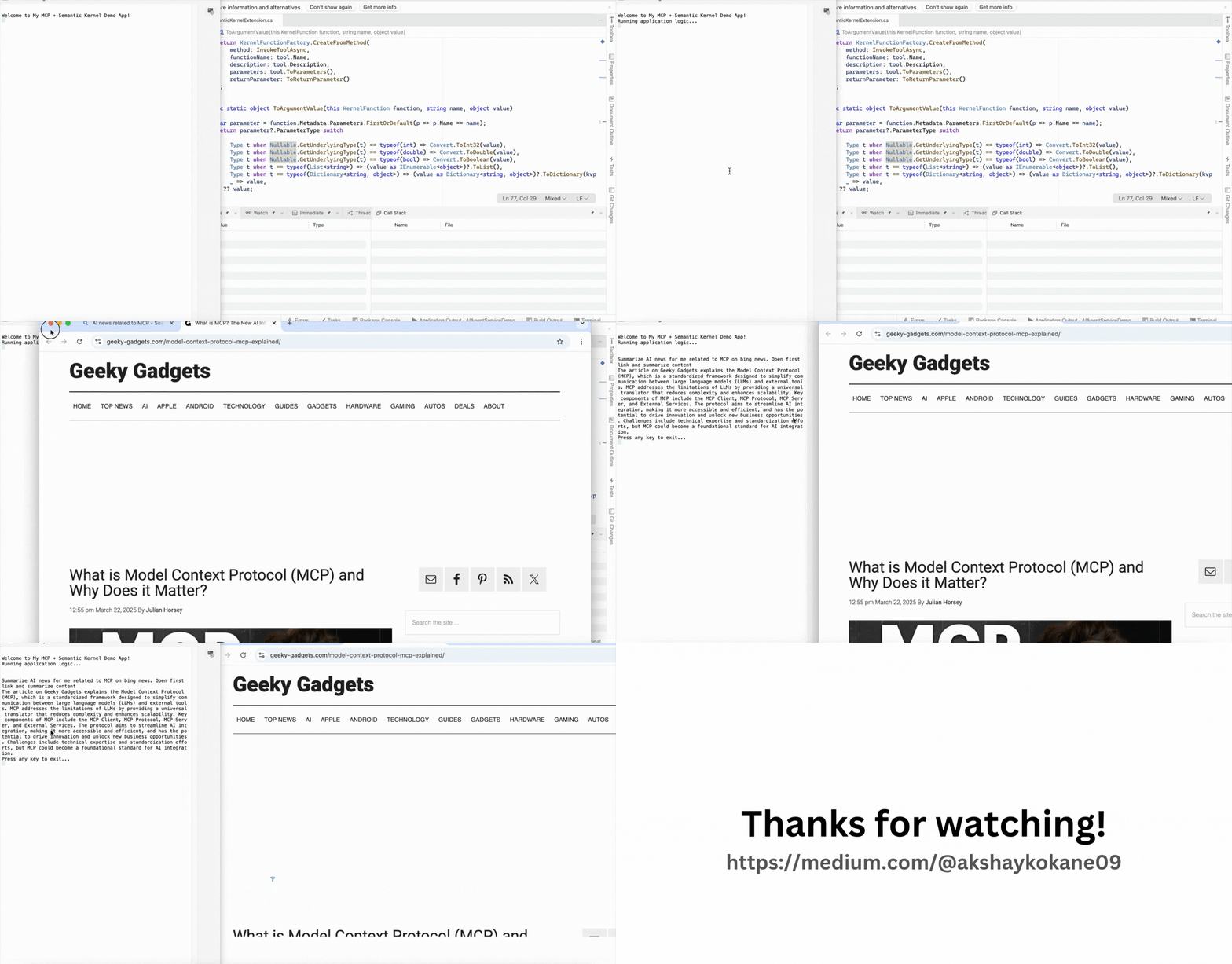
You’ll see output like:
Welcome to My MCP + Semantic Kernel Demo App!
Running application logic...

Summarize AI news for me related to MCP on bing news. Open first link and summarize content
> <summarized result here>
▶️ Output
🧠 How It Works
- Initializes the Semantic Kernel with Azure OpenAI.
- Starts a Playwright MCP Server in stdio mode.
- Maps MCP actions (like open page, extract content) to SK functions.
- Invokes a natural language prompt to fetch and summarize news content.
- Uses automatic function calling to delegate the task to the browser.
🛠 Code Highlights
GetMCPClientForPlaywright()creates an MCP client using Playwright.MapToFunctionsAsync()integrates MCP capabilities into Semantic Kernel.- Prompts like “Summarize AI news…” trigger both browsing and summarization.
🧪 Example Use Case
You can modify the prompt to:
var prompt = "Search GitHub for latest Semantic Kernel issues and summarize the top 3.";
📁 Project Structure
├── Program.cs
├── AzureAIAgentServiceDemo.csproj
├── README.md
└── ...
📌 Future Ideas
- Add UI using Blazor or Console enhancements
- Integrate multi-turn conversations using
AgentGroupChat - Extend MCP to handle screenshots or downloads
🤝 Contributing
Feel free to fork, enhance, or suggest improvements via pull requests!
📜 License
MIT License. See LICENSE file for details.
Let me know if you’d like to include diagrams or badge-style highlights too!
Dev Tools Supporting MCP
The following are the main code editors that support the Model Context Protocol. Click the link to visit the official website for more information.







