
Simple Mcp Agent
What is Simple Mcp Agent
simple-mcp-agent is a command-line tool that utilizes the Model Context Protocol (MCP) to access various external tools and generate AI-driven responses to user queries.
Use cases
Use cases for simple-mcp-agent include automating responses to user queries in customer support, integrating multiple tools for data analysis, and enhancing interactive applications by providing AI-generated insights based on user input.
How to use
To use simple-mcp-agent, clone the repository, install the required dependencies using pip, and configure the MCP servers by modifying the ‘server_configs’ list in the code. After setting up the necessary API keys, start the agent to begin interacting with MCP-compatible servers.
Key features
Key features of simple-mcp-agent include the ability to connect to MCP servers running in Docker containers, automatic discovery of available tools, AI-driven decision-making for tool usage, natural language response generation, source referencing, and enhanced terminal output using the Rich library.
Where to use
simple-mcp-agent can be used in various fields such as software development, AI research, and any domain requiring automated responses and tool integration through the MCP framework.
Clients Supporting MCP
The following are the main client software that supports the Model Context Protocol. Click the link to visit the official website for more information.





Overview
What is Simple Mcp Agent
simple-mcp-agent is a command-line tool that utilizes the Model Context Protocol (MCP) to access various external tools and generate AI-driven responses to user queries.
Use cases
Use cases for simple-mcp-agent include automating responses to user queries in customer support, integrating multiple tools for data analysis, and enhancing interactive applications by providing AI-generated insights based on user input.
How to use
To use simple-mcp-agent, clone the repository, install the required dependencies using pip, and configure the MCP servers by modifying the ‘server_configs’ list in the code. After setting up the necessary API keys, start the agent to begin interacting with MCP-compatible servers.
Key features
Key features of simple-mcp-agent include the ability to connect to MCP servers running in Docker containers, automatic discovery of available tools, AI-driven decision-making for tool usage, natural language response generation, source referencing, and enhanced terminal output using the Rich library.
Where to use
simple-mcp-agent can be used in various fields such as software development, AI research, and any domain requiring automated responses and tool integration through the MCP framework.
Clients Supporting MCP
The following are the main client software that supports the Model Context Protocol. Click the link to visit the official website for more information.
Content
Simple MCP Agent
A command-line agent that uses the Model Context Protocol (MCP) to access external tools and provide helpful responses.
Overview
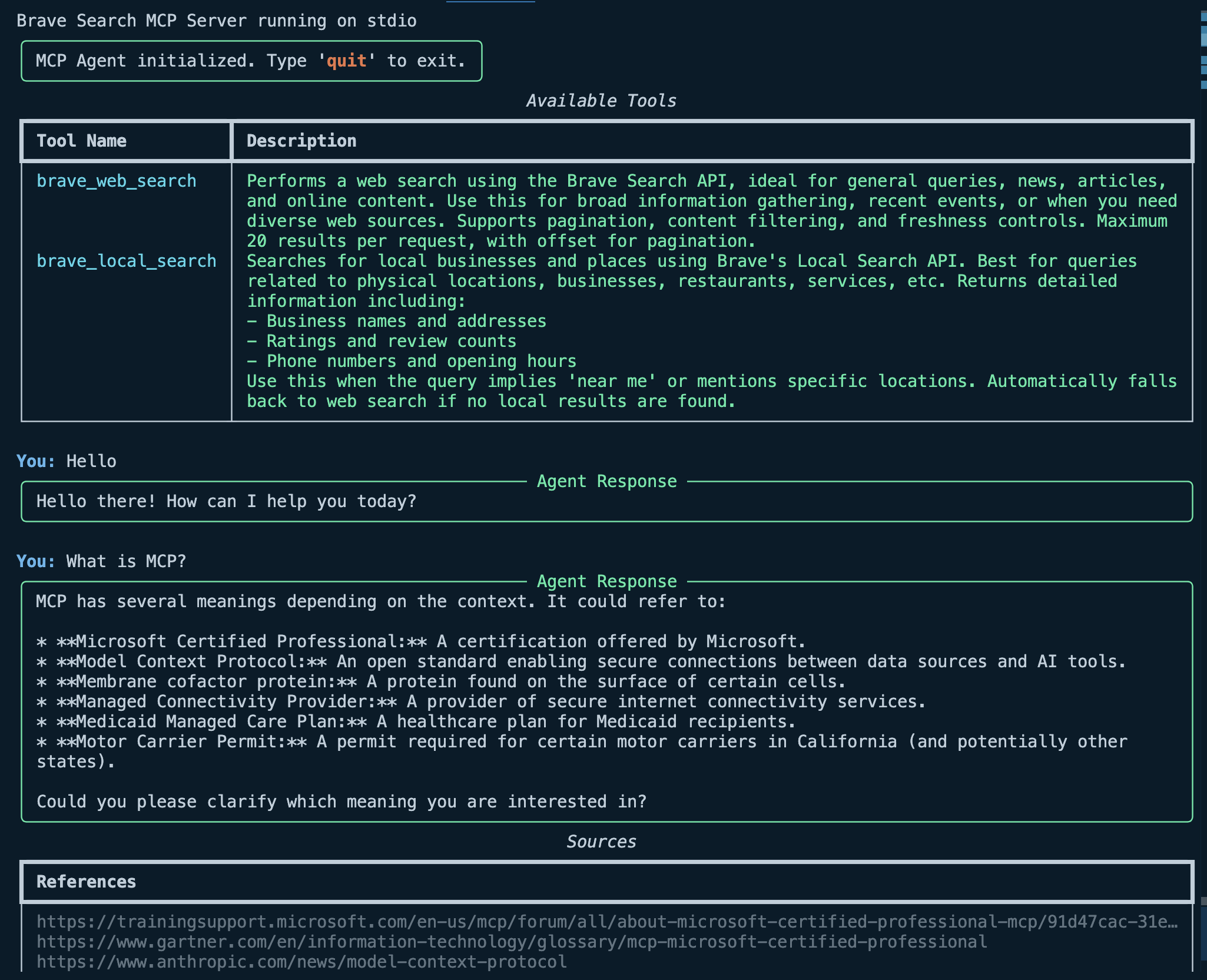
This agent connects to MCP-compatible servers, discovers available tools, and uses them to respond to user queries. It leverages the Opper SDK for AI-powered reasoning and response generation.
Features
- Connects to MCP servers running in Docker containers
- Automatically discovers available tools from connected servers
- Uses AI to determine when and how to use tools based on user input
- Generates natural language responses incorporating tool results
- Provides source references when applicable
- Enhanced terminal output using Rich library
Installation
- Clone the repository
- Install dependencies:
pip install -r requirements.txt
Configuration
Adding MCP Servers
The agent can be configured with different MCP servers and tools by modifying the server_configs list in the code. Each server configuration requires:
image: The Docker image name for the MCP serverenv: Environment variables needed by the server (e.g., API keys)
Example code has Brave Search as a tool.
Brave Search MCP Server
Follow these steps to add Brave Search as a tool:
- Clone the MCP server repository: https://github.com/modelcontextprotocol/
- Run
docker build -t mcp/brave-search:latest -f src/brave-search/Dockerfile . - Signup for a Brave Search API key: https://api-dashboard.search.brave.com/login
- It’s free but you need to add a credit card to your account
- Add the API key to the
BRAVE_SEARCH_API_KEYvariable in the code - Start the agent with the instructions below (it will run and execute the docker container)
Opper API key
For Agent reasoning, example uses Opper API:
- Signup for an Opper account: https://opper.com/ (it’s free!)
- Create an API key
- Add the API key to the
OPPER_API_KEYenvironment variable in the code
Usage
Run the agent from the command line:
python cli.py
Interacting with the Agent
Once running, you can interact with the agent through the command line:
- Type your question or request
- The agent will determine if tools are needed to answer
- If tools are used, the agent will incorporate their results in the response
- Source references will be displayed when available
- Type ‘quit’, ‘exit’, or ‘q’ to end the session
Project Structure
cli.py: Command-line interface with Rich formattingagent.py: Core agent implementationschemas.py: Data models/schemas used by the applicationrequirements.txt: Dependencies for the project
Dev Tools Supporting MCP
The following are the main code editors that support the Model Context Protocol. Click the link to visit the official website for more information.







