
Sjtu Mcp Server
What is Sjtu Mcp Server
sjtu-mcp-server is a platform that integrates campus services with AI using the Model Context Protocol (MCP). It aims to enhance the interaction between large language models and campus information systems, providing a unified AI interface for various services.
Use cases
Use cases for sjtu-mcp-server include automating student inquiries, integrating various campus services into a single AI interface, and providing personalized assistance for academic tasks through natural language processing.
How to use
To use sjtu-mcp-server, run the program and add the server URL ‘http://localhost:5162/sse’ in a compatible client like Cherry Studio that supports MCP servers. The initial setup will use SSE format, with plans to transition to stdio format in future releases.
Key features
Key features of sjtu-mcp-server include integration with campus services, the use of the MCP protocol for standardized interactions, support for natural language commands, and a focus on data security and local deployment.
Where to use
sjtu-mcp-server can be used in educational institutions to streamline campus services such as course schedule inquiries, library reservations, and grade analysis, making it easier for students and staff to access information.
Clients Supporting MCP
The following are the main client software that supports the Model Context Protocol. Click the link to visit the official website for more information.





Overview
What is Sjtu Mcp Server
sjtu-mcp-server is a platform that integrates campus services with AI using the Model Context Protocol (MCP). It aims to enhance the interaction between large language models and campus information systems, providing a unified AI interface for various services.
Use cases
Use cases for sjtu-mcp-server include automating student inquiries, integrating various campus services into a single AI interface, and providing personalized assistance for academic tasks through natural language processing.
How to use
To use sjtu-mcp-server, run the program and add the server URL ‘http://localhost:5162/sse’ in a compatible client like Cherry Studio that supports MCP servers. The initial setup will use SSE format, with plans to transition to stdio format in future releases.
Key features
Key features of sjtu-mcp-server include integration with campus services, the use of the MCP protocol for standardized interactions, support for natural language commands, and a focus on data security and local deployment.
Where to use
sjtu-mcp-server can be used in educational institutions to streamline campus services such as course schedule inquiries, library reservations, and grade analysis, making it easier for students and staff to access information.
Clients Supporting MCP
The following are the main client software that supports the Model Context Protocol. Click the link to visit the official website for more information.
Content




Background
展开项目背景
当前大语言模型领域正经历着关键的技术范式转型:一方面,**Scaling Law的边际效益显著放缓**,传统依赖数据规模与算力堆叠的路径已触及瓶颈。OpenAI联合创始人Ilya Sutskever指出,预训练时代的数据增长接近天花板,GPT系列模型的性能提升幅度明显减小,投入与回报的失衡迫使行业探索新方向。另一方面,**大模型的基础能力经过数年迭代已足够成熟**,推理成本大幅下降至“白菜价”,从“不够用”演变为“急需落地”,2025年被视为AI应用爆发的元年。在此背景下,Agent(智能体)成为公认的最佳应用形态,其通过任务拆解、工具调用与自主决策的能力,将大模型从“对话工具”升级为“生产力引擎”,被视为通往AGI的必经之路。而MCP协议(Model Context Protocol)的崛起,则为Agent生态提供了关键基础设施。作为开源的标准化交互协议,MCP统一了大模型与外部工具、数据源的连接方式,解决了传统Function Call的碎片化问题,被类比为“AI领域的HTTP协议”。阿里云、OpenAI等巨头已全面集成MCP,其生态正以指数级扩张,成为Agent开发的事实标准。
在此趋势下,本项目基于MCP协议构建校园服务Agent,通过标准化接口将大模型与校园信息系统(如课表查询、图书馆预约、成绩分析等)深度对接,用户仅需自然语言指令即可完成复杂操作。这一设计将分散的校园服务整合为统一的AI交互入口,既保障了数据安全与本地化部署需求,又通过MCP的开放性降低了开发门槛,为大模型在教育场景的落地提供了轻量化解决方案。
Quick Start
- 在 Github Releases 下载最新版的程序,解压后,复制其中可执行文件(Windows 下为
SJTUGeek.MCP.Server.exe)的完整路径 - (推荐)完成 jAccount 授权以便使用仅登录后可用的工具,具体方式请参考 Authorization。
- (推荐)安装 Python 环境,并安装依赖库
pip install -r requirements.txt
- 在 Cherry Studio 等支持 MCP 服务器的客户端中添加服务器
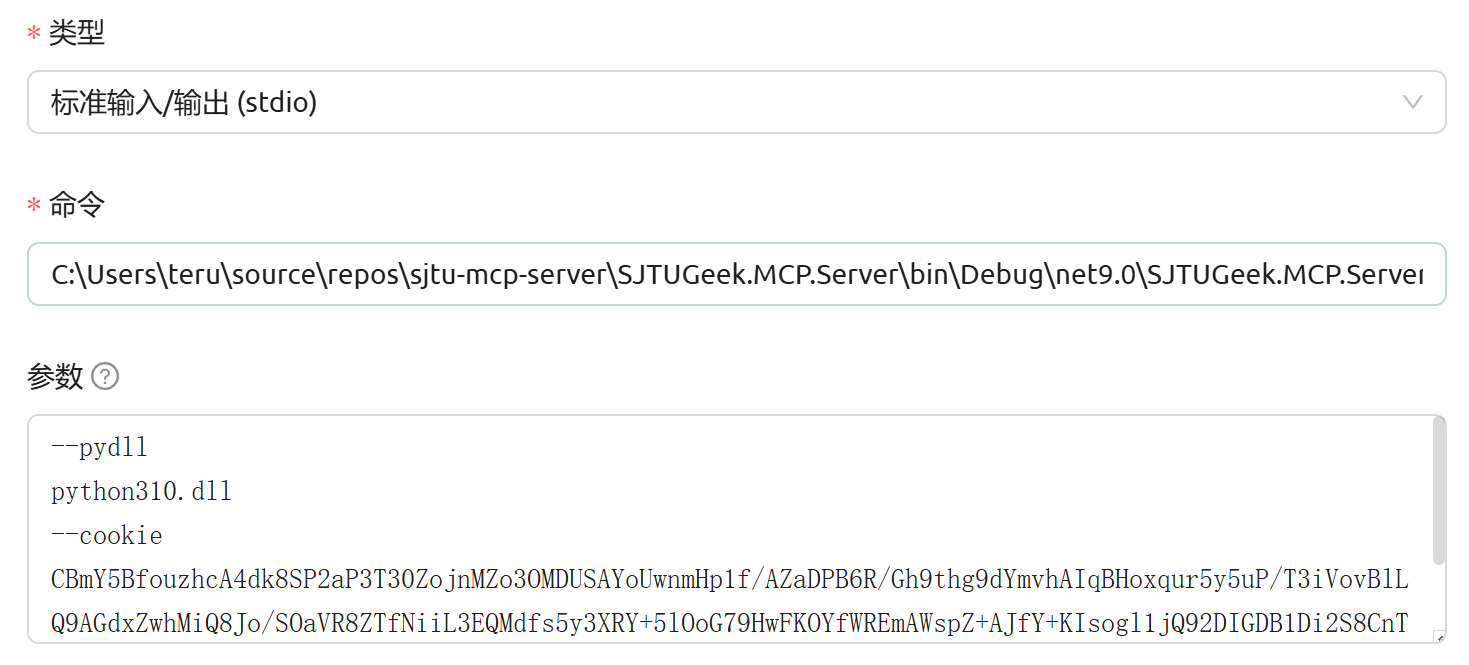
- 推荐使用 stdio 形式,“命令”填写程序完整路径,“参数”一行一个,不要加双引号
- 若要启用 Python 插件,则需要加上
--pydll参数,Windows 系统需要加上后缀.dll,例如python310.dll - 若要访问仅登录后可用的工具,则必须加上
--cookie参数
- 若要启用 Python 插件,则需要加上
- 若使用 SSE 形式,则启动
SJTUGeek.MCP.Server程序时需要加上--use-http参数,还有--cookie=<你的 Cookie>,然后在客户端填写地址为http://localhost:5173/sse - 若使用 Streamable HTTP 形式,则启动
SJTUGeek.MCP.Server程序时需要加上--use-http参数,还有--cookie=<你的 Cookie>,然后在客户端填写地址为http://localhost:5173/
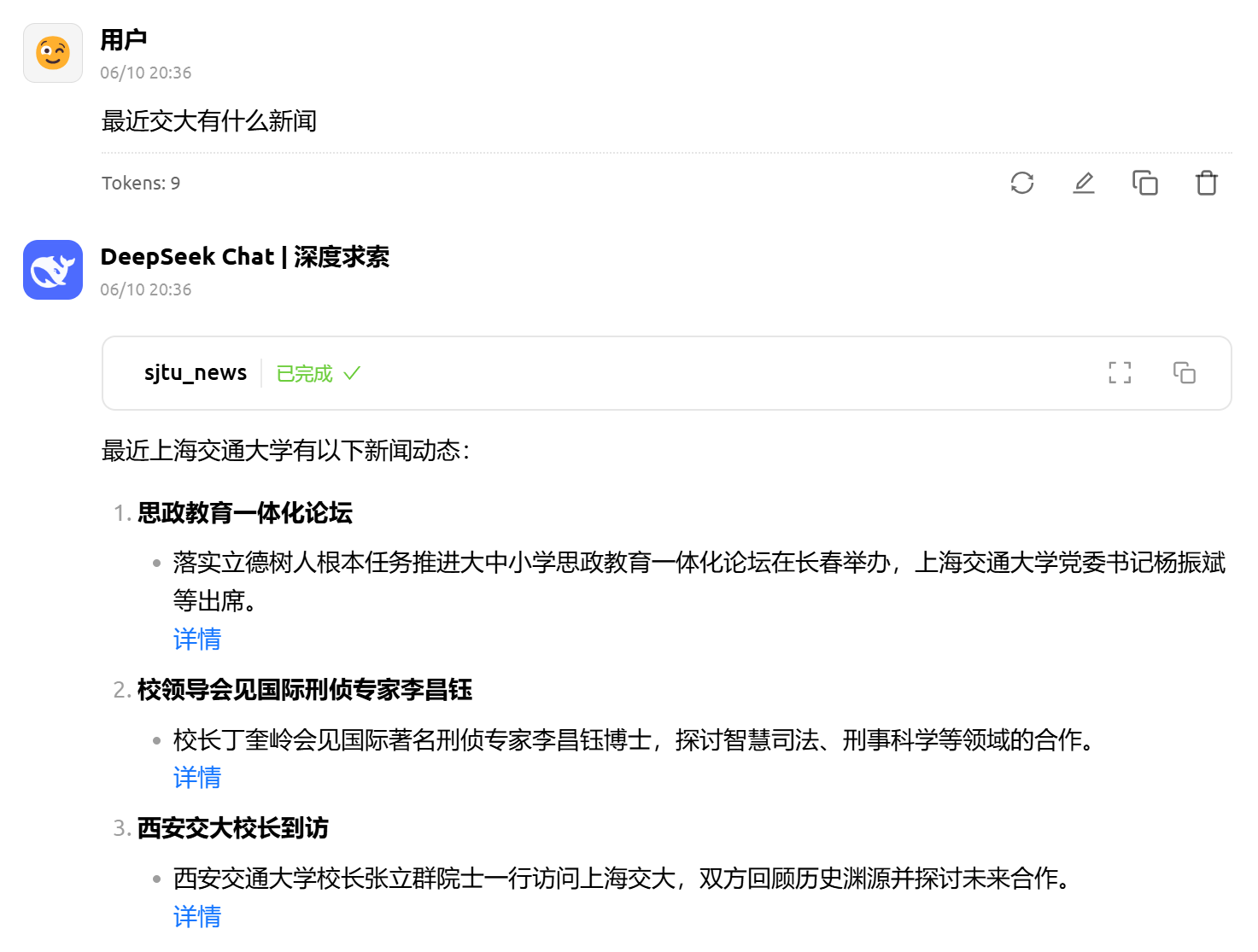
- 启用 MCP 服务器,和 LLM 对话,例如:
Tool Intergration
| 网站 | 工具列表 | 实现方法 |
|---|---|---|
| 教学信息服务网 https://i.sjtu.edu.cn/ |
原生 | |
| 交大邮箱 https://mail.sjtu.edu.cn/ |
原生 | |
| 场馆预约 https://sports.sjtu.edu.cn/pc/ |
原生 | |
| 四则运算 (测试功能) |
Python 插件 | |
| 个人信息 https://my.sjtu.edu.cn/ |
Python 插件 | |
| 第二课堂 https://activity.sjtu.edu.cn/ |
Python 插件 | |
| 教务处 https://jwc.sjtu.edu.cn/ |
Python 插件 | |
| 交大新闻网 https://news.sjtu.edu.cn/ |
Python 插件 |
*注:通过 Python 插件实现的工具需要 Python 环境才可以运行
Authorization
- 打开 https://my.sjtu.edu.cn/ 并登录
- 然后在同一浏览器窗口内打开 https://jaccount.sjtu.edu.cn/jaccount/
- 按下 F12 打开开发者工具(部分浏览器也可以使用 Ctrl+Shift+I),在“应用程序——存储——Cookie”里面可以看到 JAAuthCookie
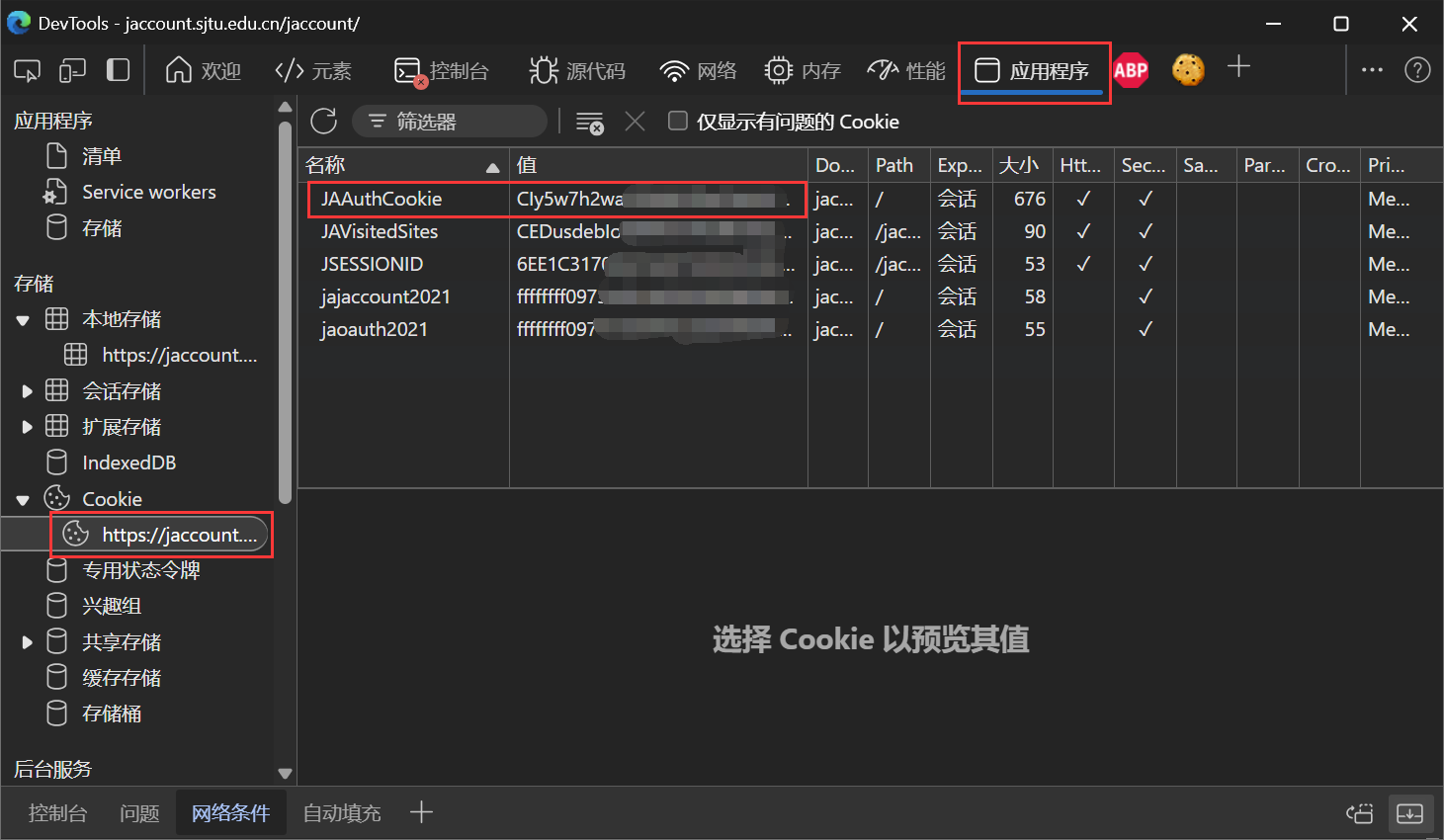
- 复制这一串内容,作为
SJTUGeek.MCP.Server启动时的--cookie参数值
Roadmap
- [ ] 支持 JS 脚本
- [x] 优化参数以及返回值类型判断
- [x] 命令行参数解析
- [x] 禁用 Python/JS
- [x] 工具分组控制
- [x] 脚本环境赋能
- [x] jAccount 凭据
- [x] 内存缓存
- [ ] 数据库KV存储
- [ ] 日志系统
Contribution Guide
- 为了方便开箱即用,MCP 工具首选使用 C# 语言实现(本仓库)
- 如果不会 C#,也可以写 Python,在 contrib 子仓库
- 若用 Python 开发,请把 JAAuthCookie 添加到环境变量,方便调试
Contact
欢迎加入上海交通大学学生信息技术协会(思源极客协会),和我们一起探索数智校园的无限可能!
协会官网:https://geek.sjtu.edu.cn/
招新问卷:https://ssc.sjtu.edu.cn/f/fdd3762e
Dev Tools Supporting MCP
The following are the main code editors that support the Model Context Protocol. Click the link to visit the official website for more information.







