
Slackbot Mcp Host
What is Slackbot Mcp Host
slackbot-mcp-host is a Slack Bot that serves as an MCP Host, allowing integration of various MCP servers into Slack for enhanced communication and functionality.
Use cases
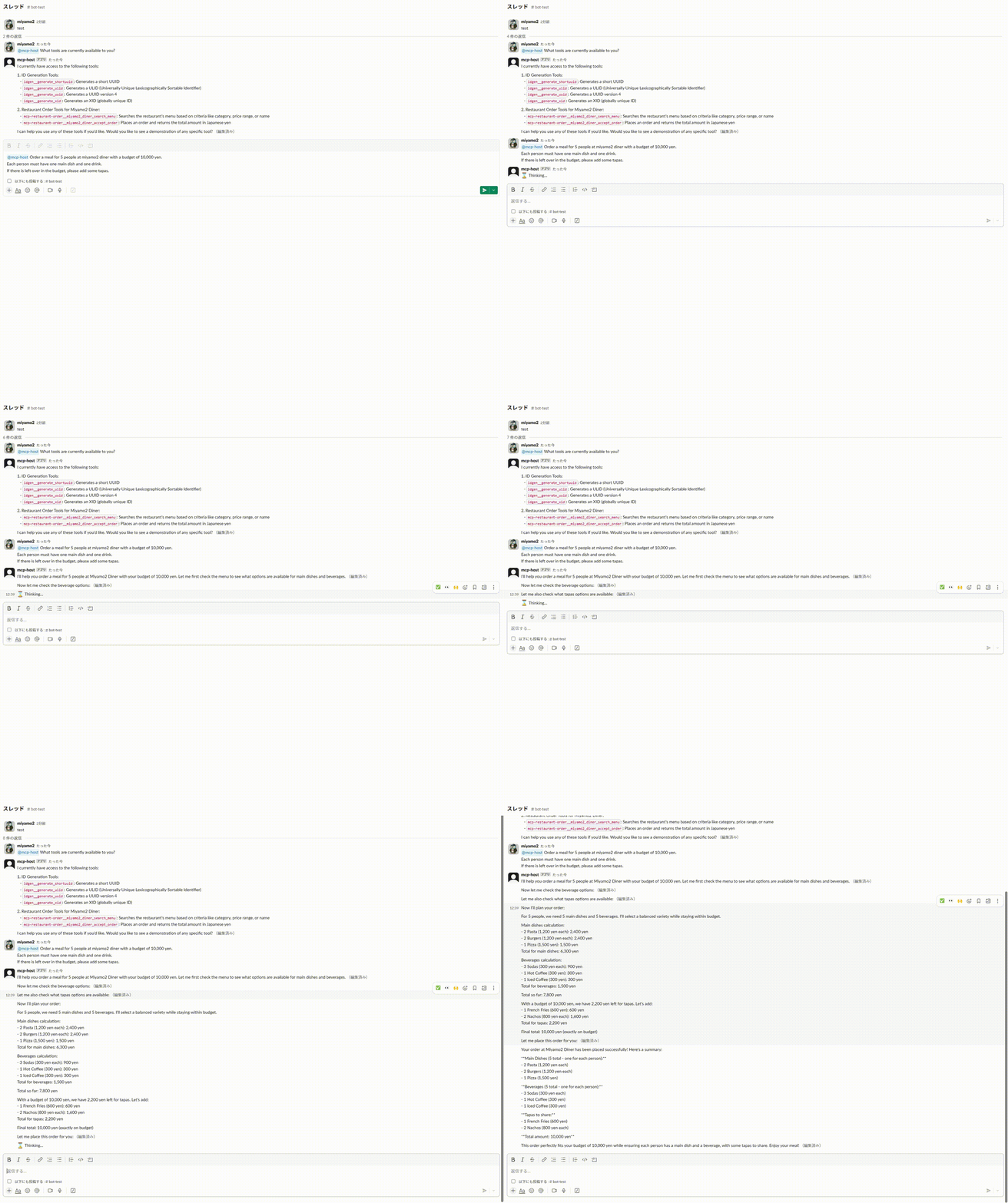
Use cases include automating restaurant orders, fetching data from servers, and integrating search functionalities directly into Slack channels, enhancing team productivity and responsiveness.
How to use
To use slackbot-mcp-host, create a Slack App, set up a GCP project, enable billing, and configure the necessary APIs. Follow the setup instructions provided in the README to bundle MCP servers and deploy them using Docker.
Key features
Key features include support for various MCP servers like stdio and the ability to bundle MCP servers with Docker images at compile time. It supports multiple programming environments such as Go, npm, uv, and bun.
Where to use
slackbot-mcp-host can be used in any environment where Slack is utilized for team communication, particularly in software development, project management, and customer service applications.
Clients Supporting MCP
The following are the main client software that supports the Model Context Protocol. Click the link to visit the official website for more information.





Overview
What is Slackbot Mcp Host
slackbot-mcp-host is a Slack Bot that serves as an MCP Host, allowing integration of various MCP servers into Slack for enhanced communication and functionality.
Use cases
Use cases include automating restaurant orders, fetching data from servers, and integrating search functionalities directly into Slack channels, enhancing team productivity and responsiveness.
How to use
To use slackbot-mcp-host, create a Slack App, set up a GCP project, enable billing, and configure the necessary APIs. Follow the setup instructions provided in the README to bundle MCP servers and deploy them using Docker.
Key features
Key features include support for various MCP servers like stdio and the ability to bundle MCP servers with Docker images at compile time. It supports multiple programming environments such as Go, npm, uv, and bun.
Where to use
slackbot-mcp-host can be used in any environment where Slack is utilized for team communication, particularly in software development, project management, and customer service applications.
Clients Supporting MCP
The following are the main client software that supports the Model Context Protocol. Click the link to visit the official website for more information.
Content
slackbot-mcp-host
MCP Host as a Slack Bot
Demo
Features
Supported MCP Servers
- [x] stdio
- [x] executable file (Must be installed by bundle feature)
- [ ] sse
Bundle MCP Servers
‘slackbot-mcp-host’ able to bundle MCP server with Docker image at compile time.
- [x] go
- [ ] npm
- [x] uv
- [x] bun
Setup
Create a Slack App
See: https://api.slack.com/quickstart
GCP
Login to GCP
gcloud auth application-default login
Create a new project
gcloud projects create <PROJECT_ID>
gcloud config set project <PROJECT_ID>
Enable billing
See available billing account
gcloud billing accounts list
# output
ACCOUNT_ID: <BILLING_ACCOUNT_ID>
NAME: <BILLING_ACCOUNT_NAME>
OPEN: <TRUE|FALSE>
MASTER_ACCOUNT_ID: <MASTER_ACCOUNT_ID>
Link billing account to the project
gcloud alpha billing projects link <PROJECT_ID> --billing-account="<BILLING_ACCOUNT_ID>"
Enable api
gcloud services enable iam.googleapis.com run.googleapis.com artifactregistry.googleapis.com
Terraform
Edit terraform variables
{
  "mcpServers": {
    "hotpepper-gourmet-mcp-server": {
      "command": "hotpepper-gourmet-mcp-server",
      "env": {
        "HOTPEPPER_GOURMET_API_KEY": "<HOTPEPPER Gourmet API Key>"
      }
    },
    "fetch": {
      "command": "mcp-server-fetch"
    },
    "server-brave-search": {
      "command": "mcp-server-brave-search",
      "env": {
        "BRAVE_API_KEY": "<BraveApiKey>",
      }
    }
  },                                           # (Required) MCP servers to connect to.,
  "bundle": {
    "go": {
      "packages": [
        "github.com/miyamo2/hotpepper-gourmet-mcp-server@latest"
      ]
    },
    "uv": {
      "packages": [
        "mcp-server-fetch"
      ]
    },
    "bun": {
      "packages": [
        "@modelcontextprotocol/server-brave-search@latest"
      ]
    }
  },                                           # (Optional) MCP servers to install at compile time. Supported: go, uv, bun
  "llmProviderName": "anthropic",              # (Required) anthropic | openai | google
  "llmApiKey": "<LLMApiKey>",                  # (Optional) Model to be used
  "llmModelName": "<LLMModelName>",            # (Optional) API Key for LLM Provider
  "slackBotToken": "<SlackBotToken>",          # (Required) Slack bot token. 'app_mentions:read', 'chat:write' and 'users:read' scopes are required.
  "slackSigninSecret": "<SlackSigninSecret>",  # (Required) Slack Signin Secret
  "allowedUsers": [
    "<UserID1>"
  ],                                           # (Optional) List of user IDs who can use the bot
  "gcpProjectId": "<GCPProjectId>",            # (Required) GCP project ID
  "gcpProjectNumber": "<GCPProjectNumber>",    # (Required) GCP project number
  "gcpRegion": "<GCPRegion>"                   # (Required) GCP region
}
terraform apply
cd .deploy
terraform init
terraform plan -var-file tfvars.json
terraform apply -var-file tfvars.json
Related Repositories
Dev Tools Supporting MCP
The following are the main code editors that support the Model Context Protocol. Click the link to visit the official website for more information.







