
Snippy
What is Snippy
Snippy is a serverless, AI-powered code snippet management service built on Azure Functions. It utilizes Durable Functions, Azure OpenAI, and Azure Cosmos DB to manage and analyze code snippets efficiently.
Use cases
Use cases for Snippy include managing reusable code snippets, enhancing code completion features in IDEs like Visual Studio Code, and providing intelligent code suggestions through AI agents.
How to use
To use Snippy, you can interact with its HTTP endpoints or MCP Tools. You can save code snippets, retrieve them, and perform advanced queries using Azure AI Agents for code analysis and generation.
Key features
Key features of Snippy include: saving snippets via HTTP/MCP triggers, generating vector embeddings using Azure OpenAI, storing and querying data in Azure Cosmos DB, and exposing backend capabilities as MCP tools.
Where to use
Snippy can be used in software development environments, particularly where code snippet management and AI-driven code generation are needed, such as in integrated development environments (IDEs) and collaborative coding platforms.
Clients Supporting MCP
The following are the main client software that supports the Model Context Protocol. Click the link to visit the official website for more information.





Overview
What is Snippy
Snippy is a serverless, AI-powered code snippet management service built on Azure Functions. It utilizes Durable Functions, Azure OpenAI, and Azure Cosmos DB to manage and analyze code snippets efficiently.
Use cases
Use cases for Snippy include managing reusable code snippets, enhancing code completion features in IDEs like Visual Studio Code, and providing intelligent code suggestions through AI agents.
How to use
To use Snippy, you can interact with its HTTP endpoints or MCP Tools. You can save code snippets, retrieve them, and perform advanced queries using Azure AI Agents for code analysis and generation.
Key features
Key features of Snippy include: saving snippets via HTTP/MCP triggers, generating vector embeddings using Azure OpenAI, storing and querying data in Azure Cosmos DB, and exposing backend capabilities as MCP tools.
Where to use
Snippy can be used in software development environments, particularly where code snippet management and AI-driven code generation are needed, such as in integrated development environments (IDEs) and collaborative coding platforms.
Clients Supporting MCP
The following are the main client software that supports the Model Context Protocol. Click the link to visit the official website for more information.
Content
Snippy · Intelligent Code-Snippet Service with MCP Tools


Snippy is an Azure Functions–based reference application that turns any function into an MCP (Model Context Protocol) tool consumable by GitHub Copilot Chat and other MCP‑aware clients. The sample implements a production‑style code‑snippet service with AI‑powered analysis:
- Save snippets – persists code, metadata and OpenAI embeddings in Cosmos DB DiskANN
- Semantic retrieve – vector search over embeddings
- AI Agents – generate a deep wiki or language‑specific code style guide from stored snippets
- Durable fan‑out/fan‑in with Blueprints – in experimental branch for large‑scale processing
- Microsoft Fabric integration – in gk/fabric branch demonstrating how to build Agents with Fabric Data Agents
The project ships with reproducible azd infrastructure, so azd up will stand up the entire stack – Functions, Cosmos DB, Azure OpenAI and Azure AI Agents – in a single command.
Important Security Notice
This repository is intended for learning and demonstration purposes. Do not deploy it to production without a thorough security review. At a minimum you should:
- Swap connection strings for Managed Identity + Azure Key Vault
- Restrict network access to Azure services via Private Endpoints or service‑tags
- Enable GitHub secret‑scanning and CI security tools
Features • Architecture • Getting Started • Guidance
Features
- Remote MCP trigger – expose Functions as real‑time SSE tools
- AI‑assisted documentation – “deep‑wiki” and “code‑style” agents create rich Markdown (Mermaid, diagrams, etc.)
- Vector search on Cosmos DB DiskANN – low‑latency semantic retrieval
- One‑click deploy –
azd upprovisions and deploys code & infra - Codespaces & Dev Containers – fully configured dev environment in your browser or local VS Code
Tool Matrix
| Tool Name | Purpose |
|---|---|
save_snippet |
Save code snippets with vector embeddings for semantic search |
get_snippet |
Retrieve previously saved code snippets by their unique name |
code_style |
Generate language-specific code style guides from saved snippets |
deep_wiki |
Create comprehensive wiki documentation by analyzing code snippets |
Architecture Diagram
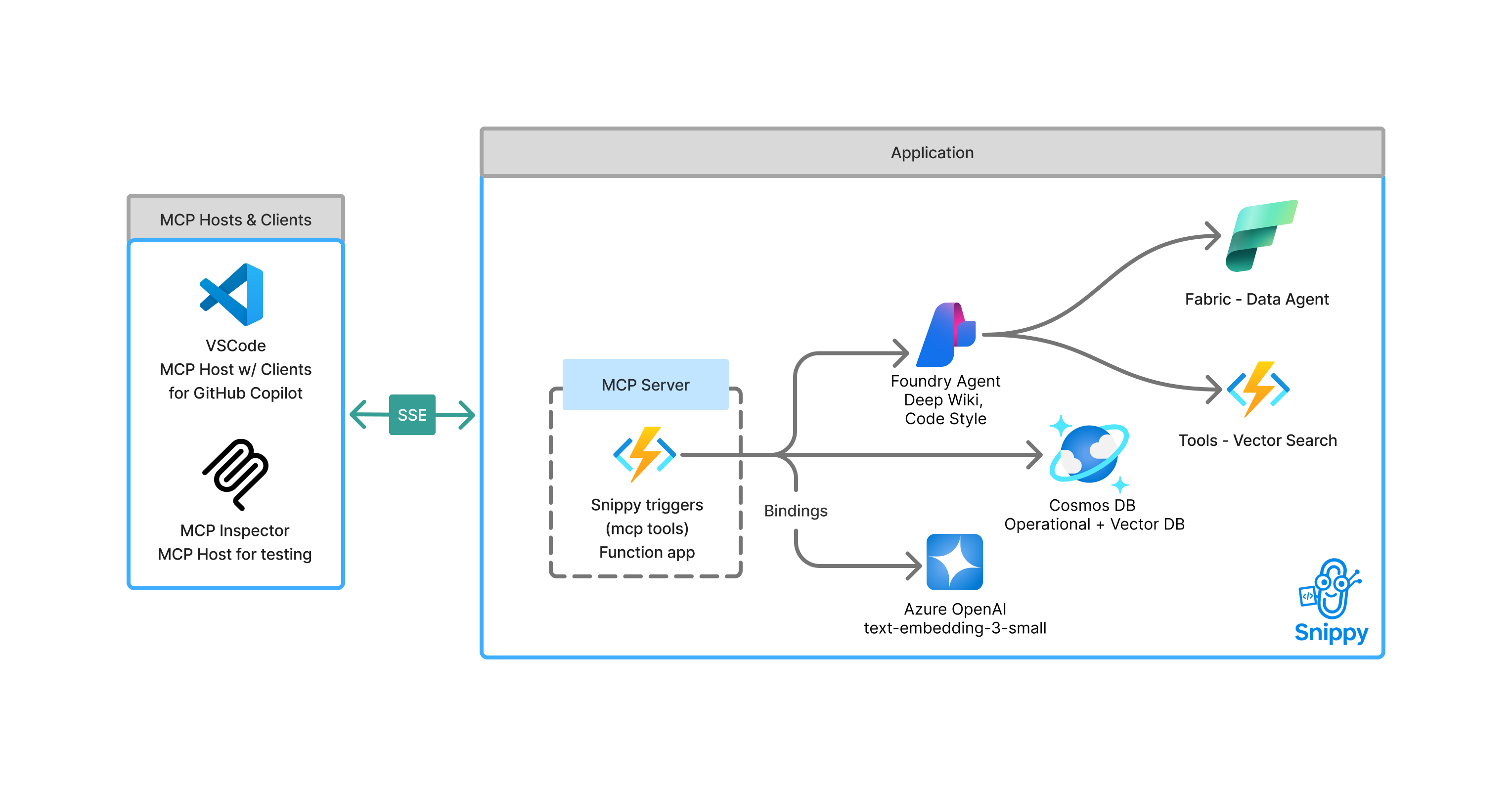
flowchart LR
    %% ─── MCP Hosts & Clients (local) ──────────────────────────────
    subgraph mcphosts["MCP Hosts & Clients (Your Computer)"]
        Host["Host<br/>(VS Code / IDE)"]
        Client["Client<br/>(GitHub Copilot)"]
    end

    %% ─── Application on Azure (remote) ────────────────────────────
    subgraph app["Application (Azure)"]
        Snippy["MCP Server<br/>Snippy Triggers<br/>(Function App)"]:::dashed
        Foundry["Foundry Agent<br/>Deep Wiki · Code Style"]
        Cosmos["Cosmos DB<br/>Operational + Vector DB"]:::datasource
        AOAI["Azure OpenAI<br/>text‑embedding‑3‑small"]
        FabricDA["Fabric – Data Agent"]
        VectorTool["Tools – Vector Search"]
    end

    %% ─── Local interactions ───────────────────────────────────────
    Host <--> Client

    %% ─── MCP protocol to Azure ────────────────────────────────────
    Client <-- "MCP Protocol (SSE)" --> Snippy

    %% ─── Bindings & data flow inside Azure ────────────────────────
    Snippy -- Bindings --> AOAI
    Snippy --> Cosmos
    Snippy --> Foundry
    Foundry --> FabricDA
    Foundry --> VectorTool

    %% ─── Styling ──────────────────────────────────────────────────
    classDef datasource stroke-width:2,stroke-dasharray:5 5
    classDef dashed stroke-width:2,stroke-dasharray:5 5,fill:transparent
    class Cosmos datasource
    class Snippy dashed
    style mcphosts fill:transparent
    style app fill:transparent
Getting Started
You can run Snippy in GitHub Codespaces, VS Code Dev Containers, or your local environment. The fastest path is Codespaces.
Snippy requires an Azure region that supports text‑embedding‑3‑small (or a compatible embeddings model) and Azure AI Agents. The
azdworkflow prompts you for a region; we recommend eastus for best availability.
GitHub Codespaces
-
Click Open in Codespaces above (first badge) – the container build may take a few minutes.
-
When the terminal appears, sign in:
azd auth login --use-device-code -
Launch the stack:
azd up -
Once deployment completes, copy the printed MCP URL and open GitHub Copilot Chat → Agent mode to try commands like “Save this snippet as hello‑world”.
VS Code Dev Containers
Prerequisites: Docker Desktop + the Dev Containers extension.
-
Click the Dev Containers badge (second badge) or run Remote‑Containers: Open Repository in Container from VS Code.
-
Sign in and launch as shown for Codespaces:
azd auth login
azd up
Local Environment
Prerequisites
- azd CLI
- Python 3.11 +
uv - Node 18+ (for Functions Core Tools)
- Azure Functions Core Tools v4 (
npm i -g azure-functions-core-tools@4 --unsafe-perm)
Quickstart
# 1. Clone & init
azd init --template Azure-Samples/snippy

# 2. Sign in
azd auth login

# 3. Provision & deploy
azd up
The CLI prints the Function App URL, MCP endpoint and system key when finished. To remove all resources later:
azd down --purge
Guidance
Region Availability
Azure OpenAI model support varies by region. Verify availability here and choose the same region for all Azure resources. eastus and swedencentral are good default choices.
Costs
Estimate monthly cost using the Azure Pricing Calculator. Major components:
- Azure Functions – Consumption / Flex tiers
- Cosmos DB – Serverless or provisioned throughput
- Azure OpenAI – pay‑as‑you‑go per 1K tokens
- Azure AI Agents – per‑execution billing (preview)
Security
Snippy uses User-Assigned Managed Identity for secure service-to-service authentication. The infrastructure is configured with:
- User-Assigned Managed Identity on the Function App with appropriate RBAC roles:
- Cosmos DB Data Contributor
- Storage Blob Data Owner and Queue Data Contributor
- Application Insights Monitoring Metrics Publisher
- Azure AI Project Developer
For production deployments, we recommend:
- Restrict inbound traffic with Private Endpoints + VNet integration
- Enable network security features like service endpoints and firewall rules
Resources
- Blog – Build AI agent tools using Remote MCP with Azure Functions (https://aka.ms/snippy-blog)
- Model Context Protocol spec – https://aka.ms/mcp
- Azure Functions Remote MCP docs – https://aka.ms/azure-functions-mcp
- Develop Python apps for Azure AI – https://learn.microsoft.com/azure/developer/python/azure-ai-for-python-developers
Contributing
Standard fork → branch → PR workflow. Use Conventional Commits (feat:, fix:) in commit messages.
License
MIT © Microsoft Corporation
Dev Tools Supporting MCP
The following are the main code editors that support the Model Context Protocol. Click the link to visit the official website for more information.







