
Spryker Package Search Mcp
What is Spryker Package Search Mcp
spryker-package-search-mcp is a Model Context Protocol server designed to provide package search capabilities for Spryker GitHub repositories, enabling users to search for Spryker packages and their code contents using natural language queries.
Use cases
Use cases include searching for specific Spryker packages during development, analyzing code contents for better understanding, and integrating with AI tools to enhance the context of Spryker projects.
How to use
To use spryker-package-search-mcp, clone the repository, navigate to the directory, and install the necessary packages using npm. Configure the MCP server settings in a JSON format, ensuring to include your GitHub personal access token for authentication.
Key features
Key features include searching for Spryker packages on GitHub, performing code-level searches across repositories, filtering results by specific organizations (such as spryker, spryker-eco, spryker-sdk, spryker-shop), and running as an MCP server using stdio transport.
Where to use
spryker-package-search-mcp is primarily used in software development environments, particularly for projects involving Spryker’s e-commerce framework, where developers need to efficiently search and manage packages.
Clients Supporting MCP
The following are the main client software that supports the Model Context Protocol. Click the link to visit the official website for more information.





Overview
What is Spryker Package Search Mcp
spryker-package-search-mcp is a Model Context Protocol server designed to provide package search capabilities for Spryker GitHub repositories, enabling users to search for Spryker packages and their code contents using natural language queries.
Use cases
Use cases include searching for specific Spryker packages during development, analyzing code contents for better understanding, and integrating with AI tools to enhance the context of Spryker projects.
How to use
To use spryker-package-search-mcp, clone the repository, navigate to the directory, and install the necessary packages using npm. Configure the MCP server settings in a JSON format, ensuring to include your GitHub personal access token for authentication.
Key features
Key features include searching for Spryker packages on GitHub, performing code-level searches across repositories, filtering results by specific organizations (such as spryker, spryker-eco, spryker-sdk, spryker-shop), and running as an MCP server using stdio transport.
Where to use
spryker-package-search-mcp is primarily used in software development environments, particularly for projects involving Spryker’s e-commerce framework, where developers need to efficiently search and manage packages.
Clients Supporting MCP
The following are the main client software that supports the Model Context Protocol. Click the link to visit the official website for more information.
Content
Spryker Package Search Tool
A command-line tool that initializes a Model Context Protocol (MCP) server to provide package search capabilities for Spryker GitHub repositories.
This tool allows you to search Spryker packages or their code contents using natural language queries. It supports filtering by specific GitHub organizations.
✨ Features
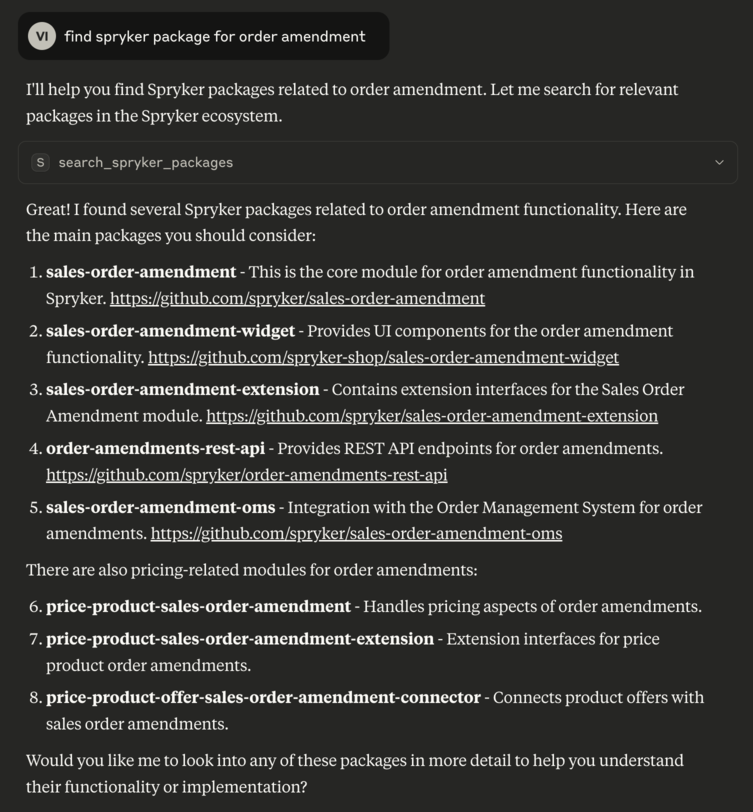
- Search for Spryker packages on GitHub
- Code-level search across Spryker repositories
- Support for filtering by organization (
spryker,spryker-eco,spryker-sdk,spryker-shop) - Runs as an MCP server using stdio transport
🚀 Installation
Ensure npm and npx are installed.
git clone
cd spryker-module-finder && npm install
MCP server makes the tool compatible with various AI agents to extend context with Spryker Project context
Tools:
Settings
You can add as many servers as projects, just by configuring them properly using the project name.
{
  "mcpServers": {
    "sprykerPackageSearch": {
      "command": "npx",
      "args": [
        "-y",
        "/FULL_PATH/spryker-module-finder"
      ],
      "env": {
        "GITHUB_PERSONAL_ACCESS_TOKEN": "token"
      }
    }
  }
}
Debug
npx @modelcontextprotocol/inspector npx node src/index.js
Test
npm test
npx eslint . --fix
🧠 Available Tools
search_spryker_packages
Searches for Spryker packages based on a natural language query.
Parameters:
-
query (string, required): The natural language query to search GitHub repositories.
-
organisations (array of strings, optional): List of GitHub orgs to filter by. Example:
[“spryker”, “spryker-eco”, “spryker-sdk”, “spryker-shop”]
search_spryker_package_code
Searches for PHP code inside Spryker GitHub repositories.
Parameters:
-
query (string, required): The natural language query to search within code.
-
organisations (array of strings, optional): List of GitHub orgs to filter by. Example:
[“spryker”, “spryker-eco”, “spryker-sdk”, “spryker-shop”]
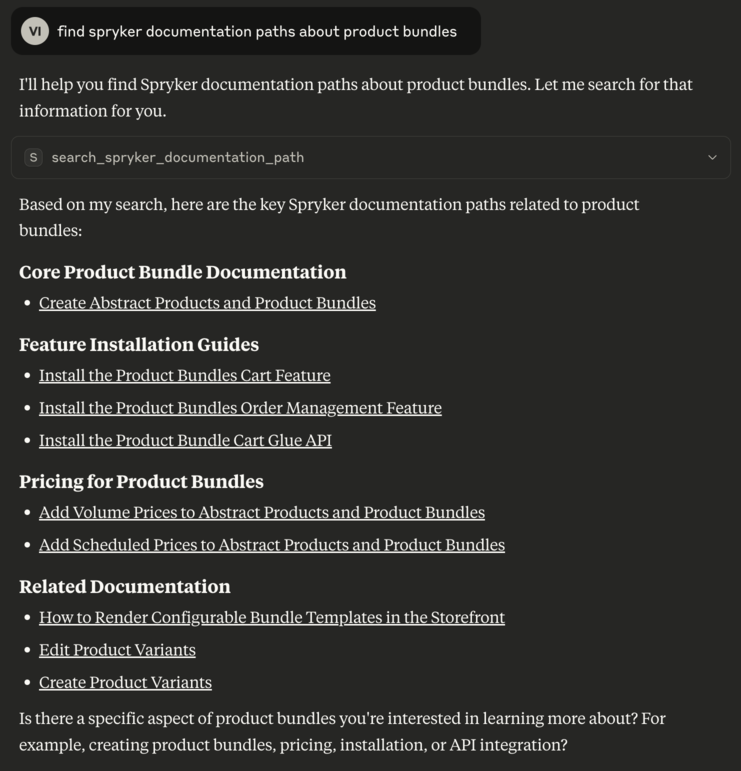
search_spryker_documentation_path
Searches for Spryker documentation links.
Parameters:
- query (string, required): The natural language query to search Spryker documentation links.
🧩 Architecture
Built with Model Context Protocol SDK
Uses StdioServerTransport for communication
Validates input with zod
Handles GitHub API integration for repository and code search
📄 License
👥 Authors
Dev Tools Supporting MCP
The following are the main code editors that support the Model Context Protocol. Click the link to visit the official website for more information.







