
Sre
What is Sre
SmythOS is an operating system specifically designed for managing AI agents at scale, providing a robust and scalable platform for building, deploying, and managing intelligent AI applications. Inspired by traditional operating systems, it simplifies the complexity of AI agent workflows while ensuring high performance and security.
Use cases
SmythOS is suitable for a variety of applications, such as intelligent chatbots, data processing agents, content generation systems, and automated workflows. It enables developers to create agents that can interact with databases, process data, and integrate with external APIs seamlessly.
How to use
To get started with SmythOS, users can install the command line interface (CLI) to scaffold new projects, or directly add the SDK to existing projects. The SDK provides a simple and intuitive interface for building agents, allowing users to execute and manage agent workflows efficiently using a unified resource abstraction.
Key features
SmythOS boasts a number of important features including an agent-first design, modular architecture, built-in security with access control, support for multiple resource types, and a powerful unified SDK. Its components facilitate seamless integration and operation under varying deployment environments, ensuring scalability from development to production.
Where to use
SmythOS can be utilized in various environments ranging from local systems to cloud-based infrastructures, making it ideal for enterprise applications, startup solutions, and individual projects. Its adaptability ensures it can be effectively deployed in hybrid systems as well as in edge computing scenarios.
Clients Supporting MCP
The following are the main client software that supports the Model Context Protocol. Click the link to visit the official website for more information.





Overview
What is Sre
SmythOS is an operating system specifically designed for managing AI agents at scale, providing a robust and scalable platform for building, deploying, and managing intelligent AI applications. Inspired by traditional operating systems, it simplifies the complexity of AI agent workflows while ensuring high performance and security.
Use cases
SmythOS is suitable for a variety of applications, such as intelligent chatbots, data processing agents, content generation systems, and automated workflows. It enables developers to create agents that can interact with databases, process data, and integrate with external APIs seamlessly.
How to use
To get started with SmythOS, users can install the command line interface (CLI) to scaffold new projects, or directly add the SDK to existing projects. The SDK provides a simple and intuitive interface for building agents, allowing users to execute and manage agent workflows efficiently using a unified resource abstraction.
Key features
SmythOS boasts a number of important features including an agent-first design, modular architecture, built-in security with access control, support for multiple resource types, and a powerful unified SDK. Its components facilitate seamless integration and operation under varying deployment environments, ensuring scalability from development to production.
Where to use
SmythOS can be utilized in various environments ranging from local systems to cloud-based infrastructures, making it ideal for enterprise applications, startup solutions, and individual projects. Its adaptability ensures it can be effectively deployed in hybrid systems as well as in edge computing scenarios.
Clients Supporting MCP
The following are the main client software that supports the Model Context Protocol. Click the link to visit the official website for more information.
Content
SmythOS - The Operating System for Agentic AI




Everything you need to build, deploy, and manage intelligent AI agents at scale. SmythOS is designed with a philosophy inspired by operating system kernels, ensuring a robust and scalable foundation for AI agents.
SDK Documentation | SRE Core Documentation | Code Examples
Why SmythOS exists
- Shipping production-ready AI agents shouldn’t feel like rocket science.
- Autonomy and control can, and must, coexist.
- Security isn’t an add-on; it’s built-in.
- The coming Internet of Agents must stay open and accessible to everyone.
Design Principles
SmythOS provides a complete Operating System for Agentic AI. Just as traditional operating systems manage resources and provide APIs for applications, SmythOS manages AI resources and provides a unified SDK that works from development to production.
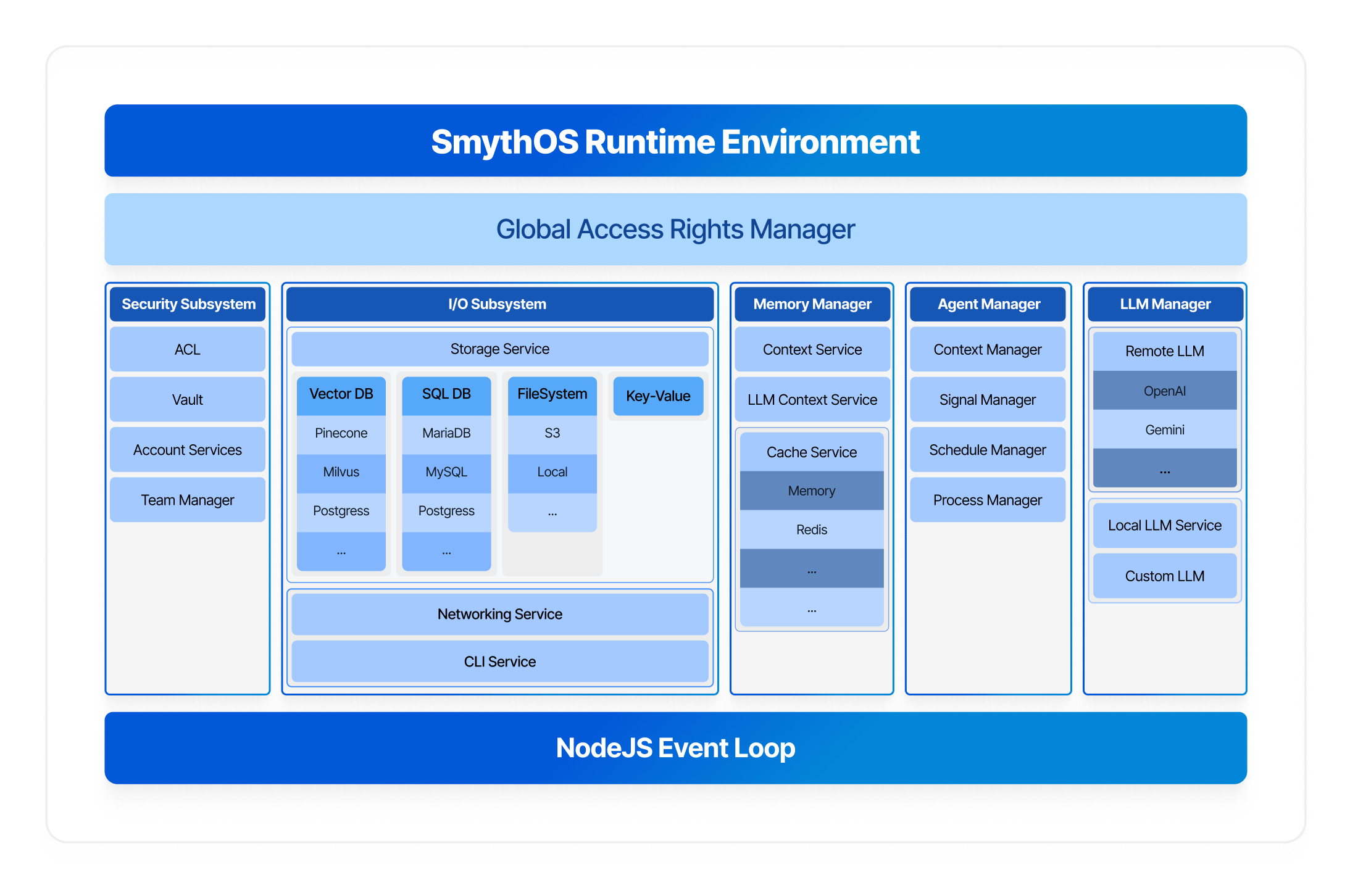
Unified Resource Abstraction
SmythOS provides a unified interface for all resources, ensuring consistency and simplicity across your entire AI platform. Whether you’re storing a file locally, on S3, or any other storage provider, you don’t need to worry about the underlying implementation details. SmythOS offers a powerful abstraction layer where all providers expose the same functions and APIs.
This principle applies to all services - not just storage. Whether you’re working with VectorDBs, cache (Redis, RAM), LLMs (OpenAI, Anthropic), or any other resource, the interface remains consistent across providers.
This approach makes your AI platform easy to scale and incredibly flexible. You can seamlessly swap between different providers to test performance, optimize costs, or meet specific requirements without changing a single line of your business logic.
Key Benefits:
- Agent-First Design: Built specifically for AI agent workloads
- Developer-Friendly: Simple SDK that scales from development to production
- Modular Architecture: Extensible connector system for any infrastructure
- Production-Ready: Scalable, observable, and battle-tested
- Enterprise Security: Built-in access control and secure credential management
Quick Start
We made a great tutorial that’s really worth watching:

Method 1: Using the CLI (Recommended)
Install the CLI globally and create a new project:
npm i -g @smythos/cli
sre create
The CLI will guide you step-by-step to create your SDK project with the right configuration for your needs.
Method 2: Direct SDK Installation
Add the SDK directly to your existing project:
npm install @smythos/sdk
Check the Examples, documentation and Code Templates to get started.
Note: If you face an issue with the CLI or with your code, set environment variable LOG_LEVEL=“debug” and run your code again. Then share the logs with us, it will help diagnose the problem.
Repository Structure
This monorepo contains three main packages:
SRE (Smyth Runtime Environment) - packages/core
The SRE is the core runtime environment that powers SmythOS. Think of it as the kernel of the AI agent operating system.
Features:
- Modular Architecture: Pluggable connectors for every service (Storage, LLM, VectorDB, Cache, etc.)
- Security-First: Built-in Candidate/ACL system for secure resource access
- Resource Management: Intelligent memory, storage, and compute management
- Agent Orchestration: Complete agent lifecycle management
- 40+ Components: Production-ready components for AI, data processing, and integrations
Supported Connectors:
- Storage: Local, S3, Google Cloud, Azure
- LLM: OpenAI, Anthropic, Google AI, AWS Bedrock, Groq, Perplexity
- VectorDB: Pinecone, Milvus, RAMVec
- Cache: RAM, Redis
- Vault: JSON File, AWS Secrets Manager, HashiCorp
SDK - packages/sdk
The SDK provides a clean, developer-friendly abstraction layer over the SRE runtime. It’s designed for simplicity without sacrificing power.
Why Use the SDK:
- Simple API: Clean, intuitive interface that’s easy to learn
- Type-Safe: Full TypeScript support with IntelliSense
- Production-Ready: Same code works in development and production
- Configuration-Independent: Business logic stays unchanged as infrastructure scales
CLI - packages/cli
The SRE CLI helps you get started quickly with scaffolding and project management.
Code examples
The SDK allows you to build agents with code or load and run a .smyth file.
.smyth is the extension of agents built with our SmythOS builder.
Example 1 : load and run an agent from .smyth file
async function main() {
    const agentPath = path.resolve(__dirname, 'my-agent.smyth');

    //Importing the agent workflow
    const agent = Agent.import(agentPath, {
        model: Model.OpenAI('gpt-4o'),
    });

    //query the agent and get the full response
    const result = await agent.prompt('Hello, how are you ?');

    console.log(result);
}
Want stream mode ? easy
Click to expand: Stream Mode Example - Real-time response streaming with events
    const events = await agent.prompt('Hello, how are you ?').stream();
    events.on('content', (text) => {
        console.log('content');
    });

    events.on('end', /*... handle end ... */)
    events.on('usage', /*... collect agent usage data ... */)
    events.on('toolCall', /*... ... */)
    events.on('toolResult', /*... ... */)
    ...
Want chat mode ? easy
Click to expand: Chat Mode Example - Conversational agent with memory
    const chat = agent.chat();

    //from there you can use the prompt or prompt.stream to handle it

    let result = await chat.prompt("Hello, I'm Smyth")
    console.log(result);

    result = await chat.prompt('Do you remember my name ?");
    console.log(result);


    //the difference between agent.prompt() and chat.prompt() is that the later remembers the conversation
Example 2 : Article Writer Agent
In this example we are coding the agent logic with the help of the SDK elements.
Click to expand: Complete Article Writer Agent - Full example using LLM + VectorDB + Storage
import { Agent, Model } from '@smythos/sdk';

async function main() {
    // Create an intelligent agent
    const agent = new Agent({
        name: 'Article Writer',
        model: 'gpt-4o',
        behavior: 'You are a copy writing assistant. The user will provide a topic and you have to write an article about it and store it.',
    });

    // Add a custom skill that combines multiple AI capabilities
    agent.addSkill({
        id: 'AgentWriter_001',
        name: 'WriteAndStoreArticle',
        description: 'Writes an article about a given topic and stores it',
        process: async ({ topic }) => {
            // VectorDB - Search for relevant context
            const vec = agent.vectordb.Pinecone({
                namespace: 'myNameSpace',
                indexName: 'demo-vec',
                pineconeApiKey: process.env.PINECONE_API_KEY,
                embeddings: Model.OpenAI('text-embedding-3-large'),
            });

            const searchResult = await vec.search(topic, {
                topK: 10,
                includeMetadata: true,
            });
            const context = searchResult.map((e) => e?.metadata?.text).join('\n');

            // LLM - Generate the article
            const llm = agent.llm.OpenAI('gpt-4o-mini');
            const result = await llm.prompt(`Write an article about ${topic} using the following context: ${context}`);

            // Storage - Save the article
            const storage = agent.storage.S3({
                /*... S3 Config ...*/
            });
            const uri = await storage.write('article.txt', result);

            return `The article has been generated and stored. Internal URI: ${uri}`;
        },
    });

    // Use the agent
    const result = await agent.prompt('Write an article about Sakura trees');
    console.log(result);
}

main().catch(console.error);
Architecture Highlights
Built-in Security
Security is a core tenant of SRE. Every operation requires proper authorization through the Candidate/ACL system, ensuring that agents only
access resources they are permitted to.
const candidate = AccessCandidate.agent(agentId);
const storage = ConnectorService.getStorageConnector().user(candidate);
await storage.write('data.json', content);
Development to Production Evolution
Your business logic stays identical while infrastructure scales:
When you use the SDK, SmythOS Runtime Environment will be implicitly initialized with general connectors that covers standard agent use cases.
Click to expand: Basic SRE Setup - Default development configuration
// you don't need to explicitly initialize SRE
// we are just showing you how it is initialized internally
// const sre = SRE.init({
//     Cache: { Connector: 'RAM' },
//     Storage: { Connector: 'Local' },
//     Log: { Connector: 'ConsoleLog' },
// });

async function main() {
    // your agent logic goes here
}

main();
But you can explicitly initialize SRE with other built-in connectors, or make your own
Use cases :
- You want to use a custom agents store
- You want to store your API keys and other credentials in a more secure vault
- You need enterprise grade security and data isolation
- …
Click to expand: Production SRE Setup - Enterprise-grade configuration with custom connectors
const sre = SRE.init({
    Account: { Connector: 'EnterpriseAccountConnector', Settings: { ... } },
    Vault: { Connector: 'Hashicorp', Settings: { url: 'https://vault.company.com' } },
    Cache: { Connector: 'Redis', Settings: { url: 'redis://prod-cluster' } },
    Storage: { Connector: 'S3', Settings: { bucket: 'company-ai-agents' } },
    VectorDB: { Connector: 'Pinecone', Settings: { indexName: 'company-ai-agents' } },
    Log: { Connector: 'CustomLogStore'},
});


async function main() {
    // your agent logic goes here
}

main();
Component System
40+ production-ready components for every AI use case.
These components can be invoked programmatically or through the symbolic representation of the agent workflow (the .smyth file).
- AI/LLM:
GenAILLM,ImageGen,LLMAssistant - External:
APICall,WebSearch,WebScrape,HuggingFace - Data:
DataSourceIndexer,DataSourceLookupJSONFilter - Logic:
LogicAND,LogicOR,Classifier,ForEach - Storage:
LocalStorage,S3 - Code:
ECMAScript,ServerlessCode
Key Features
| Feature | Description |
|---|---|
| Agent-Centric | Built specifically for AI agent workloads and patterns |
| Secure by Default | Enterprise-grade security with data isolation |
| High Performance | Optimized for high-throughput AI operations |
| Modular | Swap any component without breaking your system |
| Observable | Built-in monitoring, logging, and debugging tools |
| Cloud-Native | Runs anywhere - local, cloud, edge, or hybrid |
| Scalable | From development to enterprise production |
Contributing
We welcome contributions! Please see our Contributing Guide and Code of Conduct.
License
This project is licensed under the MIT License.
What’s Next?
- We will release an open source visual agent IDE later this year.
- Support us at SmythOS
- Join our community to stay updated on new features, connectors, and capabilities.
/smɪθ oʊ ɛs/
Ride the llama. Skip the drama.
Dev Tools Supporting MCP
The following are the main code editors that support the Model Context Protocol. Click the link to visit the official website for more information.







