
Ssh Mcp
What is Ssh Mcp
ssh-mcp is a secure CLI tool designed for executing JSON commands over SSH, serving as a bridge between AI systems and operational tasks.
Use cases
Use cases include automating server management tasks, integrating AI agents for operational decision-making, and executing structured commands in remote environments.
How to use
To use ssh-mcp, install the tool and run it from the command line, providing the necessary JSON command and SSH connection details.
Key features
Key features include structured command execution, support for AI integration, and the ability to handle arguments and metadata, making it suitable for automated operations.
Where to use
ssh-mcp can be used in fields such as DevOps, AI operations, and any environment where automated interactions with remote systems are required.
Clients Supporting MCP
The following are the main client software that supports the Model Context Protocol. Click the link to visit the official website for more information.





Overview
What is Ssh Mcp
ssh-mcp is a secure CLI tool designed for executing JSON commands over SSH, serving as a bridge between AI systems and operational tasks.
Use cases
Use cases include automating server management tasks, integrating AI agents for operational decision-making, and executing structured commands in remote environments.
How to use
To use ssh-mcp, install the tool and run it from the command line, providing the necessary JSON command and SSH connection details.
Key features
Key features include structured command execution, support for AI integration, and the ability to handle arguments and metadata, making it suitable for automated operations.
Where to use
ssh-mcp can be used in fields such as DevOps, AI operations, and any environment where automated interactions with remote systems are required.
Clients Supporting MCP
The following are the main client software that supports the Model Context Protocol. Click the link to visit the official website for more information.
Content
ssh-mcp: Simple, Secure, Structured AI Tool Execution over SSH



ssh-mcp is a simple, secure, and structured CLI tool that enables AI agents and developers to execute JSON-based commands over SSH using the Model Context Protocol (MCP).
The missing bridge between AI and ops.
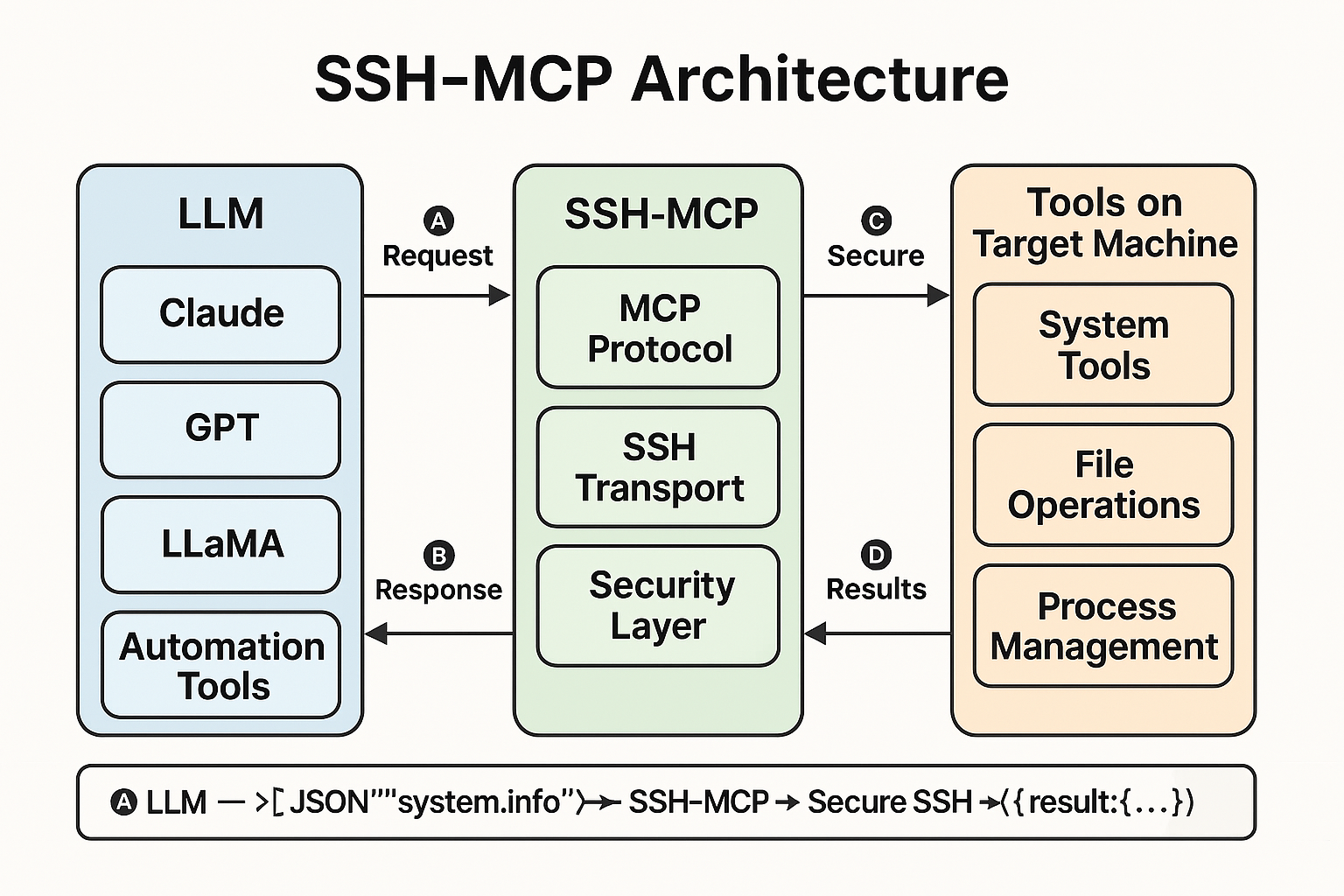
It acts as a bridge between AI systems (like Claude, LLaMA, GPT) and real-world system operations, allowing tools, prompts, and resource-based interactions through a structured protocol.
📚 Table of Contents
📌 Current Status
🚧 Under active development – MVP Bash implementation available. Go version and package manager support coming soon.
❓ The Problem
SSH works great for people. But for AI agents and automated devtools?
- There’s no structure — just raw text output
- No arguments, schemas, or results
- No streaming, prompting, or metadata
Result: AI agents can’t reliably automate remote tasks. Devtools can’t reason with responses. And humans must glue everything together.
✅ The Solution
ssh-mcp makes SSH structured, predictable, and AI-friendly.
- Wrap any remote tool as a JSON-based callable
- Interact with remote machines using structured requests
- Return consistent results with explanations and suggestions
- Secure-by-default using existing SSH keys
✨ Key Benefits
| Feature | Description |
|---|---|
| ✅ Simple | One binary or bash script, zero dependencies |
| 🔐 Secure | Uses existing SSH auth (no daemon, no socket) |
| 📦 Structured | MCP protocol for inputs, outputs, context |
| 🤖 AI-Ready | Built for agents, LLMs, auto-devtools |
| ⚙️ Extensible | Add your own tools, prompts, resources |
👥 Who Should Use This
If you’re building:
- AI tools that talk to real infrastructure
- Developer copilots that touch live servers
- Secure automations that need structured control
…then ssh-mcp helps you move fast without sacrificing control or safety.
💡 Use Cases
- 💻 Developers: Structured command execution over SSH
- 🤖 AI Agents (Claude, GPT, LLaMA): Natural language → structured tool invocation
- 🛠️ Automation: Run predefined tools, long-running ops, and observability
- 👨💻 Replit / Cursor / AutoGPT: Drop-in remote tool layer
⚖️ Comparison to Alternatives
| Feature | Raw SSH | REST APIs | ssh-mcp |
|---|---|---|---|
| Structured Output | ❌ | ✅ | ✅ |
| Schema-based Args | ❌ | ✅ | ✅ |
| Streaming Support | ❌ | Limited | ✅ |
| Requires Daemon | ❌ | Usually | ❌ |
| Secure by SSH | ✅ | ❌ | ✅ |
| AI Prompt Support | ❌ | ❌ | ✅ |
⚙️ Protocol Design
Request Format
{
  "tool": "string",
  "args": {
    "property1": "value1"
  },
  "conversation_id": "uuid",
  "context": {
    "user_intent": "string",
    "reasoning": "string"
  }
}
Response Format
{
  "conversation_id": "uuid",
  "status": {
    "code": 0,
    "message": "Success"
  },
  "result": {
    "property1": "value1"
  },
  "explanation": "string",
  "suggestions": [
    {
      "tool": "string",
      "description": "string"
    }
  ],
  "error": {
    "code": "string",
    "message": "string",
    "details": {}
  }
}
⚡ Quick Start
# 1. Install
git clone https://github.com/sameehj/ssh-mcp.git
cd ssh-mcp
chmod +x install.sh
./install.sh

# 2. Run a tool
echo '{"tool":"system.info"}' | ssh-mcp user@host
Note: Package manager support (
brew,apt,scoop) is planned for future releases.
🔐 Prerequisites
- SSH access to the target system
- Bash and
jqinstalled on remote machine - Key-based auth recommended
🚀 Features
- Full MCP Protocol support
- Tools, prompts, and resource handling
- Conversation tracking and AI context embedding
- Structured error handling, suggestions, explanations
- Shell completions, self-discovery, tool schemas
📊 Tool Categories
Meta Tools
meta.discover: List toolsmeta.describe: Tool descriptionsmeta.schema: Tool input schema
System Tools
system.info: OS, CPU, memorysystem.health: Disk, load, uptime
File Tools
file.read,file.write,file.list,file.find
Process Tools
process.list,process.info
Network Tools
network.status,network.route
Resources
resource.get,resource.list,resource.create
Long-Running
longRunning.backup,longRunning.scan,longRunning.download
🤖 AI Integration Example (Python)
import json, subprocess, uuid

class McpClient:
    def __init__(self, server):
        self.server = server
        self.conversation_id = str(uuid.uuid4())

    def execute_tool(self, tool_name, args=None, user_intent=None):
        payload = {
            "tool": tool_name,
            "args": args or {},
            "conversation_id": self.conversation_id,
        }
        if user_intent:
            payload["context"] = {"user_intent": user_intent}

        result = subprocess.run([
            "ssh", self.server, "./mcp.sh"
        ], input=json.dumps(payload).encode(), stdout=subprocess.PIPE)
        return json.loads(result.stdout)
💬 Chat / REPL Support
Use ssh-mcp in conversational loops or LLaMA-based shells:
while true; do
  echo -n "mcp > "
  read CMD
  echo $CMD | ssh-mcp user@host
done
Pair this with a local LLM (e.g. LLaMA) to enable:
“Check CPU usage” →
{ "tool": "system.monitor" }
🔮 Roadmap
- ✅ Bash-based MVP (
mcp.sh) - 🚧 Go binary version (
ssh-mcp) - 🚧 Streaming support for long-running tools
- 🚧 Resource references: inline or URI-based
- 🚧 Prompt + tool hybrid execution
- 🚧 Plugin architecture for third-party tools
- 🚧 Package manager support (
brew,apt,scoop) - 🚧 Shell completions and
--discover/--describe - 🚧 Integration with Claude, Cursor, Replit AI agents
🪧 License
MIT License — see LICENSE file for details.
🎯 Architecture Diagram
🔎 References & Related Projects
- MCP Protocol (early-stage spec)
- MCP Specification (draft)
- ClaudeMCP (conceptual integration)
- KernelFaaS (eBPF backend)
🎉 Get Involved
Want to contribute tools, prompts, or ideas? Want to use ssh-mcp with your AI shell, devtool, or infra layer?
Let’s build it together. Star the repo, fork it, or open an issue.
🚀 Let’s Build the AI Shell of the Future
ssh-mcpis more than a CLI — it’s a protocol for building intelligent, secure interfaces between humans, AI, and machines.
- ⭐ Star the repo
- 🛠️ Contribute a tool or prompt
- 💬 Tell us what you’re building
This is the terminal AI deserves.
Dev Tools Supporting MCP
The following are the main code editors that support the Model Context Protocol. Click the link to visit the official website for more information.







