
Streamlit With Mcp
What is Streamlit With Mcp
This project is a Streamlit-based React Agent client application that communicates with an MCP (Message Communication Protocol) server. It utilizes the intuitive UI components of Streamlit to visually represent interactions with the server, integrating parts of the OpenMCP project to build an efficient conversational agent system leveraging LangChain and LangGraph.
Use cases
It can be used for real-time communication and interaction with an MCP server, facilitating a variety of applications such as chatbots, data retrieval systems, and interactive interfaces that require server communication and user input management.
How to use
To use the application, create and activate a Python virtual environment, install the required packages from ‘requirements.txt’, and run the Streamlit application with ‘streamlit run main.py’. Ensure the MCP server configurations are set correctly in ‘config/mcp_config.json’.
Key features
The application features a user-friendly interface for accessing and managing server communications effectively. It implements both standard and real-time communication using SSE (Server-Sent Events) and allows users to query and interact with tools through a visually intuitive platform.
Where to use
This application can be deployed in various environments where interaction with a backend server is needed, such as in educational tools, customer service chat agents, and data querying platforms across web and mobile applications.
Clients Supporting MCP
The following are the main client software that supports the Model Context Protocol. Click the link to visit the official website for more information.





Overview
What is Streamlit With Mcp
This project is a Streamlit-based React Agent client application that communicates with an MCP (Message Communication Protocol) server. It utilizes the intuitive UI components of Streamlit to visually represent interactions with the server, integrating parts of the OpenMCP project to build an efficient conversational agent system leveraging LangChain and LangGraph.
Use cases
It can be used for real-time communication and interaction with an MCP server, facilitating a variety of applications such as chatbots, data retrieval systems, and interactive interfaces that require server communication and user input management.
How to use
To use the application, create and activate a Python virtual environment, install the required packages from ‘requirements.txt’, and run the Streamlit application with ‘streamlit run main.py’. Ensure the MCP server configurations are set correctly in ‘config/mcp_config.json’.
Key features
The application features a user-friendly interface for accessing and managing server communications effectively. It implements both standard and real-time communication using SSE (Server-Sent Events) and allows users to query and interact with tools through a visually intuitive platform.
Where to use
This application can be deployed in various environments where interaction with a backend server is needed, such as in educational tools, customer service chat agents, and data querying platforms across web and mobile applications.
Clients Supporting MCP
The following are the main client software that supports the Model Context Protocol. Click the link to visit the official website for more information.
Content
Streamlit MCP Client
MCP 서버와 통신하는 Streamlit 기반의 React Agent 클라이언트 애플리케이션입니다.
프로젝트 개요
이 프로젝트는 Streamlit을 활용하여 MCP(Message Communication Protocol) 서버와 통신하는 간단한 React Agent를 구현한 것입니다. Streamlit의 직관적인 UI 컴포넌트를 활용하여 서버와의 통신을 시각적으로 표현합니다.
React Agent 구현은 OpenMCP 프로젝트의 코드 일부를 인용하였습니다. LangChain과 LangGraph를 기반으로 작성되었습니다. 이를 통해 효율적인 대화형 에이전트 시스템을 구축했습니다.
스크린샷
메인 화면
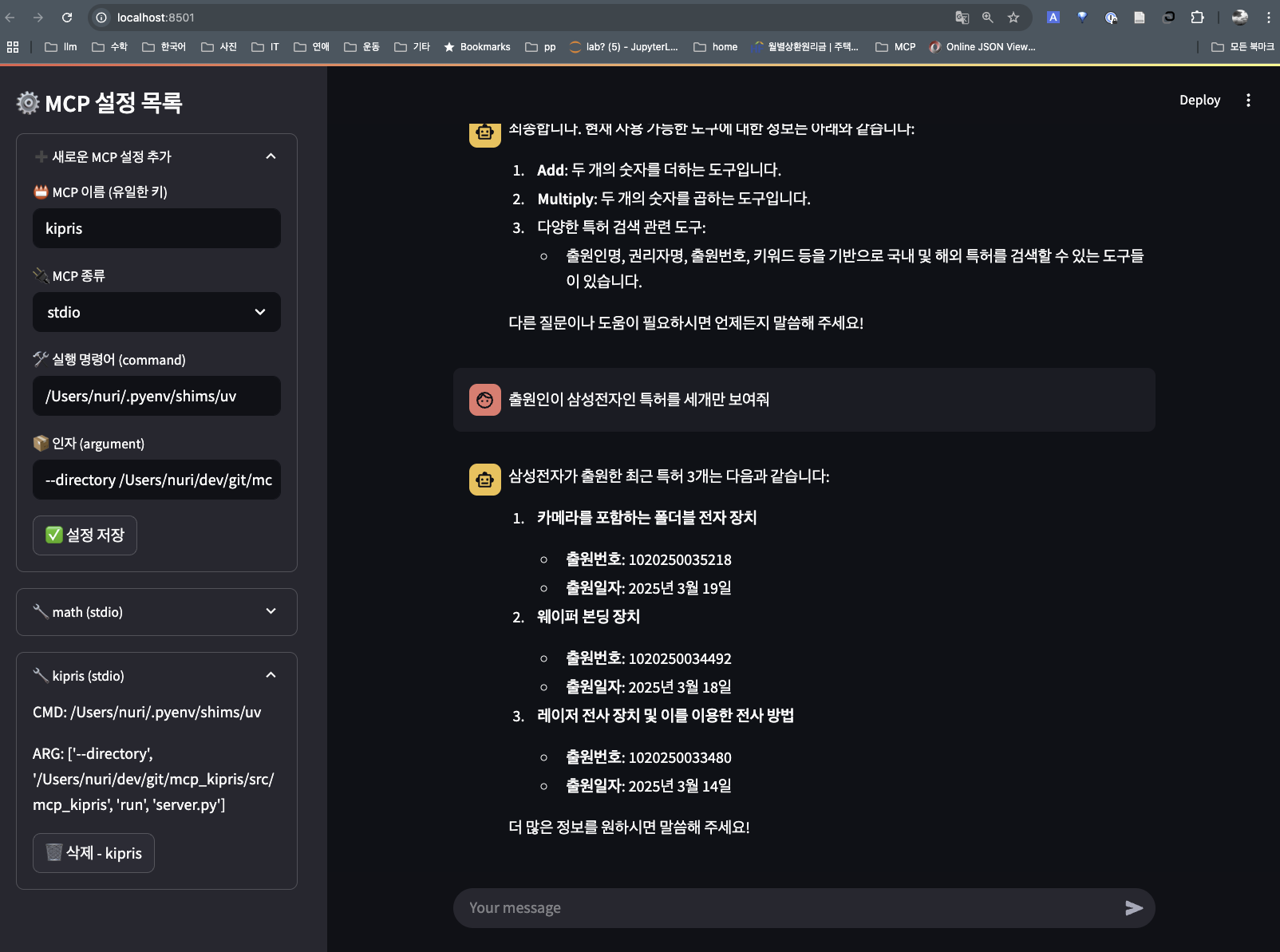
기본 화면 구조
상세 기능
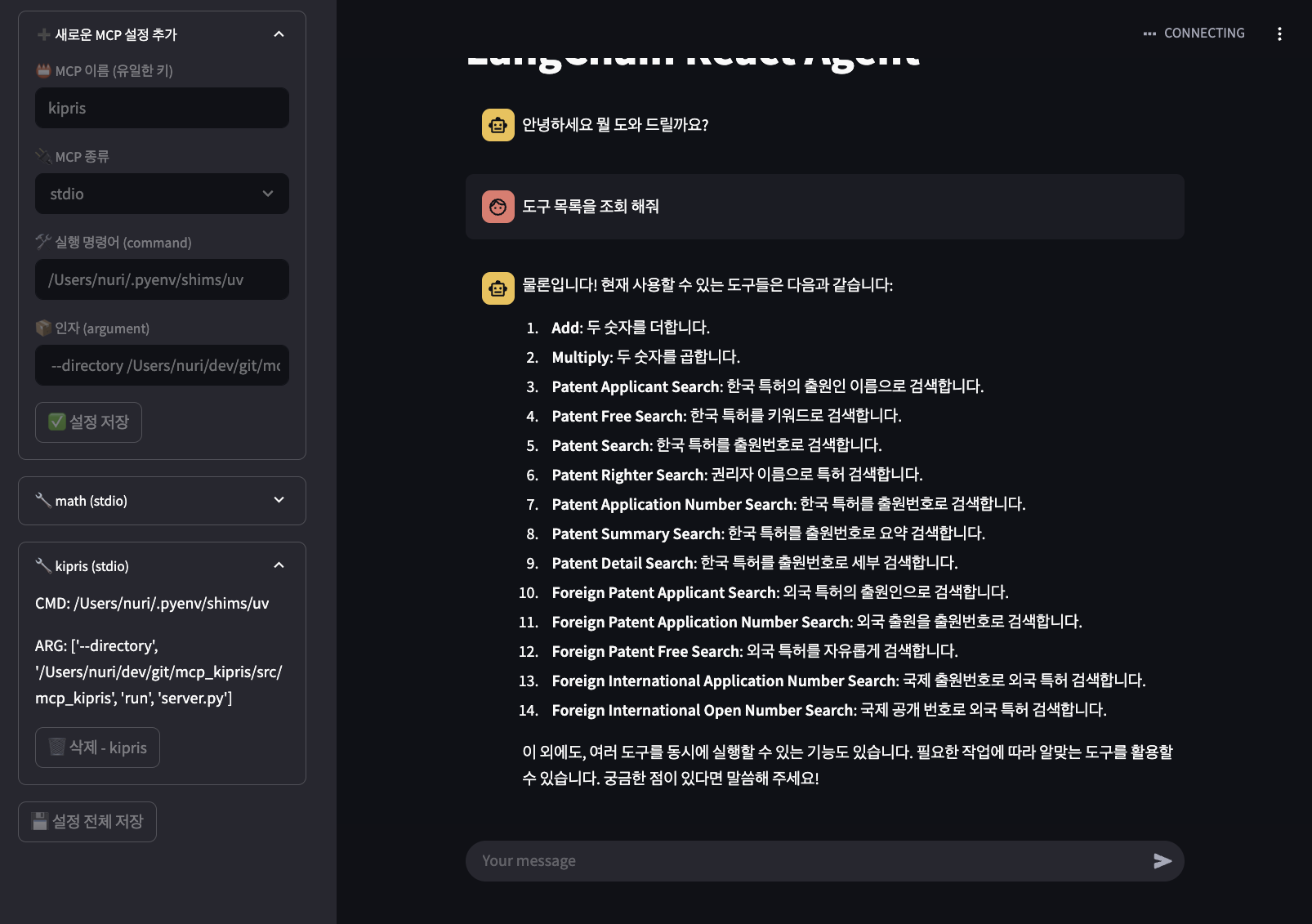
사용중인 도구 조회 화면
기술 스택
- Python
- Streamlit
- LangChain
- LangGraph
- MCP Protocol
설치 방법
- 가상환경 생성 및 활성화
python -m venv .venv
source .venv/bin/activate  # Linux/Mac
# or
.venv\Scripts\activate  # Windows
- 필요한 패키지 설치
pip install -r requirements.txt
실행 방법
streamlit run main.py
프로젝트 구조
streamlit_mcp_client/
├── main.py                # 메인 Streamlit 애플리케이션
├── src/                   # 소스 코드
│   └── api/              # API 관련 모듈
│       ├── graph.py      # LangGraph 기반 React Agent 구현
│       └── math_server.py # 수학 서버 통신
├── config/               # 설정 파일 디렉토리
│   └── mcp_config.json   # MCP 서버 연결 및 프로토콜 설정
├── assets/               # 이미지 등 정적 파일
│   ├── demo1.png         # 메인 화면 스크린샷
│   └── demo2.png         # 상세 기능 스크린샷
├── .streamlit/           # Streamlit 설정
│   └── secrets.toml      # 시크릿 설정
├── pyproject.toml        # 프로젝트 설정
├── .env                  # 환경 변수
└── README.md            # 프로젝트 문서
설정
MCP 설정
MCP 서버 연결 및 프로토콜 관련 설정은 config/mcp_config.json 파일에서 관리됩니다. 이 파일에서 서버 주소, 포트, 통신 프로토콜 등의 설정을 변경할 수 있습니다.
향후 작업 계획
현재 개발 중인 기능들과 향후 구현 예정인 작업들입니다:
-
서버 통신 테스트
- SSE(Server-Sent Events) 기반 실시간 통신 테스트
- Node.js 기반 서버와의 통신 테스트
-
코드 최적화
- 전반적인 코드 구조 개선
- 성능 최적화
- 테스트 코드 작성
-
구조 변경
- 프로젝트 구조 리팩토링
- 모듈 구조 개선
참고 링크
- OpenMCP - MCP 프로토콜 참조
- LangChain - LLM 애플리케이션 프레임워크
- LangGraph - LangChain 기반 그래프 오케스트레이션
- mcp kipris - 제가 만든 plus.kipris.or.kr API MCP Server
라이선스
MIT License
기여 방법
- 이 저장소를 Fork 합니다.
- 새로운 Feature 브랜치를 생성합니다.
- 변경사항을 Commit 합니다.
- 브랜치에 Push 합니다.
- Pull Request를 생성합니다.
Dev Tools Supporting MCP
The following are the main code editors that support the Model Context Protocol. Click the link to visit the official website for more information.







