
Supabase Mcp Client
What is Supabase Mcp Client
The supabase-mcp-client is a React application built with NextJS that integrates Supabase MCP tools and UI components using Tambo, allowing for conversational interactions with Supabase services.
Use cases
Use cases include building customer support chatbots, interactive data querying interfaces, and applications that require real-time user interactions with a backend powered by Supabase.
How to use
To use supabase-mcp-client, install the necessary packages with ‘npm install’, configure your environment variables in a ‘.env.local’ file, and run the application locally with ‘npm run dev’. Access the app at ‘localhost:3000’.
Key features
Key features include the ability to register React components as UI tools, fetch tool definitions from a local Supabase MCP server, and facilitate conversational interactions through a chat interface.
Where to use
supabase-mcp-client can be used in web applications that require dynamic interactions with Supabase services, particularly in scenarios involving chatbots or conversational UIs.
Clients Supporting MCP
The following are the main client software that supports the Model Context Protocol. Click the link to visit the official website for more information.





Overview
What is Supabase Mcp Client
The supabase-mcp-client is a React application built with NextJS that integrates Supabase MCP tools and UI components using Tambo, allowing for conversational interactions with Supabase services.
Use cases
Use cases include building customer support chatbots, interactive data querying interfaces, and applications that require real-time user interactions with a backend powered by Supabase.
How to use
To use supabase-mcp-client, install the necessary packages with ‘npm install’, configure your environment variables in a ‘.env.local’ file, and run the application locally with ‘npm run dev’. Access the app at ‘localhost:3000’.
Key features
Key features include the ability to register React components as UI tools, fetch tool definitions from a local Supabase MCP server, and facilitate conversational interactions through a chat interface.
Where to use
supabase-mcp-client can be used in web applications that require dynamic interactions with Supabase services, particularly in scenarios involving chatbots or conversational UIs.
Clients Supporting MCP
The following are the main client software that supports the Model Context Protocol. Click the link to visit the official website for more information.
Content
Supabase MCP Client React App
Conversationally use Supabase!
A NextJS app showing how Supabase MCP tools and UI tools can be added to a React app using Tambo.
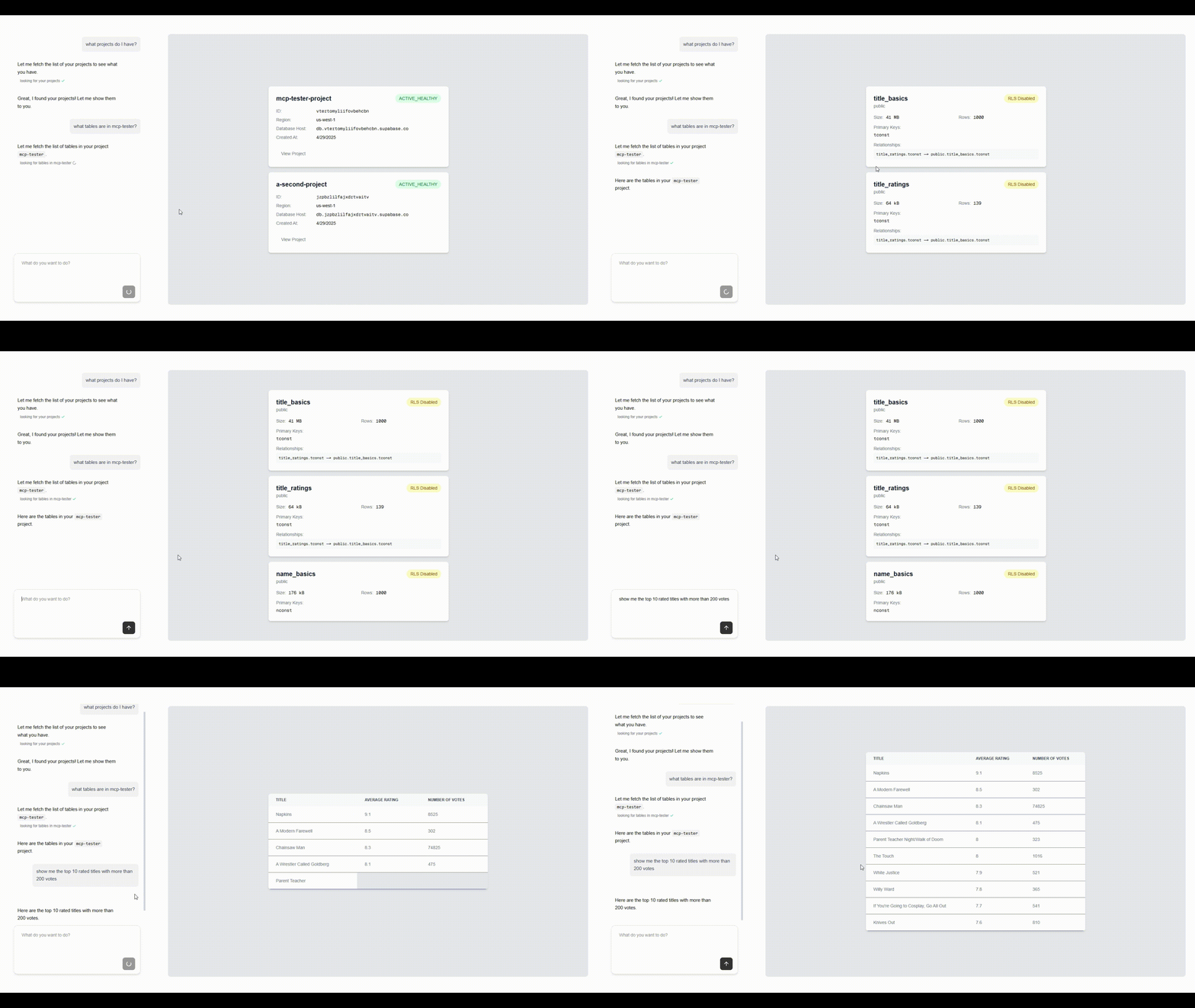
Tambo is a tool that lets you define and register your React components as UI tools that an LLM can use.
Supabase MCP is an MCP server that provides tool definitions for interacting with Supabase that an LLM can use.
How it works
- On startup a local Supabase MCP server is started.
- The app fetches its tool definitions and registers the tools with Tambo.
- The app registers components as “UI tools” with Tambo (see
src/lib/tambo.ts). - When a message is submitted in the chat, it, along with the combined list of tools and components, is sent to Tambo to decide which tools to call and what text or UI to display.
To tell Tambo where to find the MCP server, we simply list the URL in src/app/layout.tsx:
  <TamboMcpProvider
    mcpServers={[
      `http://localhost:${process.env.NEXT_PUBLIC_SERVER_PORT}/sse`,
    ]}
  >
Run locally and connect to your Supabase
-
npm install -
Rename
example.env.localto.env.localand add your keys:
-
SUPABASE_ACCESS_TOKEN: Your Supabase personal access token. You can generate one for your Supabase account here: https://supabase.com/dashboard/account/tokens -
NEXT_PUBLIC_TAMBO_API_KEY: Your Tambo API key. You can get a tambo API key for free here, or by runningnpx tambo init
Your .env.local file should look like this:
NEXT_PUBLIC_TAMBO_API_KEY=<your tambo api key>
SUPABASE_ACCESS_TOKEN=<your Supabase personal access token>
NEXT_PUBLIC_SERVER_PORT=<your port>
- Run
npm run devand go tolocalhost:3000to use the app!
Customizing
Add MCP servers
To add MCP servers, you can add more URLs to the mcpServers array in src/app/layout.tsx. Tambo will automatically fetch and use the tool definitions from the MCP servers.
<TamboMcpProvider
  mcpServers={[
    `http://localhost:${process.env.NEXT_PUBLIC_SERVER_PORT}/sse`,
    "another-mcp-server-url",
  ]}
>
Change what components Tambo can use
The components or “UI tools” that Tambo can use are registered in src/lib/tambo.ts.
For example, see how the supabaseProjectList component is registered with tambo:
const components: TamboComponent[] = [
  {
    name: "supabaseProjectList",
    description:
      "A component that displays a list of Supabase projects with their details. Use this when displaying a list of projects.",
    component: ProjectList,
    propsSchema: z.object({
      projects: z
        .array(
          z.object({
            name: z.string().describe("The name of the project"),
            id: z.string().describe("The project ID"),
            region: z
              .string()
              .describe("The region where the project is hosted"),
            status: z.string().describe("The current status of the project"),
            databaseHost: z.string().describe("The database host URL"),
            createdAt: z.string().describe("The creation date of the project"),
          })
        )
        .describe("Array of projects to display"),
    }),
  },
  //...
];
Note that the component field in the definition is a reference to the actual React component.
This list is passed to the TamboProvider component in src/app/layout.tsx:
<TamboProvider
  apiKey={process.env.NEXT_PUBLIC_TAMBO_API_KEY!}
  components={components}
>
  {children}
</TamboProvider>
Update the components array with any component(s) you want Tambo to be able to use in a response.
You can find more information about the component registration options here.
Limit the number of rows returned by execute_sql
The number of rows returned by a query affects how long the table component takes to generate. The default row limit returned by a query in a Supabase project is 1000, but you can change the Max rows setting in your Supabase dashboard under Project Settings under Data API.
Dev Tools Supporting MCP
The following are the main code editors that support the Model Context Protocol. Click the link to visit the official website for more information.







