
Tabby Mcp Server
What is Tabby Mcp Server
Tabby-MCP-Server is a powerful plugin that implements the Model Context Protocol (MCP) for AI terminal control and automation.
Use cases
Use cases include automating command execution, managing SSH sessions with AI assistance, and retrieving terminal output for analysis or logging.
How to use
To use Tabby-MCP-Server, clone the repository, build the Docker image, and run the container. Follow the installation instructions provided in the README.
Key features
Key features include AI connection for seamless integration with terminal, built-in MCP server, terminal control for executing commands, session management for SSH sessions, command abort functionality, and flexible buffer access.
Where to use
Tabby-MCP-Server can be used in various fields such as software development, system administration, and automation tasks where AI can enhance terminal interactions.
Clients Supporting MCP
The following are the main client software that supports the Model Context Protocol. Click the link to visit the official website for more information.





Overview
What is Tabby Mcp Server
Tabby-MCP-Server is a powerful plugin that implements the Model Context Protocol (MCP) for AI terminal control and automation.
Use cases
Use cases include automating command execution, managing SSH sessions with AI assistance, and retrieving terminal output for analysis or logging.
How to use
To use Tabby-MCP-Server, clone the repository, build the Docker image, and run the container. Follow the installation instructions provided in the README.
Key features
Key features include AI connection for seamless integration with terminal, built-in MCP server, terminal control for executing commands, session management for SSH sessions, command abort functionality, and flexible buffer access.
Where to use
Tabby-MCP-Server can be used in various fields such as software development, system administration, and automation tasks where AI can enhance terminal interactions.
Clients Supporting MCP
The following are the main client software that supports the Model Context Protocol. Click the link to visit the official website for more information.
Content
🚀 Tabby-MCP-Server


Powerful Tabby plugin that implements Model Context Protocol (MCP) server, enabling AI-powered terminal control and automation.

📹 Video Demo
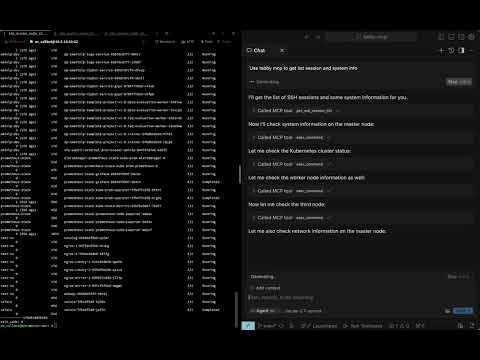
Watch the full video demonstration of Tabby-MCP in action:
✨ Features
- 🤖 AI Connection: Seamlessly connect AI assistants to your terminal
- 🔌 MCP Server: Built-in Model Context Protocol server implementation
- 🖥️ Terminal Control: Allow AI to execute commands and read terminal output
- 🔍 Session Management: View and manage SSH sessions
- 🚫 Command Abort: Safely abort running commands
- 📋 Buffer Access: Retrieve terminal buffer content with flexible options
📋 Table of Contents
🔧 Installation
Using Docker
You can build and install the plugin using Docker with the following command:
git clone https://github.com/thuanpham582002/tabby-mcp-server.git
cd tabby-mcp-server
# Build the Docker image
docker build -t tabby-mcp . && docker run -v $(pwd)/build:/output tabby-mcp
bash scripts/copy_to_plugin_folder.sh
This command builds a Docker image tagged as ‘tabby-mcp’ and runs a container from this image, mounting your local ‘build’ directory to ‘/output’ in the container. The script scripts/copy_to_plugin_folder.sh will copy the built files to the Tabby plugin folder.
Note: Our CI/CD workflows on GitHub also use this Docker-based build process to ensure consistency between local development and production releases.
🚀 Quick Start
- Install the plugin
- Configure your Tabby environment
- Connect to MCP server from any of the supported clients listed at https://modelcontextprotocol.io/clients
💻 Usage Examples
Connect an AI to Control Your Terminal
Retrieve SSH Session List
⚙️ Configuration
Configure the MCP server through the Tabby settings:
MCP Client Configuration
When connecting to the Tabby MCP server from an AI client (like Claude, GPT, etc.), use the following configuration:
{
  "mcpServers": {
    "Tabby MCP": {
      "url": "http://localhost:3001/sse"
    }
  }
}
You may need to adjust the url parameter if you’ve configured a different host or port in your server settings.
📚 API Reference
Available Tools
| Tool | Description | Parameters |
|---|---|---|
getSshSessionList |
Get list of SSH sessions | None |
execCommand |
Execute a command in terminal | command, tabId |
getTerminalBuffer |
Get terminal content | tabId, startLine, endLine |
abortCommand |
Abort a running command | None |
🤝 Contributing
Contributions are welcome! Here’s how you can help:
- Fork the repository
- Create a feature branch (
git checkout -b feature/amazing-feature) - Commit your changes (
git commit -m 'Add amazing feature') - Push to the branch (
git push origin feature/amazing-feature) - Open a Pull Request
See the contributing guidelines for more details.
Continuous Integration
Our project uses GitHub Actions for CI/CD with Docker-based builds:
- Pull Requests: Automatically built and tested using Docker to ensure compatibility
- Main Branch: Builds with Docker, publishes to npm, and creates GitHub releases
- Benefits: Consistent environment across development, testing, and production
To set up the CI/CD pipeline in your fork:
-
Configure the required secrets in your repository settings:
NPM_TOKEN: Your npm access token for publishingGITHUB_TOKEN: Automatically provided by GitHub Actions
-
The workflows will automatically run on push and pull request events.
📝 License
This project is licensed under the MIT License - see the LICENSE file for details.
Made with ❤️ by Pham Tien Thuan
Dev Tools Supporting MCP
The following are the main code editors that support the Model Context Protocol. Click the link to visit the official website for more information.







