
Task Manager Mcp
What is Task Manager Mcp
task-manager-mcp is a terminal-based task tracking application designed to help users manage tasks and project plans through a three-pane user interface.
Use cases
Use cases for task-manager-mcp include managing software development tasks, tracking project milestones, organizing personal to-do lists, and facilitating team collaboration on projects.
How to use
To use task-manager-mcp, clone the repository, install dependencies, and start the terminal UI with the command ‘python -m main.py’. Users can navigate using key bindings or utilize the command-line interface for scripting.
Key features
Key features include a three-pane terminal UI for task lists, task details, and project plans; task management capabilities (create, view, edit, delete tasks); project plan management; a complete API for programmatic access; and data persistence.
Where to use
task-manager-mcp can be used in various fields including software development, project management, personal productivity, and any environment where task tracking is essential.
Clients Supporting MCP
The following are the main client software that supports the Model Context Protocol. Click the link to visit the official website for more information.





Overview
What is Task Manager Mcp
task-manager-mcp is a terminal-based task tracking application designed to help users manage tasks and project plans through a three-pane user interface.
Use cases
Use cases for task-manager-mcp include managing software development tasks, tracking project milestones, organizing personal to-do lists, and facilitating team collaboration on projects.
How to use
To use task-manager-mcp, clone the repository, install dependencies, and start the terminal UI with the command ‘python -m main.py’. Users can navigate using key bindings or utilize the command-line interface for scripting.
Key features
Key features include a three-pane terminal UI for task lists, task details, and project plans; task management capabilities (create, view, edit, delete tasks); project plan management; a complete API for programmatic access; and data persistence.
Where to use
task-manager-mcp can be used in various fields including software development, project management, personal productivity, and any environment where task tracking is essential.
Clients Supporting MCP
The following are the main client software that supports the Model Context Protocol. Click the link to visit the official website for more information.
Content
Terminal Task Tracker
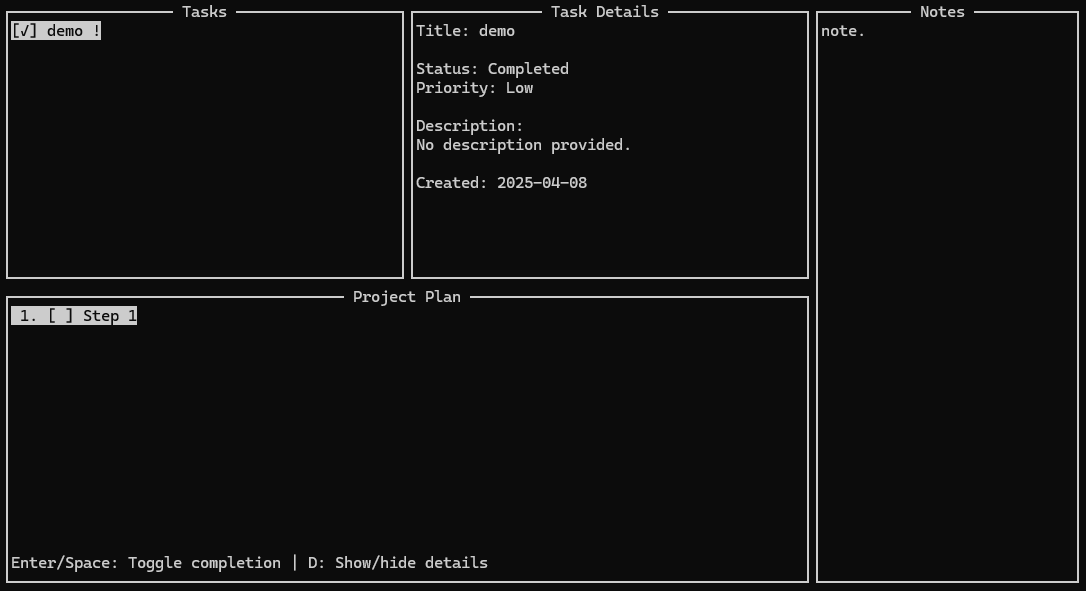
A terminal-based task tracking application with a three-pane layout for managing tasks and project plans.
Image
Features
- Three-pane terminal UI:
- Task list (top left)
- Task details (top right)
- Project plan (bottom, full width)
- Task management:
- Create, view, edit, and delete tasks
- Set priorities and status
- Add detailed descriptions
- Project plan management:
- Define high-level project steps
- Track step completion
- Reorder steps
- Complete API for programmatic access
- Command-line interface for scripting
- Data persistence
Installation
# Clone the repository
git clone https://github.com/yourusername/terminal-task-tracker.git
cd terminal-task-tracker

# Install dependencies
pip install -e .
Usage
Terminal UI
To start the terminal UI:
python -m main.py
Key bindings:
Tab: Cycle between windowsUp/Down: Navigate listsEnter: Select task (in task list)n: New item (in task list or plan)e: Edit itemd: Delete itemSpace: Toggle completion (in plan)Esc: Exit
Command-line Interface
The CLI provides access to all functionality:
# List all tasks
python -m app.api.cli task list

# Add a new task
python -m app.api.cli task add "Implement feature X" --description "Details about feature X" --priority 2

# Mark a plan step as completed
python -m app.api.cli plan toggle STEP_ID

# Export data to JSON
python -m app.api.cli export data.json
API Usage
from app.core.task_manager import TaskManager
from app.core.plan_manager import PlanManager
from app.api.api import TaskTrackerAPI

# Initialize managers
task_manager = TaskManager("tasks.json")
plan_manager = PlanManager("plan.json")

# Create API
api = TaskTrackerAPI(task_manager, plan_manager)

# Add a task
task = api.add_task("Implement feature X", "Details about feature X", priority=2)

# Add a plan step
step = api.add_plan_step("Design architecture for shared operations module")

# Mark step as completed
api.toggle_plan_step(step["id"])

# Save data
api.save_all()
Project Structure
terminal-task-tracker/
├── app/
│   ├── __init__.py
│   ├── core/               # Business logic
│   │   ├── __init__.py
│   │   ├── task_manager.py
│   │   └── plan_manager.py
│   ├── ui/                 # Terminal UI
│   │   ├── __init__.py
│   │   ├── terminal_ui.py
│   │   ├── ui_components.py
│   │   └── input_handler.py
│   └── api/                # API and CLI
│       ├── __init__.py
│       ├── api.py
│       └── cli.py
├── main.py                 # Main application entry point
└── README.md
Data Storage
By default, data is stored in the ~/.tasktracker directory:
tasks.json: Tasks dataplan.json: Project plan datanotes.json: Notes data
License
MIT
Dev Tools Supporting MCP
The following are the main code editors that support the Model Context Protocol. Click the link to visit the official website for more information.







