
Telegram Bot Mcp
What is Telegram Bot Mcp
telegram-bot-mcp is a Multi-purpose Computing Platform (MCP) designed for interacting with the Telegram Bot API. It enables users to send and receive messages, media, and manage bot functionalities seamlessly.
Use cases
Use cases include automating responses in customer service chats, sending notifications or alerts to users, conducting polls or surveys, and managing media content distribution through Telegram.
How to use
To use telegram-bot-mcp, clone the repository from GitHub, set up a virtual environment, and install the necessary dependencies. After that, configure your MCP settings with your bot token and run the server.
Key features
Key features include sending text messages, sending media content (photos, documents, videos, audio), creating and sending polls, retrieving bot information, receiving updates from users, and deleting messages.
Where to use
telegram-bot-mcp can be used in various fields such as customer support automation, interactive chatbots, social media management, and any application that requires real-time communication through Telegram.
Clients Supporting MCP
The following are the main client software that supports the Model Context Protocol. Click the link to visit the official website for more information.





Overview
What is Telegram Bot Mcp
telegram-bot-mcp is a Multi-purpose Computing Platform (MCP) designed for interacting with the Telegram Bot API. It enables users to send and receive messages, media, and manage bot functionalities seamlessly.
Use cases
Use cases include automating responses in customer service chats, sending notifications or alerts to users, conducting polls or surveys, and managing media content distribution through Telegram.
How to use
To use telegram-bot-mcp, clone the repository from GitHub, set up a virtual environment, and install the necessary dependencies. After that, configure your MCP settings with your bot token and run the server.
Key features
Key features include sending text messages, sending media content (photos, documents, videos, audio), creating and sending polls, retrieving bot information, receiving updates from users, and deleting messages.
Where to use
telegram-bot-mcp can be used in various fields such as customer support automation, interactive chatbots, social media management, and any application that requires real-time communication through Telegram.
Clients Supporting MCP
The following are the main client software that supports the Model Context Protocol. Click the link to visit the official website for more information.
Content
Telegram Bot MCP
MCP (Multi-purpose Computing Platform) for working with Telegram Bot API. Provides functions for sending and receiving messages through Telegram bot.
Features
- Send text messages to chats
- Send media content (photos, documents, videos, audio)
- Create and send polls
- Get bot information
- Get updates (messages, events) from users
- Delete messages
Installation
git clone https://github.com/coderroleggg/telegram-bot-mcp
cd telegram-bot-mcp
uv venv
source .venv/bin/activate
uv pip install -e .
Connecting to Claude Desktop, Cursor
Add the telegram-bot block to your mcp.json or claude_desktop_config.json or completely replace the file content with:
Available Functions
sendMessage- send text messagesendPhoto- send photodeleteMessage- delete messagegetMe- get bot informationgetUpdates- get new messages and events
Usage Examples
Sending a Message
response = mcp.call("sendMessage", {"chatId": "12345678", "text": "Hello, world!"})
print(response)
Getting Updates
updates = mcp.call("getUpdates", {})
for update in updates["updates"]:
    print(update)
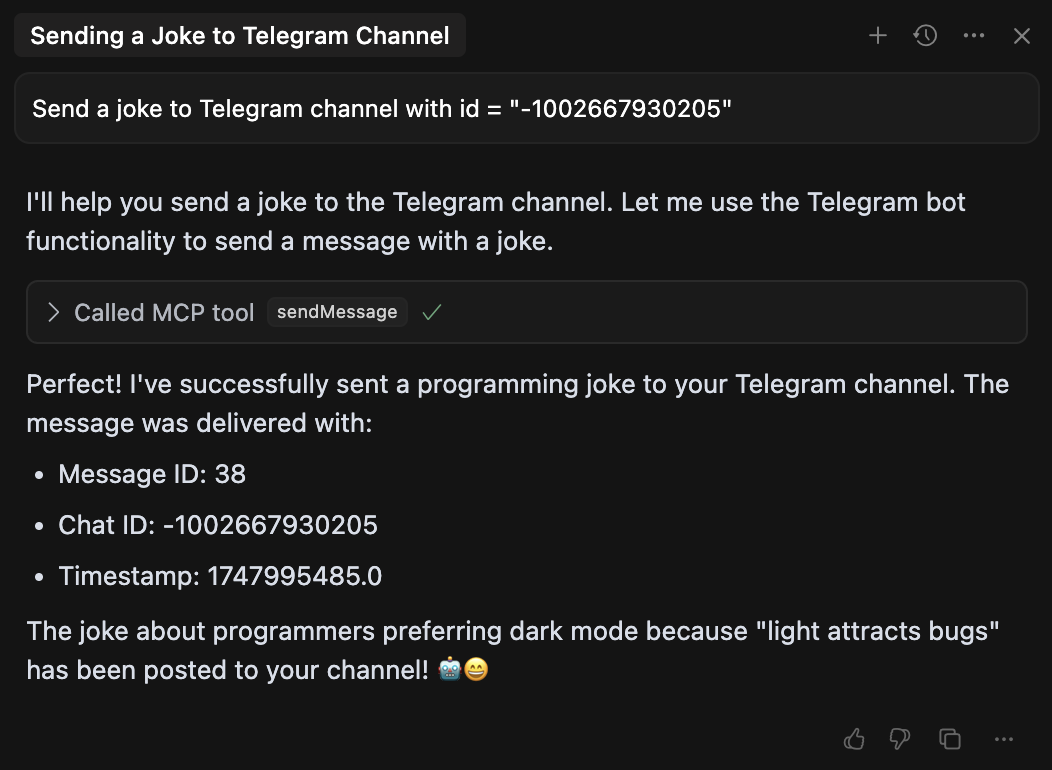
Example Usage in Cursor
Here’s how to use the Telegram Bot MCP in Cursor:
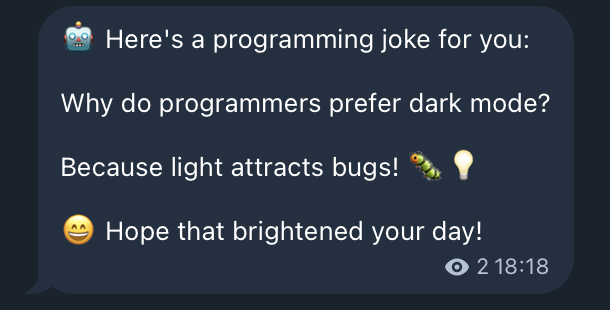
Result Message
Example of a message sent through the bot:
License
MIT
API Tools
initialize
Initializes configuration for Telegram Bot MCP.
Parameters:
token: Your Telegram bot token obtained from @BotFather
sendMessage
Sends a text message to the specified chat.
Parameters:
chatId: Chat ID where to send the message (string or number)text: Message text to send
sendPhoto
Sends a photo to the specified chat.
Parameters:
chatId: Chat ID where to send the photo (string or number)photoUrl: Photo URL or path to local filecaption: Photo caption (optional)
sendDocument
Sends a document to the specified chat.
Parameters:
chatId: Chat ID where to send the document (string or number)documentUrl: Document URL or path to local filecaption: Document caption (optional)filename: File name (optional)
sendVideo
Sends a video to the specified chat.
Parameters:
chatId: Chat ID where to send the video (string or number)videoUrl: Video URL or path to local filecaption: Video caption (optional)duration: Video duration in seconds (optional)width: Video width (optional)height: Video height (optional)
sendAudio
Sends audio to the specified chat.
Parameters:
chatId: Chat ID where to send the audio (string or number)audioUrl: Audio URL or path to local filecaption: Audio caption (optional)duration: Audio duration in seconds (optional)performer: Performer (optional)title: Track title (optional)
sendPoll
Sends a poll message to the specified chat.
Parameters:
chatId: Chat ID where to send the poll (string or number)question: Poll questionoptions: List of answer options (strings)isAnonymous: Whether the poll is anonymous (optional, default True)allowsMultipleAnswers: Whether multiple answers are allowed (optional, default False)
getMe
Gets information about the bot.
Parameters: none
getUpdates
Gets updates (messages, events) from Telegram Bot API.
Parameters:
offset: ID of the first update to return (optional)limit: Maximum number of updates to return (optional, default 100)timeout: Timeout in seconds (optional, default 0)
deleteMessage
Deletes a message from the chat.
Parameters:
chatId: Chat ID from which to delete the message (string or number)messageId: Message ID to delete (number)
How to Get chatId?
To get a chat or user ID, there are several ways:
-
Use the
getUpdatestool and find the needed ID after sending a message to your bot -
Use a bot like @userinfobot: send it a message, and it will return your ID
-
For group chats: add your bot to the group, send a message and use
getUpdatesto find the group ID -
For channels:
- First, add your bot as an administrator to the channel with permission to send messages
- Forward any message from the channel to @userdatailsbot
- The bot will return the channel ID (it will be negative and start with -100)
- Use this ID as
chatIdwhen sending messages to the channel
Limitations
- Bot cannot start a conversation with a user first, the user must send a message to the bot first
- Bot can only send messages to chats where it is present
- Some file formats may be restricted by Telegram
- When sending local files, they must be accessible to the process in which MCP is running
Additional Information
For more information about Telegram Bot API:
Dev Tools Supporting MCP
The following are the main code editors that support the Model Context Protocol. Click the link to visit the official website for more information.







