
Temporal Durable Mcp Weather Sample
What is Temporal Durable Mcp Weather Sample
temporal-durable-mcp-weather-sample is a repository designed to demonstrate the ease of using workflows as tools for MCP servers by implementing Temporal workflows to enhance the durability of the weather example from modelcontext.io.
Use cases
Use cases include querying weather alerts, obtaining forecasts for specific cities, and leveraging the MCP server tools for enhanced weather data management.
How to use
To use temporal-durable-mcp-weather-sample, clone the repository, set up a virtual environment, install dependencies, start the Temporal server and worker, and configure Claude for Desktop to interact with the weather tools.
Key features
Key features include the implementation of Temporal workflows for durability, integration with Claude for Desktop, and the ability to retrieve weather alerts and forecasts through MCP server commands.
Where to use
This repository can be used in fields such as weather forecasting, data analysis, and any application requiring durable workflows for managing weather-related data.
Clients Supporting MCP
The following are the main client software that supports the Model Context Protocol. Click the link to visit the official website for more information.





Overview
What is Temporal Durable Mcp Weather Sample
temporal-durable-mcp-weather-sample is a repository designed to demonstrate the ease of using workflows as tools for MCP servers by implementing Temporal workflows to enhance the durability of the weather example from modelcontext.io.
Use cases
Use cases include querying weather alerts, obtaining forecasts for specific cities, and leveraging the MCP server tools for enhanced weather data management.
How to use
To use temporal-durable-mcp-weather-sample, clone the repository, set up a virtual environment, install dependencies, start the Temporal server and worker, and configure Claude for Desktop to interact with the weather tools.
Key features
Key features include the implementation of Temporal workflows for durability, integration with Claude for Desktop, and the ability to retrieve weather alerts and forecasts through MCP server commands.
Where to use
This repository can be used in fields such as weather forecasting, data analysis, and any application requiring durable workflows for managing weather-related data.
Clients Supporting MCP
The following are the main client software that supports the Model Context Protocol. Click the link to visit the official website for more information.
Content
Temporal & Durable MCP
The purpose of this repo is to demonstrate how easy it is to leverage workflows as tools for MCP servers by taking modelcontext.io’s weather example and making it durable by implementing the MCP tools as Temporal workflows
Prerequisites:
- Python3+
uv(curl -LsSf https://astral.sh/uv/install.sh | sh)- Temporal Local Setup Guide
- Claude for Desktop
Getting Started
- First step - clone me
cd temporal-durable-mcp-weather-sampleuv venv(create virtual env)source .venv/bin/activateuv pip install pyproject.toml- Start Temporal Server:
temporal server start-dev - Start Worker:
python worker.py - Edit your Claude for Desktop Config:
- Open Claude for Desktop
- Click
Settingsin the toolbar - Click
Developer - Click
Edit Config(this should open up a finder window that points to a file calledclaude_desktop_config.json) - Open the file mentioned above in your editor of choice and modify it to look like the following
-
{
  "mcpServers": {
    "weather": {
      "command": "uv",
      "args": [
        "--directory",
        "/ABSOLUTE/PATH/TO/PARENT/FOLDER/temporal-durable-mcp-weather-sample",
        "run",
        "weather.py"
      ]
    }
  }
}
-
- Validate that the tools exposed by the server (
get_alerts,get_forecast) show up inSearch and Toolsby clicking the slider icon in the chat box of Claude for Desktop
- Ask Claude for any weather alerts and the forecast for a particular city - it should leverage the tools. If it doesn’t, try prompting it again encouraging it to use MCP tools that it has access to.
Results
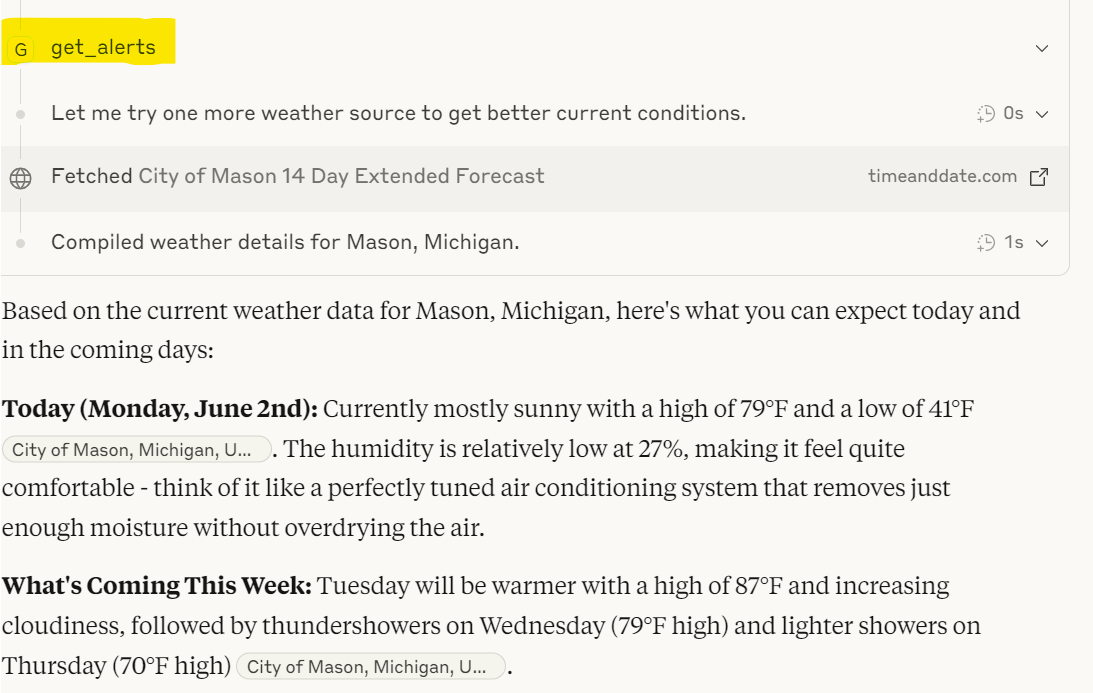
Here we can see Claude is using the tools intelligently to look for weather alerts while getting me weather information:
What’s Cool About This
This demonstrates how tools in MCP can be implemented as workflows, adding durability.
Per Claude:
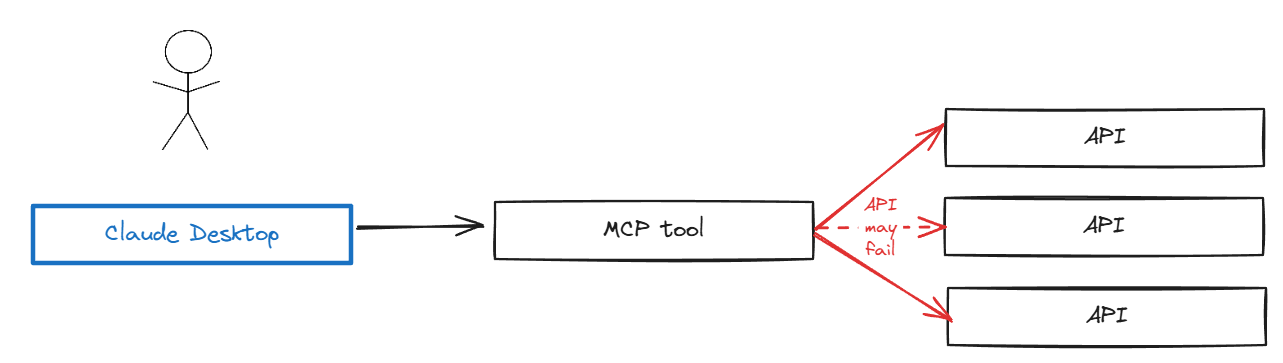
Traditional MCP tool implementations are like having a single phone conversation - if the line cuts out at any point, you lose everything and have to start over from scratch. When an AI agent is performing complex, multi-step operations (like processing a large dataset, coordinating multiple API calls, or handling a lengthy business process), a single failure anywhere in the chain means complete failure.
Temporal workflows act like a detailed journal that remembers exactly where you left off. Think of it as having a conversation with someone who takes meticulous notes - even if you both get interrupted and come back hours later, you can pick up exactly where you left off without missing a beat.
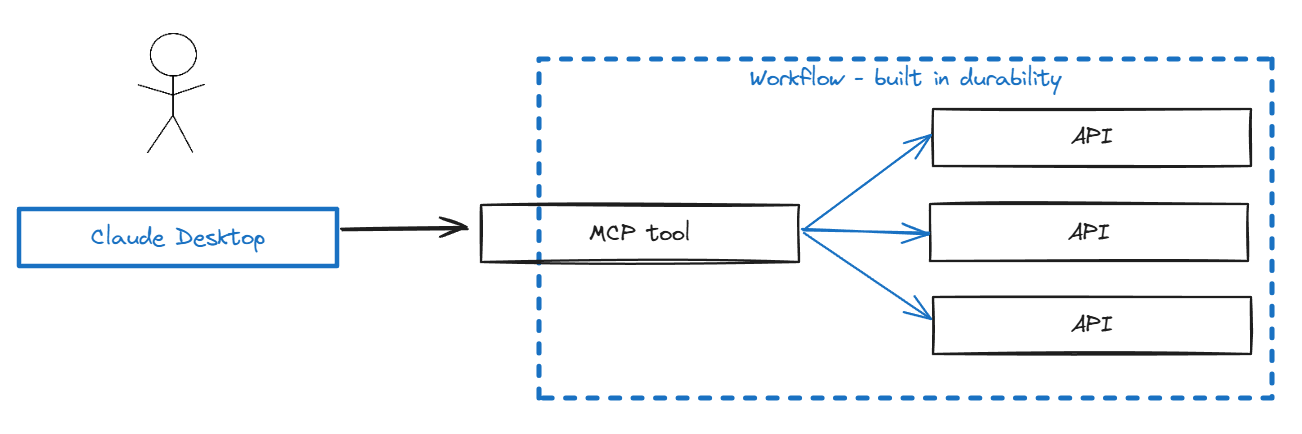
This demonstrates what we’re calling “tools as workflows” - a tool is implemented as a Temporal Workflow, with the benefits of durability, state management, and retries built in.
Dev Tools Supporting MCP
The following are the main code editors that support the Model Context Protocol. Click the link to visit the official website for more information.







