
Teslamate Mcp
What is Teslamate Mcp
teslamate-mcp is a Model Context Protocol (MCP) server that provides access to your TeslaMate database, enabling AI assistants to query Tesla vehicle data and analytics.
Use cases
Use cases for teslamate-mcp include querying driving statistics for performance analysis, monitoring battery health and efficiency, and retrieving location analytics for trip planning.
How to use
To use teslamate-mcp, clone the repository, install dependencies, configure the database connection in a .env file, and run the server using the command ‘uv run python main.py’. After setup, you can use an MCP client to ask natural language queries about your Tesla data.
Key features
Key features of teslamate-mcp include access to Tesla vehicle information, driving statistics, charging data, battery health, efficiency metrics, and location analytics, all through natural language queries.
Where to use
teslamate-mcp is primarily used in the automotive and AI assistant domains, particularly for users of Tesla vehicles who want to analyze their driving and charging data.
Clients Supporting MCP
The following are the main client software that supports the Model Context Protocol. Click the link to visit the official website for more information.





Overview
What is Teslamate Mcp
teslamate-mcp is a Model Context Protocol (MCP) server that provides access to your TeslaMate database, enabling AI assistants to query Tesla vehicle data and analytics.
Use cases
Use cases for teslamate-mcp include querying driving statistics for performance analysis, monitoring battery health and efficiency, and retrieving location analytics for trip planning.
How to use
To use teslamate-mcp, clone the repository, install dependencies, configure the database connection in a .env file, and run the server using the command ‘uv run python main.py’. After setup, you can use an MCP client to ask natural language queries about your Tesla data.
Key features
Key features of teslamate-mcp include access to Tesla vehicle information, driving statistics, charging data, battery health, efficiency metrics, and location analytics, all through natural language queries.
Where to use
teslamate-mcp is primarily used in the automotive and AI assistant domains, particularly for users of Tesla vehicles who want to analyze their driving and charging data.
Clients Supporting MCP
The following are the main client software that supports the Model Context Protocol. Click the link to visit the official website for more information.
Content
TeslaMate MCP Server
A Model Context Protocol (MCP) server that provides access to your TeslaMate database, allowing AI assistants to query Tesla vehicle data and analytics.
Overview
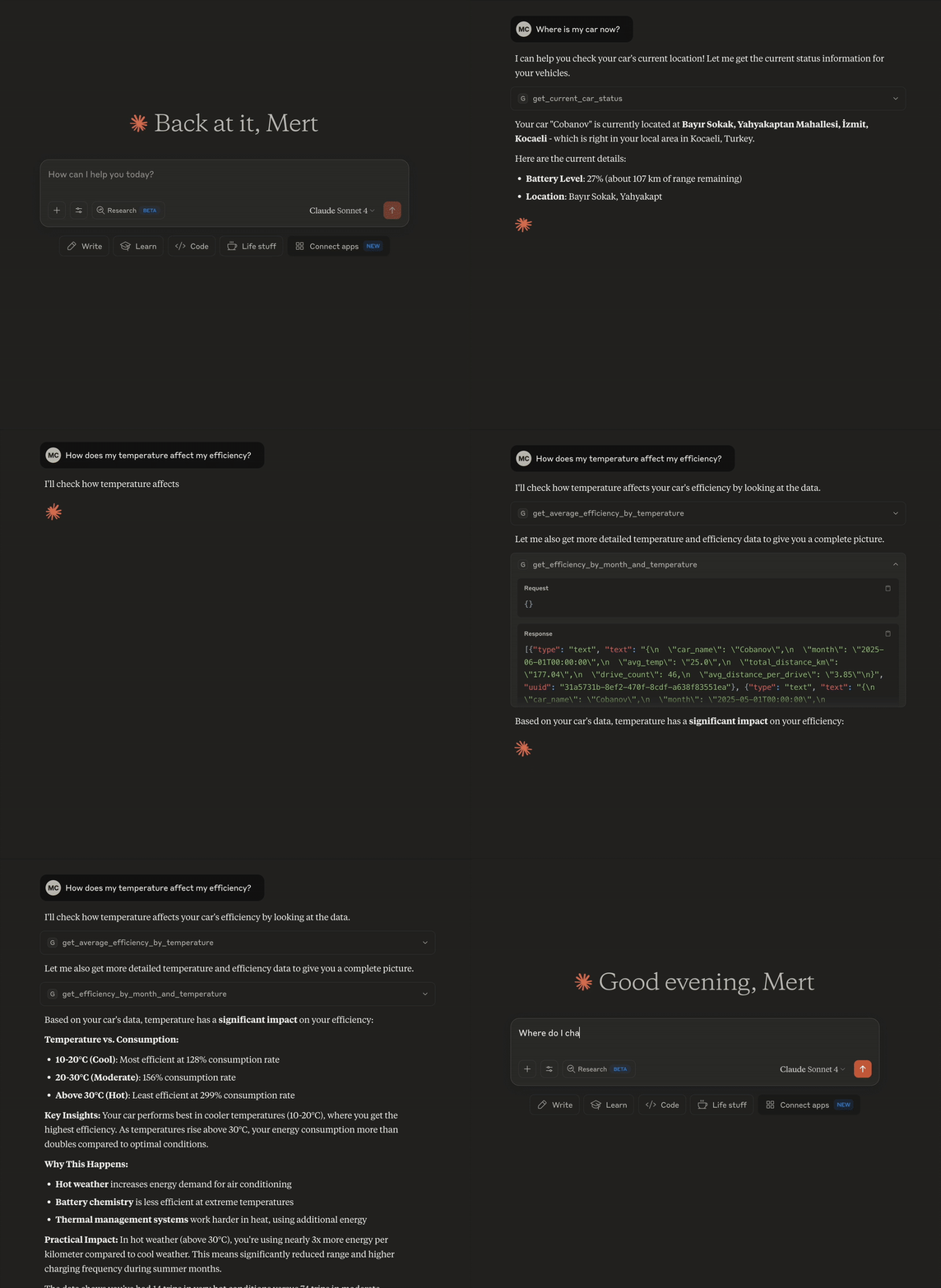
This MCP server connects to your TeslaMate PostgreSQL database and exposes various tools to retrieve Tesla vehicle information, driving statistics, charging data, battery health, efficiency metrics, and location analytics. It’s designed to work with MCP-compatible AI assistants like Claude Desktop, enabling natural language queries about your Tesla data.
Prerequisites
- TeslaMate running with a PostgreSQL database
- Python 3.11 or higher
- Access to your TeslaMate database
Installation
-
Clone this repository:
git clone https://github.com/yourusername/teslamate-mcp.git cd teslamate-mcp -
Install dependencies using uv (recommended):
uv syncOr using pip:
pip install -r requirements.txt -
Create a
.envfile in the project root:DATABASE_URL=postgresql://username:password@hostname:port/teslamate
Configuration
Environment Variables
DATABASE_URL: PostgreSQL connection string for your TeslaMate database
MCP Client Configuration
To use this server with Claude Desktop, add the following to your MCP configuration file:
macOS: ~/Library/Application Support/Claude/claude_desktop_config.json
Windows: %APPDATA%\Claude\claude_desktop_config.json
{
  "mcpServers": {
    "teslamate": {
      "command": "uv",
      "args": [
        "run",
        "python",
        "/path/to/teslamate-mcp/main.py"
      ],
      "env": {
        "DATABASE_URL": "postgresql://username:password@hostname:port/teslamate"
      }
    }
  }
}
Usage
Running the Server
uv run python main.py
Example Queries
Once configured with an MCP client, you can ask natural language questions organized by category:
Basic Vehicle Information
- “What’s my Tesla’s basic information?”
- “Show me my current car status”
- “What software updates has my Tesla received?”
Battery and Health
- “How is my battery health?”
- “Show me battery degradation over time”
- “What are my daily battery usage patterns?”
- “How are my tire pressures trending?”
Driving Analytics
- “Show me my monthly driving summary”
- “What are my daily driving patterns?”
- “What are my longest drives by distance?”
- “What’s my total distance driven and efficiency?”
Efficiency Analysis
- “How does temperature affect my efficiency?”
- “Show me efficiency trends by month and temperature”
- “Are there any unusual power consumption patterns?”
Charging and Location Data
- “Where do I charge most frequently?”
- “Show me all my charging sessions summary”
- “What are my most visited locations?”
Adding New Queries
- Create a new SQL file in the
queries/directory - Add a corresponding tool function in
main.py - Follow the existing pattern for error handling and database connections
License
This project is licensed under the MIT License - see the LICENSE file for details.
Acknowledgments
- TeslaMate - Tesla data logging software
- Model Context Protocol - Protocol for AI-tool integration
For bugs and feature requests, please open an issue on GitHub.
Dev Tools Supporting MCP
The following are the main code editors that support the Model Context Protocol. Click the link to visit the official website for more information.







