
Todo App Plus Mcp
What is Todo App Plus Mcp
todo_app_plus_mcp is a Todo application that features a FastAPI backend, a Flask UI frontend, and a Model Context Protocol (MCP) server, designed for educational purposes.
Use cases
Use cases include managing personal tasks, teaching students about RESTful APIs, and demonstrating the integration of different web technologies.
How to use
To use todo_app_plus_mcp, run the provided bootstrap script ‘start_app.sh’ to start both the API and UI servers. You can also run the API and UI servers manually using ‘uv run’ commands.
Key features
Key features include a simple Todo API with CRUD operations, a user-friendly Flask-based web interface, and interactive API documentation accessible via Swagger UI and ReDoc.
Where to use
todo_app_plus_mcp can be used in educational settings for learning web development, API design, and full-stack application architecture.
Clients Supporting MCP
The following are the main client software that supports the Model Context Protocol. Click the link to visit the official website for more information.





Overview
What is Todo App Plus Mcp
todo_app_plus_mcp is a Todo application that features a FastAPI backend, a Flask UI frontend, and a Model Context Protocol (MCP) server, designed for educational purposes.
Use cases
Use cases include managing personal tasks, teaching students about RESTful APIs, and demonstrating the integration of different web technologies.
How to use
To use todo_app_plus_mcp, run the provided bootstrap script ‘start_app.sh’ to start both the API and UI servers. You can also run the API and UI servers manually using ‘uv run’ commands.
Key features
Key features include a simple Todo API with CRUD operations, a user-friendly Flask-based web interface, and interactive API documentation accessible via Swagger UI and ReDoc.
Where to use
todo_app_plus_mcp can be used in educational settings for learning web development, API design, and full-stack application architecture.
Clients Supporting MCP
The following are the main client software that supports the Model Context Protocol. Click the link to visit the official website for more information.
Content
Todo App Plus MCP
A Todo application with a FastAPI backend, a Flask UI frontend, and a Model Context Protocol (MCP) server.
Project Structure
todo_api/- FastAPI backendtodo_ui/- Flask UI frontendtodo_mcp/- Model Context Protocol servertodo_chat/- Chat interface for interacting with the Todo apptodo_data.sample.json- Sample data that will be used to create todo_data.json on first run
Overview
This project demonstrates how to build a simple Todo application with three different interfaces:
- REST API (FastAPI) - For programmatic access
- Web UI (Flask) - For human interaction via a browser
- MCP Server - For AI assistant interaction

Project Setup
This is an educational application that uses uv for dependency management with all dependencies consolidated in pyproject.toml.
- Install all dependencies using uv:
# Install dependencies from pyproject.toml in development mode
uv pip install -e .
Running the Application
The application consists of four main components that can be run independently or together:
- The Todo API (Backend) - Serves data via REST endpoints
- The Todo UI (Frontend) - Provides a web interface
- The Todo MCP Server - Allows AI assistants to interact with the Todo app
- The Todo Chat CLI - Provides a command-line chat interface for interacting with Todo app via Claude and MCP
Running the Todo API (Backend)
The API is built with FastAPI and needs to be started first as the UI depends on it.
# Start the API server on port 8000
uv run uvicorn todo_api.main:app --reload --port 8000
Once running, the API will be available at:
The API also provides interactive documentation at:
- Swagger UI: http://localhost:8000/docs
- ReDoc: http://localhost:8000/redoc
Running the Todo UI (Frontend)
After starting the API server, run the UI server in a separate terminal:
# Start the UI server on port 8001
uv run python -m todo_ui.app
Once running, the web interface will be available at:
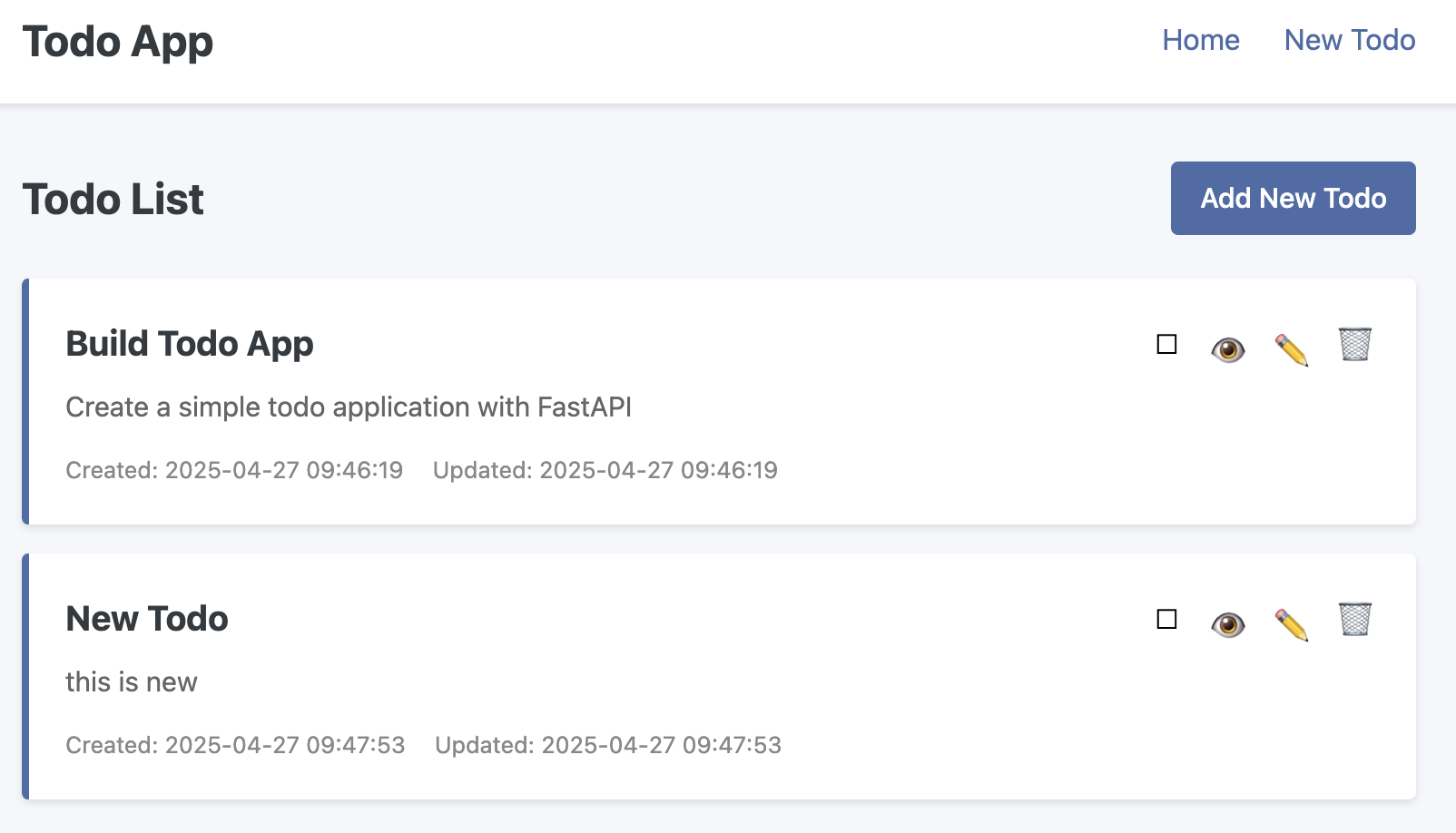
Running the Todo MCP Server
The Model Context Protocol (MCP) server allows AI assistants like Claude to interact with the Todo application by exposing MCP tools and prompts.
# Run the MCP server
uv run python -m todo_mcp.server
Running the Todo Chat CLI
The Chat CLI provides a command-line interface for interacting with Claude AI and the Todo app via MCP.
# Set your Anthropic API key in .env file
echo "ANTHROPIC_API_KEY=your_api_key_here" > .env

# Run the Chat CLI
uv run python -m todo_chat.chat_cli
Data Storage
The application uses a JSON file for data storage:
- On first run, the application will check for the existence of
todo_data.json - If
todo_data.jsondoesn’t exist, it will create one based ontodo_data.sample.json - Your personal todo data is stored in
todo_data.jsonwhich is ignored by Git to prevent accidentally committing personal data
API Endpoints
GET /todos: Get all todosGET /todos/{todo_id}: Get a specific todoPOST /todos: Create a new todoPUT /todos/{todo_id}: Update a todoDELETE /todos/{todo_id}: Delete a todo
Todo Features
Each todo item has the following properties:
- Title: A brief description of the task (required)
- Description: A more detailed explanation (optional)
- Completion Status: Whether the todo is completed
- Due Date: Optional deadline for the todo item
- Created/Updated Timestamps: Automatically tracked
Model Context Protocol (MCP) Server
The MCP server implements the Model Context Protocol, allowing AI assistants like Claude to directly interact with the Todo application.
MCP Tools
The MCP server provides the following tools:
list_todos: List all todos in the systemget_todo: Get a specific todo by IDcreate_todo: Create a new todo item with title, description, completion status, and optional due dateupdate_todo: Update an existing todo item (any field can be selectively updated)delete_todo: Delete a todo item by IDget_todo_stats: Get statistics about todos in the system
MCP Prompts
The MCP server also provides prompts for more complex analysis:
todo_analysis: Analyze the current state of todos and provide insights including overdue items, completion rates, and recommendations
Testing with the MCP Inspector
The easiest way to test your MCP server is using the built-in MCP Inspector tool:
# Start the MCP Inspector
uv run mcp dev todo_mcp/server.py
You can now open http://127.0.0.1:6274 in your browser to access the MCP Inspector.
After clicking the Connect button you will see this
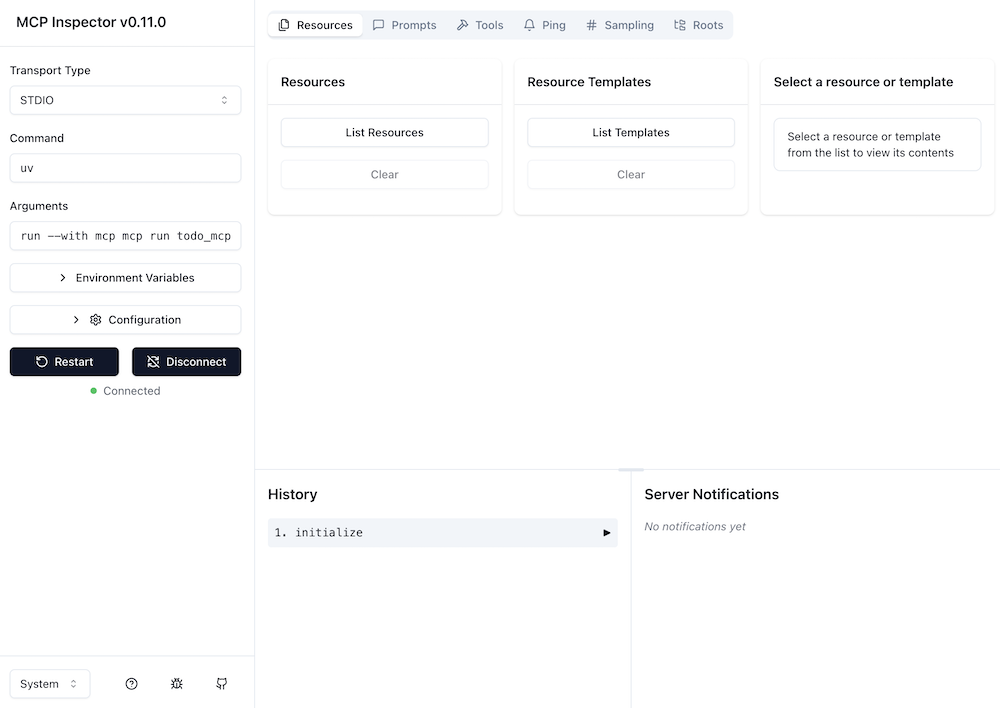
And you can now test the tools and prompts. For example, you can call the list_todos tool to see all todos:
- Click on the Tools tab
- Select the
list_todostool - Click on the Run tool button
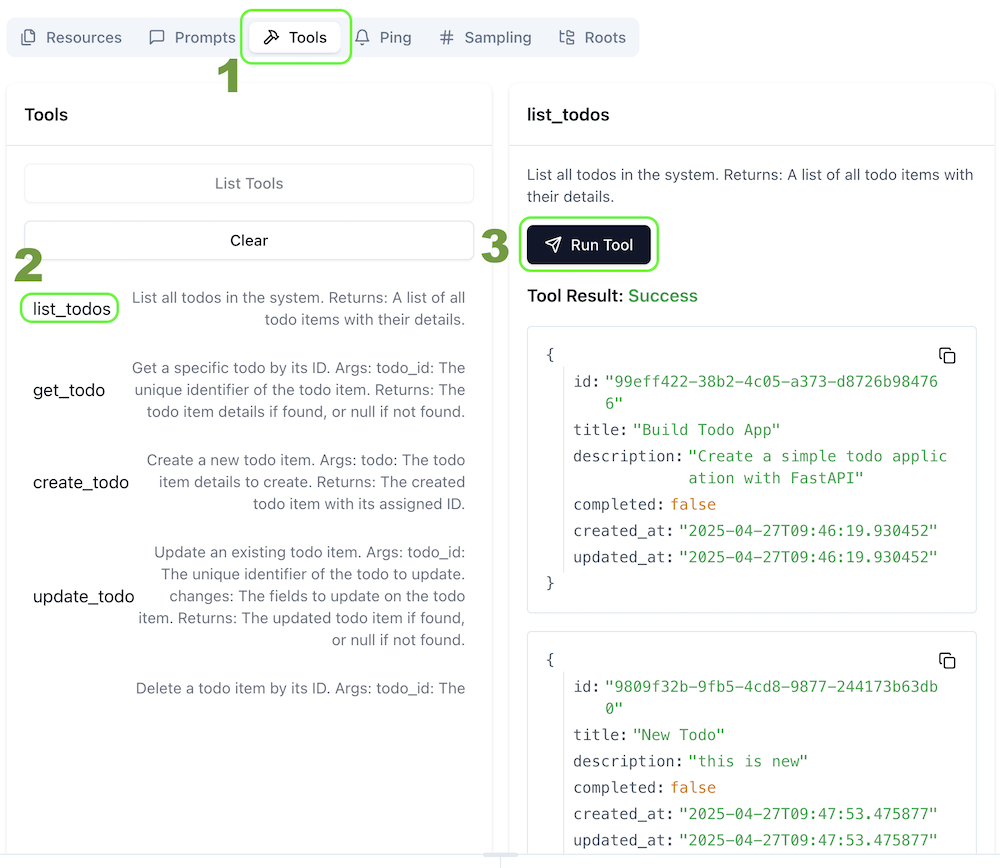
The MCP Inspector provides an interactive UI where you can:
- View and test all available tools
- Call tools with custom parameters
- Explore available prompts
- See the server history and responses
Using with Claude AI
To use this MCP server with Claude:
- Install the MCP CLI tool:
pip install mcp-cli - Install the server:
mcp install todo_mcp/server.py --name "Todo MCP Server" - The server will now be available as a tool for Claude in the Claude Desktop app or Claude web interface
What is Model Context Protocol (MCP)?
MCP is a standardized protocol that enables AI assistants like Claude to interact with external systems and tools. Unlike traditional APIs that are designed for developers to use in code, MCP is designed to be used directly by AI models.
With MCP, AI assistants can:
- Discover what tools are available
- Call these tools to perform actions or retrieve information
- Access specialized prompts for complex analyses
For more information about MCP and how it’s implemented in this project, see the MCP documentation.
Project Architecture
The Todo App Plus MCP project demonstrates a multi-interface architecture:
┌─────────────┐     ┌───────────┐     ┌──────────────┐
│             │     │           │     │              │
│ Human User  ├─────┤  Web UI   ├─────┤              │
│             │HTTP │ (Flask)   │HTTP │              │
└─────────────┘     └───────────┘     │              │
                                      │              │
┌─────────────┐     ┌───────────┐     │  Todo API    │     ┌──────────┐
│             │     │           │     │  (FastAPI)   │     │          │
│ Developer   ├─────┤  REST API ├─────┤              ├─────┤  JSON    │
│             │HTTP │ Endpoints │     │              │     │  Database│
└─────────────┘     └───────────┘     │              │     │          │
                                      │              │     └──────────┘
┌─────────────┐     ┌───────────┐     │              │
│             │     │           │     │              │
│ AI Assistant├─────┤ MCP Server├─────┤              │
│ (Claude)    │MCP  │           │     │              │
└─────────────┘     └───────────┘     └──────────────┘
This architecture allows for interaction through multiple interfaces while maintaining a single shared data source.
Contributing
This is an educational project meant to demonstrate how to integrate MCP with existing applications. Contributions are welcome to improve the codebase, add features, or enhance documentation.
License
This project is released under the MIT License.
Dev Tools Supporting MCP
The following are the main code editors that support the Model Context Protocol. Click the link to visit the official website for more information.







