
Uniswap Mcp
What is Uniswap Mcp
Uniswap MCP (Model Context Protocol) is an experimental research project that implements the Model Context Protocol for Uniswap using Protocolink and Moralis libraries.
Use cases
Use cases for Uniswap MCP include testing token swaps, conducting research on DeFi protocols, and developing applications that require wallet interactions on the Optimism network.
How to use
To use Uniswap MCP, install the required dependencies with ‘npm install’, generate a new wallet with ‘npm run generate-wallet’, configure your environment variables, and fund your wallet for testing on the Optimism network.
Key features
Key features of Uniswap MCP include wallet generation, integration with Moralis API for blockchain interactions, and the ability to perform swaps on the Optimism network.
Where to use
Uniswap MCP can be used in decentralized finance (DeFi) applications, blockchain research, and testing environments for wallet and transaction management.
Clients Supporting MCP
The following are the main client software that supports the Model Context Protocol. Click the link to visit the official website for more information.





Overview
What is Uniswap Mcp
Uniswap MCP (Model Context Protocol) is an experimental research project that implements the Model Context Protocol for Uniswap using Protocolink and Moralis libraries.
Use cases
Use cases for Uniswap MCP include testing token swaps, conducting research on DeFi protocols, and developing applications that require wallet interactions on the Optimism network.
How to use
To use Uniswap MCP, install the required dependencies with ‘npm install’, generate a new wallet with ‘npm run generate-wallet’, configure your environment variables, and fund your wallet for testing on the Optimism network.
Key features
Key features of Uniswap MCP include wallet generation, integration with Moralis API for blockchain interactions, and the ability to perform swaps on the Optimism network.
Where to use
Uniswap MCP can be used in decentralized finance (DeFi) applications, blockchain research, and testing environments for wallet and transaction management.
Clients Supporting MCP
The following are the main client software that supports the Model Context Protocol. Click the link to visit the official website for more information.
Content
Uniswap MCP (Model Context Protocol)
This package implements the Model Context Protocol for Uniswap using Protocolink and Moralis libraries.
⚠️ IMPORTANT NOTICE
This is an experimental research project:
- Do not store large amounts of funds in the generated wallet
- Use this for research and testing purposes only
Prerequisites
- Node.js and npm installed
- Moralis API key (Sign up at Moralis)
Installation
- Install all dependencies:
npm install
- Generate a new wallet:
npm run generate-wallet
-
Configure environment variables:
- Refer to
.env.examplefor the required environment variables format - Add your Moralis API key to the generated
.envfile
- Refer to
-
Fund your wallet for testing (on Optimism network):
- Transfer 0.01 ETH to your generated wallet address on Optimism (for gas fees)
- Transfer 20 USDC to your generated wallet address on Optimism (for swap testing)
- You can check your wallet balance using
npm run get-wallet-info
Environment Variables
Please refer to .env.example for the required environment variables:
MORALIS_API_KEY: Your Moralis API keyWALLET_PRIVATE_KEY: Your wallet’s private key (automatically generated bynpm run generate-wallet)
Claude Desktop Integration
To use this MCP server with Claude Desktop:
- Build the project:
npm run build
This will create the server bundle at build/index.js
-
Open Claude Desktop settings:
- On macOS: Click on the Claude menu and select “Settings…”
- On Windows: Click on the Claude icon in the system tray and select “Settings…”
-
In the Settings window:
- Click on “Developer” in the left sidebar
- Click on “Edit Config” to open the configuration file
-
Edit the configuration file (
claude_desktop_config.json):- Location on macOS:
~/Library/Application Support/Claude/claude_desktop_config.json - Location on Windows:
%APPDATA%\Claude\claude_desktop_config.json
- Location on macOS:
Add the following configuration:
{
  "mcpServers": {
    "uniswap": {
      "command": "node",
      "args": [
        "path/to/your/build/index.js"
      ]
    }
  }
}
Replace path/to/your with the actual path to your project’s build directory.
-
Restart Claude Desktop for the changes to take effect.
-
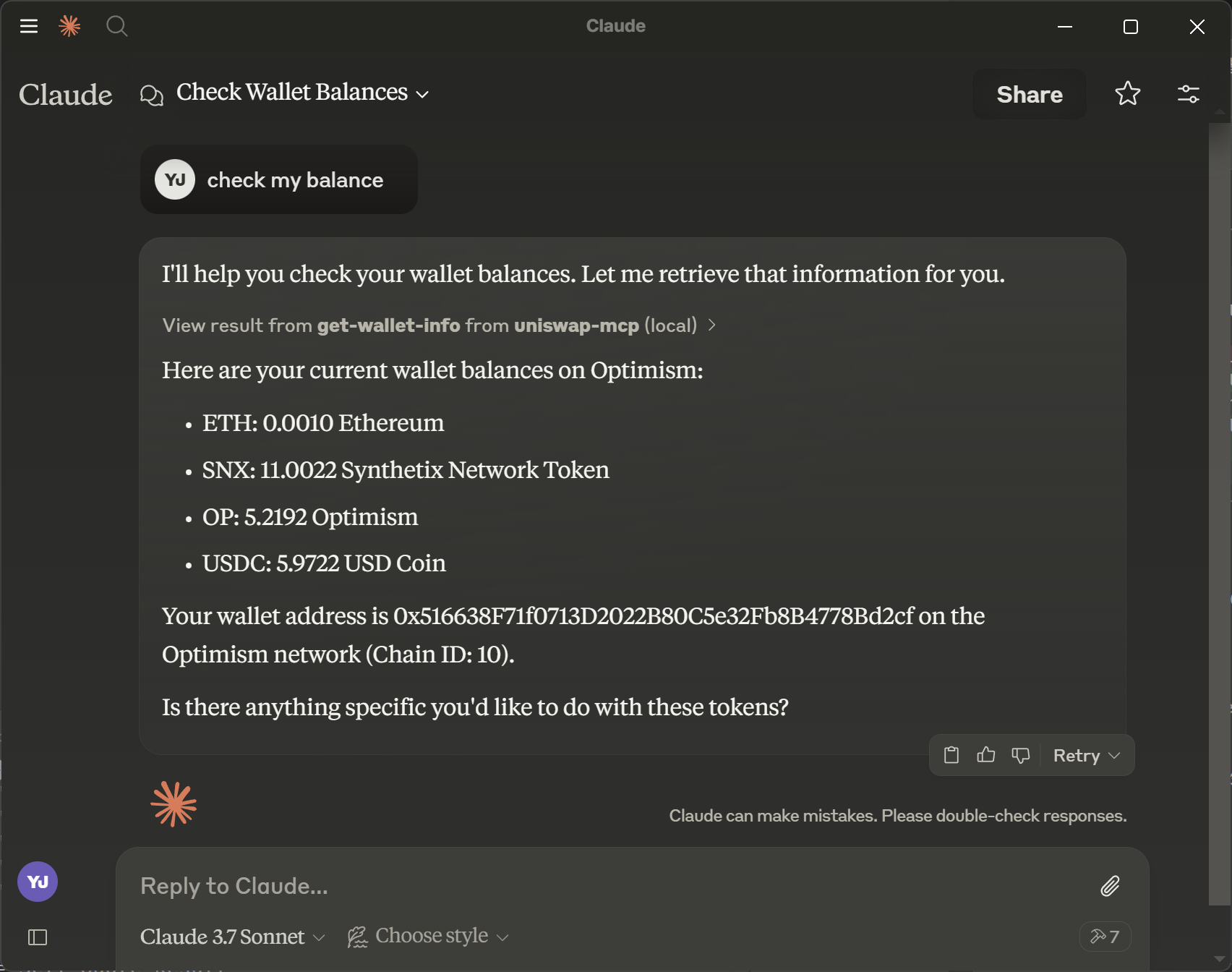
Verify the installation:
- You should see a hammer icon in the Claude interface
- Type “Check my balance” in Claude Desktop
- If the MCP server is properly connected, Claude will display your wallet balance using the get-wallet-info tool
Testing Scripts
The following scripts are available for testing the environment:
Check Wallet Information
npm run get-wallet-info
Displays your wallet address and all token balances in your wallet.
Get Token Information
npm run token-info <token-symbol>
Example: npm run token-info USDC
Retrieves detailed information about a specific token, including:
- Token name
- Contract address
- Decimals
- Chain ID
- Logo URI (if available)
Get Quote Information
npm run quote-info <token-symbol> <amount-in> [slippage]
Example: npm run quote-info OP 10 0.5
Fetches both buy and sell quotes for a token:
- Buy quote: How much of the target token you’ll receive for your USDC
- Sell quote: How much USDC you’ll receive for selling the target token
- Default slippage is 0.5% if not specified
Execute Token Swap
npm run swap-test <fromTokenSymbol> <toTokenSymbol> <amount> <slippage> [--round-trip|-r]
Example:
- Simple swap:
npm run swap-test USDC OP 10 0.5 - Round-trip swap:
npm run swap-test USDC OP 10 0.5 --round-trip
Executes a token swap with the following features:
- Swap between any supported token pairs
- Optional round-trip mode that swaps back to the original token
- Displays detailed transaction information including exchange rates and fees
- Shows profit/loss calculation for round-trip swaps
Dev Tools Supporting MCP
The following are the main code editors that support the Model Context Protocol. Click the link to visit the official website for more information.







