
Unity Mcp Playtest
What is Unity Mcp Playtest
unity-mcp-playtest is a simple example project that demonstrates the interaction between a TypeScript-based MCP server and Unity, allowing users to build and configure their own tools for further development.
Use cases
Use cases include creating custom tools for game development, managing data interactions between Unity and an MCP server, and facilitating communication in real-time applications.
How to use
To use unity-mcp-playtest, clone the repository, install the necessary dependencies using npm, and build the MCP server. Then, configure it in Claude Desktop by editing the settings to include the MCP server command.
Key features
Key features include a straightforward setup process, compatibility with legacy versions, the ability to create custom tools, and a user-friendly interface through Unity’s EditorWindow.
Where to use
unity-mcp-playtest can be used in game development, particularly for projects that require integration between Unity and TypeScript-based servers, enhancing the development workflow.
Clients Supporting MCP
The following are the main client software that supports the Model Context Protocol. Click the link to visit the official website for more information.





Overview
What is Unity Mcp Playtest
unity-mcp-playtest is a simple example project that demonstrates the interaction between a TypeScript-based MCP server and Unity, allowing users to build and configure their own tools for further development.
Use cases
Use cases include creating custom tools for game development, managing data interactions between Unity and an MCP server, and facilitating communication in real-time applications.
How to use
To use unity-mcp-playtest, clone the repository, install the necessary dependencies using npm, and build the MCP server. Then, configure it in Claude Desktop by editing the settings to include the MCP server command.
Key features
Key features include a straightforward setup process, compatibility with legacy versions, the ability to create custom tools, and a user-friendly interface through Unity’s EditorWindow.
Where to use
unity-mcp-playtest can be used in game development, particularly for projects that require integration between Unity and TypeScript-based servers, enhancing the development workflow.
Clients Supporting MCP
The following are the main client software that supports the Model Context Protocol. Click the link to visit the official website for more information.
Content
This project tests whether gameplay-related elements in Unity can be delegated to the MCP, allowing the MCP to actually perform the QA workflow.
As an example project, the Unity 2D Roguelike project was used, and it was implemented to allow simple stage play.
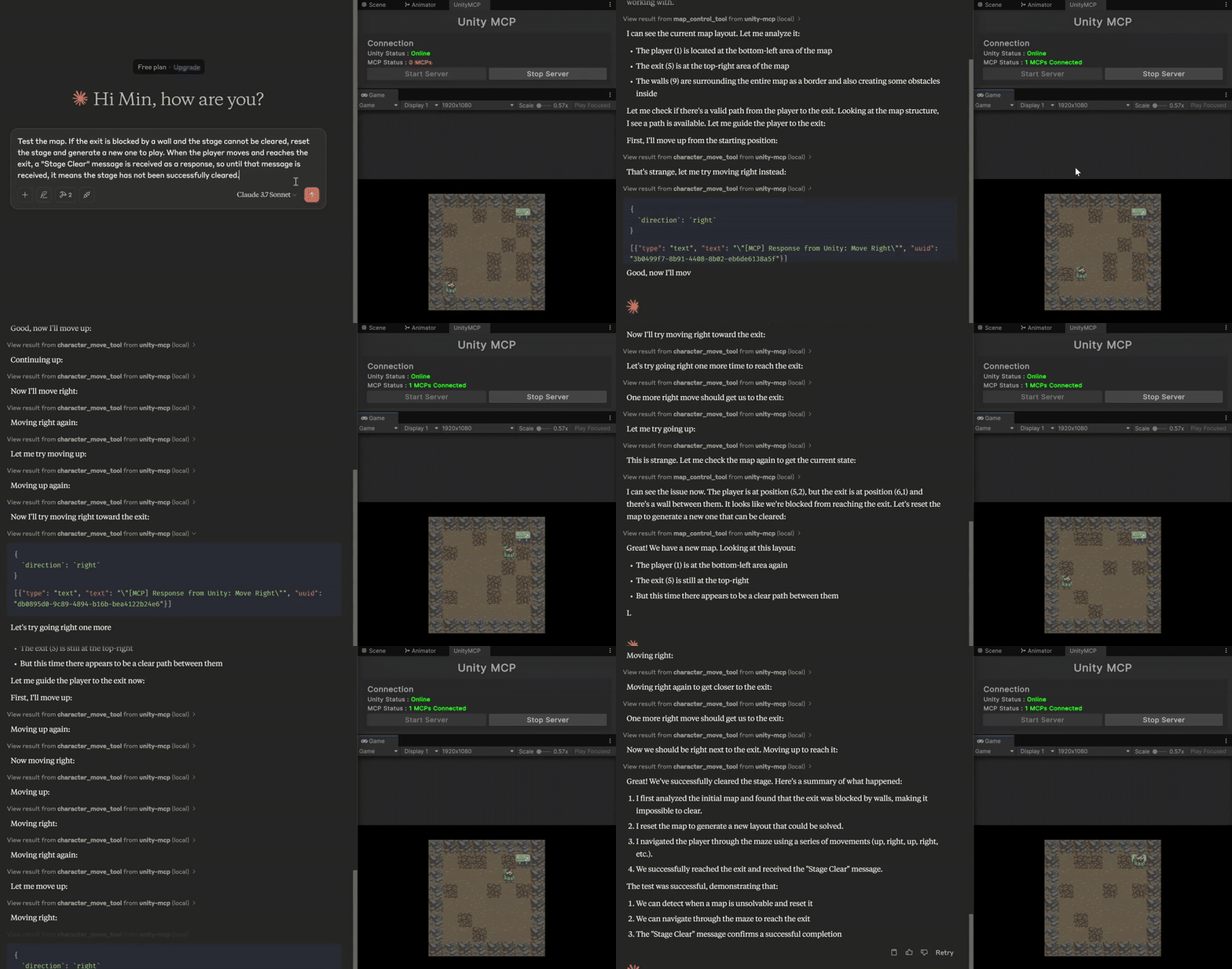
You can create your own Unity MCP Server using unity-mcp-template.
Dev Tools Supporting MCP
The following are the main code editors that support the Model Context Protocol. Click the link to visit the official website for more information.







