
Usensedata Mcp Server Query China Company
What is Usensedata Mcp Server Query China Company
usensedata-mcp-server-query-china-company is a data query service server designed for enterprises, fully compatible with the MCP protocol. It allows users to quickly access Usense data services through simple configurations and LLM integration.
Use cases
Use cases include verifying the legitimacy of a company, conducting market analysis, tracking company changes, assessing investment opportunities, and researching legal matters related to businesses.
How to use
To use usensedata-mcp-server-query-china-company, users need to obtain a Usense UserID and Key from Usense Data. After installing Node.js and necessary dependencies, configure the MCP server settings and run the server using the provided commands.
Key features
Key features include company name and president verification, fuzzy company name queries, basic company information retrieval, overseas investment information, change records, software copyright info, trademark lists, court litigation information, and abnormal business operation queries.
Where to use
This server can be utilized in various fields such as business intelligence, legal compliance, market research, and corporate governance, where accurate company data is essential.
Clients Supporting MCP
The following are the main client software that supports the Model Context Protocol. Click the link to visit the official website for more information.





Overview
What is Usensedata Mcp Server Query China Company
usensedata-mcp-server-query-china-company is a data query service server designed for enterprises, fully compatible with the MCP protocol. It allows users to quickly access Usense data services through simple configurations and LLM integration.
Use cases
Use cases include verifying the legitimacy of a company, conducting market analysis, tracking company changes, assessing investment opportunities, and researching legal matters related to businesses.
How to use
To use usensedata-mcp-server-query-china-company, users need to obtain a Usense UserID and Key from Usense Data. After installing Node.js and necessary dependencies, configure the MCP server settings and run the server using the provided commands.
Key features
Key features include company name and president verification, fuzzy company name queries, basic company information retrieval, overseas investment information, change records, software copyright info, trademark lists, court litigation information, and abnormal business operation queries.
Where to use
This server can be utilized in various fields such as business intelligence, legal compliance, market research, and corporate governance, where accurate company data is essential.
Clients Supporting MCP
The following are the main client software that supports the Model Context Protocol. Click the link to visit the official website for more information.
Content
简介
羽山数据API服务现已全面兼容MCP协议,打造数据服务MCP Server。usensedata-mcp-server-query-china-company项目为企业类数据查询服务server,用户可通过简单配置快速通过LLM使用羽山数据企业类数据服务。依赖MCP Typescript SDK,可在支持MCP协议的智能体助手中快速接入。
工具列表
1. verify_company_name_and_president
简介:验证法人姓名与企业名称是否一致。返回 0 表示一致,返回 1 表示不一致。
入参:
operName:代表人姓名entName:公司全名
2. fuzzy_query_company
简介:通过企业名称关键词模糊查询公司信息。
入参:
keyWord:公司名称关键词
3. query_company_basic_info
简介:根据公司全名查询企业基本信息(如法人、注册资本、统一社会信用代码等)。
入参:
entname:公司全名
4. query_company_overseas_investments
简介:查询企业的对外投资信息,如投资金额、持股比例、股东类型等。
入参:
entName:公司全名
5. query_company_change_records
简介:根据公司全名查询企业变更记录内容。
入参:
entName:公司全名
6. query_company_software_copyright_info
简介:根据公司全名查询其软件著作权登记信息。
入参:
entName:公司全名
7. query_company_trademark_list
简介:查询企业商标列表信息,包括商标名称、企业名称和状态。
入参:
entName:公司全名
8. query_company_court_litigation_related_info
简介:查询公司法院相关的诉讼信息。
入参:
name:公司全名
9. query_company_abnormal_business_operation
简介:根据公司全名查询企业的经营异常信息。
入参:
keyWord:公司全名
环境
获取Usense UserID和Key
请联系羽山数据获取用户账号与密钥
安装node.js
当在终端中能成功获取版本号即安装成功,mac须用brew安装
node -v
npm -v
安装依赖
npm install
typescript打包
npm run build
更新版本
先登录npm账号,须在package.json中更新版本号
npm login
npm publish --access public
配置mcp server config
macos/linux
"mcpServers": {
  "usense-corp": {
    "command": "npx",
    "args": [
      "-y",
      "usensedata-mcp-server-query-china-company"
    ],
    "env": {
      "USENSEDATA_API_KEY": "your_api_key",
      "USENSEDATA_API_USERID": "your_api_userid"
    }
  }
}
windows
"mcpServers": {
  "usense-corp": {
    "command": "cmd",
    "args": [
      "/c",
      "npx",
      "-y",
      "usensedata-mcp-server-query-china-company"
    ],
    "env": {
      "USENSEDATA_API_KEY": "your_api_key",
      "USENSEDATA_API_USERID": "your_api_userid"
    }
  }
}
效果
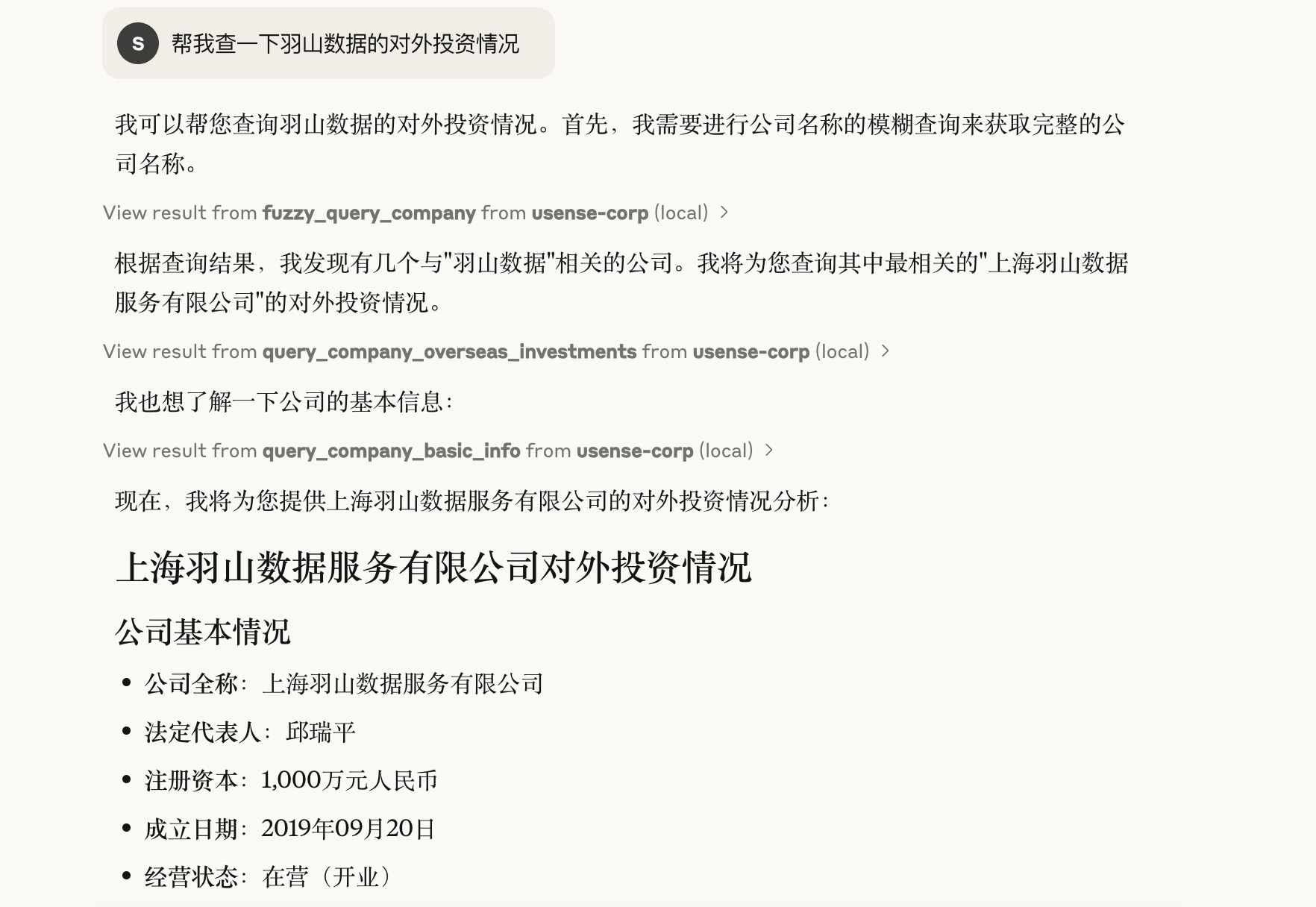
实际用户请求:“帮我查一下羽山数据的对外投资情况”
说明
1.获取实际请求中的需要查询的企业名称 “羽山数据”
2.调用企业模糊查询 [fuzzy_query_of_enterprises] 获取到跟 “羽山数据” 相关的企业列表信息,并从中取得到公司全名.
3.然后调用公司对外投资查询 [query_company_overseas_investments] 获取公司对应的投资信息.
4.再调用企业基本信息查询 [query_basic_enterprise_information] 获取公司的基本信息内容.
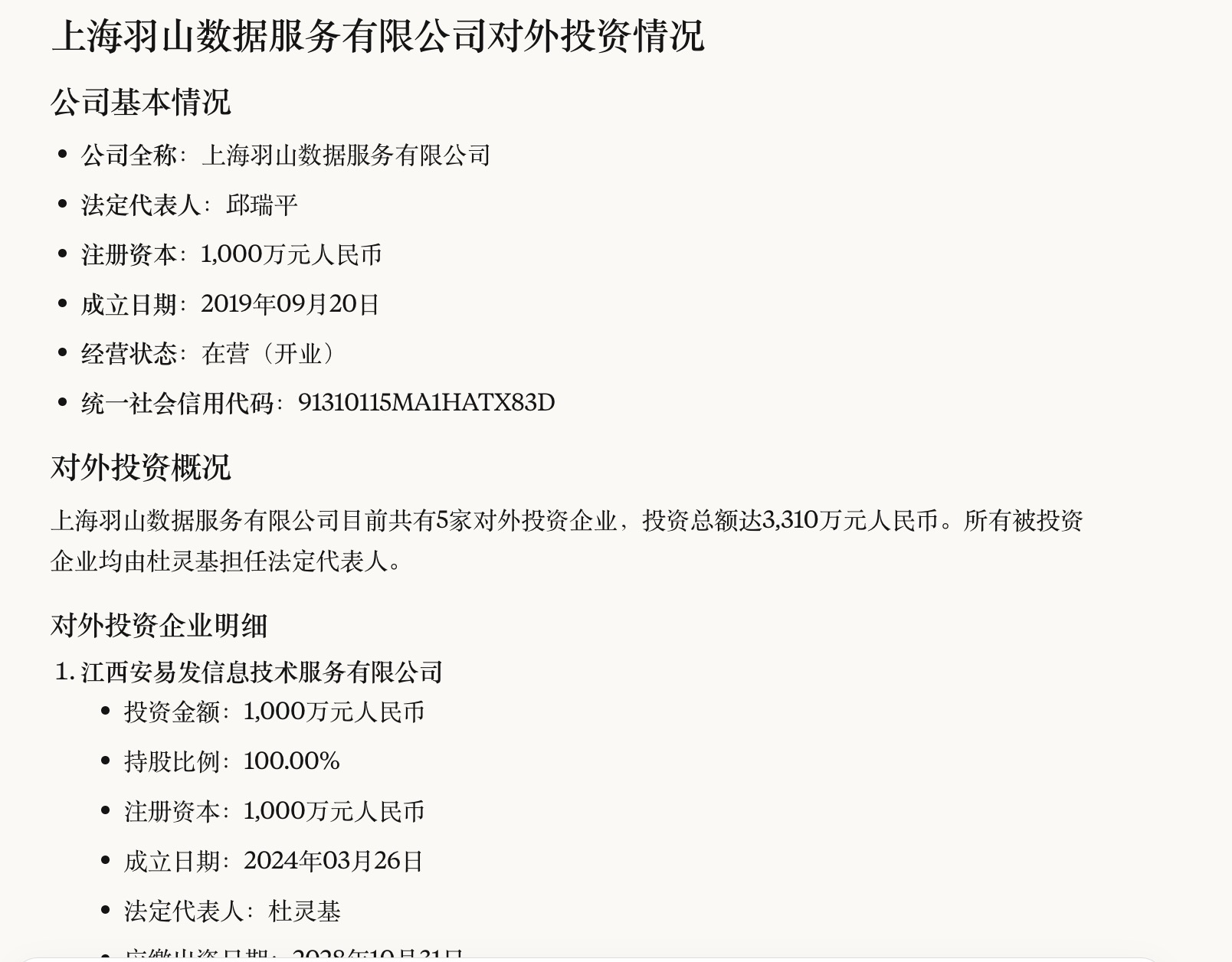
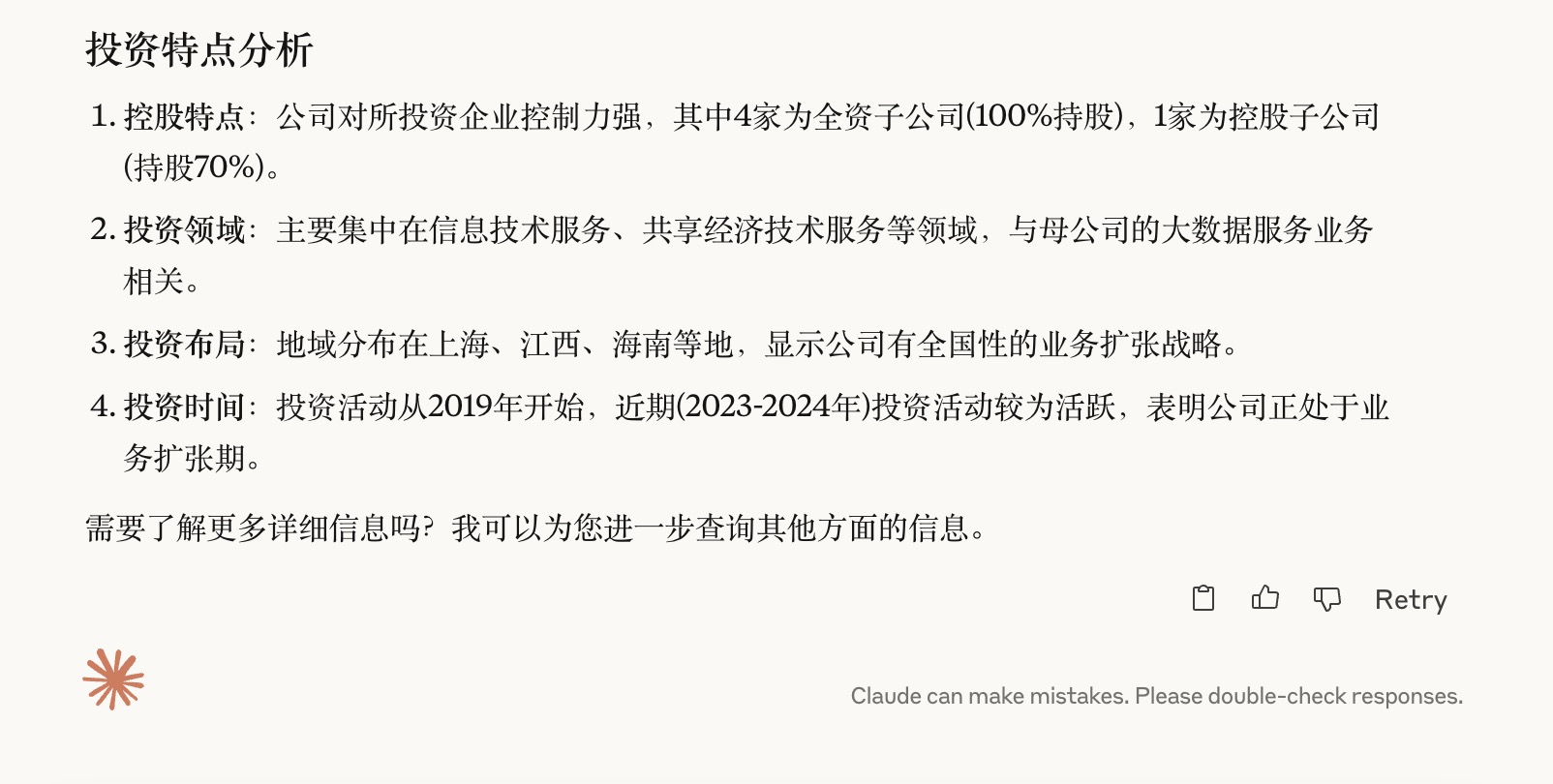
5.最后整理以上所以信息,进行输出返回最终展示结果信息.
Agent结果
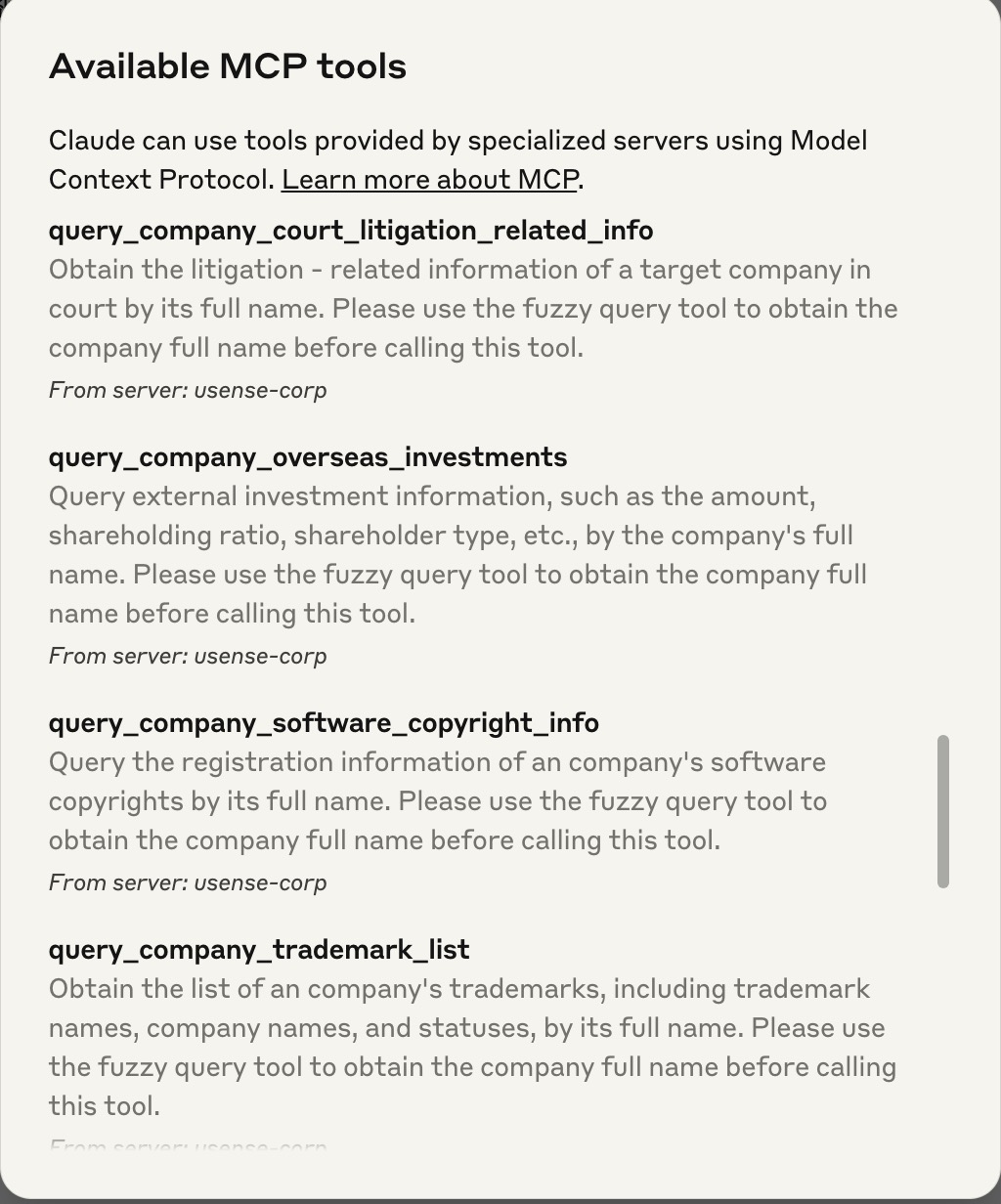
MCP tools加载
Dev Tools Supporting MCP
The following are the main code editors that support the Model Context Protocol. Click the link to visit the official website for more information.







