
Vscode Search Mcp
What is Vscode Search Mcp
vscode-search-mcp is a Model Context Protocol (MCP) server that enables web search capabilities using the OpenAI 4o search LLM, allowing LLMs to access real-time information from the web through a standardized interface.
Use cases
Use cases include enhancing coding assistance with real-time search results, integrating web-based information retrieval into development tools, and improving productivity by providing instant access to up-to-date data.
How to use
To use vscode-search-mcp, clone the repository, install the required modules (PSMCP and PSAiSuite), and set up your OpenAI API key in the environment. Configure the server using the mcp.json file and start it via VS Code.
Key features
Key features include a native PowerShell MCP server, web search functionality powered by OpenAI 4o search LLM, and seamless integration with Visual Studio Code for easy access.
Where to use
vscode-search-mcp can be used in software development environments, particularly for developers who need to incorporate real-time web search capabilities into their coding workflows.
Clients Supporting MCP
The following are the main client software that supports the Model Context Protocol. Click the link to visit the official website for more information.





Overview
What is Vscode Search Mcp
vscode-search-mcp is a Model Context Protocol (MCP) server that enables web search capabilities using the OpenAI 4o search LLM, allowing LLMs to access real-time information from the web through a standardized interface.
Use cases
Use cases include enhancing coding assistance with real-time search results, integrating web-based information retrieval into development tools, and improving productivity by providing instant access to up-to-date data.
How to use
To use vscode-search-mcp, clone the repository, install the required modules (PSMCP and PSAiSuite), and set up your OpenAI API key in the environment. Configure the server using the mcp.json file and start it via VS Code.
Key features
Key features include a native PowerShell MCP server, web search functionality powered by OpenAI 4o search LLM, and seamless integration with Visual Studio Code for easy access.
Where to use
vscode-search-mcp can be used in software development environments, particularly for developers who need to incorporate real-time web search capabilities into their coding workflows.
Clients Supporting MCP
The following are the main client software that supports the Model Context Protocol. Click the link to visit the official website for more information.
Content
VS Code Web Search MCP Server
This MCP (Model Context Protocol) server provides web search capabilities using the OpenAI 4o search LLM.
It allows LLMs to access up-to-date information from the web through a standardized interface.
Features
- Native PowerShell MCP server
- Web search using OpenAI 4o search LLM
- Integration with VS Code for easy access
Prerequisites
- PSMCP module
- PSAiSuite module
- OpenAI API key
Installation & Setup
-
Clone the repository:
git clone https://github.com/yourusername/vscode-search-mcp.git -
Install dependencies:
Install-Module -Name PSMCP, PSAiSuite -
To use OpenAI Search you will need to create an account. After logging in, go to the API Keys section in your account settings and generate a new key. Once you have your key, add it to your environment as follows:
$env:OpenAIKey = "your-openai-api-key"
Running the MCP Server using VS Code
- The MCP server is configured using a JSON file
mcp.jsonfile in the.vscodedirectory.
server configuration.
After opening the cloned repository in VS Code, you can start the MCP server by clicking Start at the top of the configuration file.
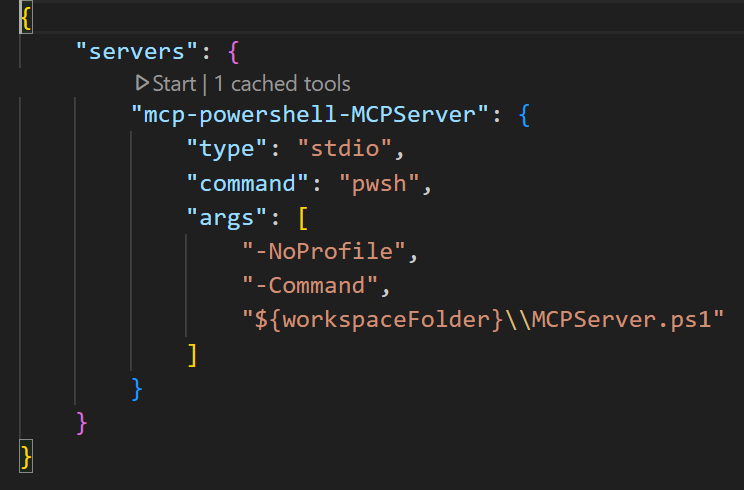
Launch Copilot:
- Start the server
- Click the
toggle chaticon in the top right corner of the window to open the copilot chat interface. - Set the Copilot
modetoAgentin the bottom right corner of the window.
VS Code Copilot should be able to find the search mcp server.
Dev Tools Supporting MCP
The following are the main code editors that support the Model Context Protocol. Click the link to visit the official website for more information.







