
Windows Vscode Cline Figma Mcp
What is Windows Vscode Cline Figma Mcp
windows-vsCode-cline-figma-mcp- is a service configuration for Figma developers in a Windows environment, designed to facilitate the integration of Figma with Visual Studio Code.
Use cases
Use cases include automating design workflows, integrating design assets into development pipelines, and enhancing collaboration between designers and developers using Figma.
How to use
To use windows-vsCode-cline-figma-mcp-, install Node.js version 16 or above, ensure you have a recent version of VSCode (tested version 1.98.2), install the Cline plugin from the VSCode marketplace, configure the large model with the appropriate API key, and set up the MCP Servers for Figma.
Key features
Key features include support for Figma integration, customizable server configurations, and the ability to run commands directly from VSCode using Node.js.
Where to use
This configuration is primarily used in software development and design environments where Figma is utilized for UI/UX design, particularly by developers working with Figma APIs.
Clients Supporting MCP
The following are the main client software that supports the Model Context Protocol. Click the link to visit the official website for more information.





Overview
What is Windows Vscode Cline Figma Mcp
windows-vsCode-cline-figma-mcp- is a service configuration for Figma developers in a Windows environment, designed to facilitate the integration of Figma with Visual Studio Code.
Use cases
Use cases include automating design workflows, integrating design assets into development pipelines, and enhancing collaboration between designers and developers using Figma.
How to use
To use windows-vsCode-cline-figma-mcp-, install Node.js version 16 or above, ensure you have a recent version of VSCode (tested version 1.98.2), install the Cline plugin from the VSCode marketplace, configure the large model with the appropriate API key, and set up the MCP Servers for Figma.
Key features
Key features include support for Figma integration, customizable server configurations, and the ability to run commands directly from VSCode using Node.js.
Where to use
This configuration is primarily used in software development and design environments where Figma is utilized for UI/UX design, particularly by developers working with Figma APIs.
Clients Supporting MCP
The following are the main client software that supports the Model Context Protocol. Click the link to visit the official website for more information.
Content
windows-vsCode-cline-figma-developer-mcp
windows环境figma-developer-mcp服务配置;
1、需要全局安装node16以上版本;
2、vscode版本需要较新的版本,目前测试的是1.98.2;
3、在vscode的插件市场找到Cline插件并安装;
4、安装完成后配置大模型默认是openRouter,选择完成后需要配置大模型的key,至于key怎么获取网上很多方法,大模型的官网一般都有介绍,基本就是注册账号就行;
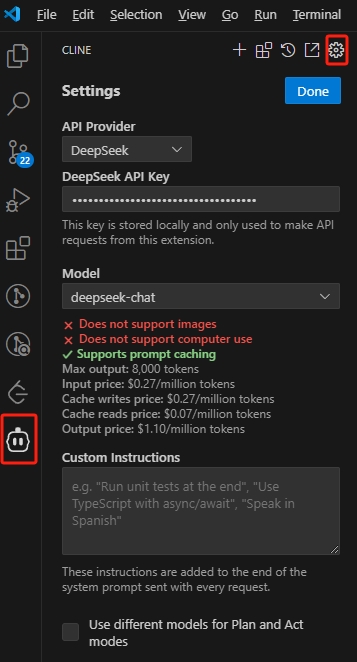
5、配置完大模型后在顶部有个四个小方块的按钮,就是MPC Servers服务,点击后可以搜索figma就可以找到,点击install,根据大模型提示一步步安装,安装过程中需要记住安装的路径;
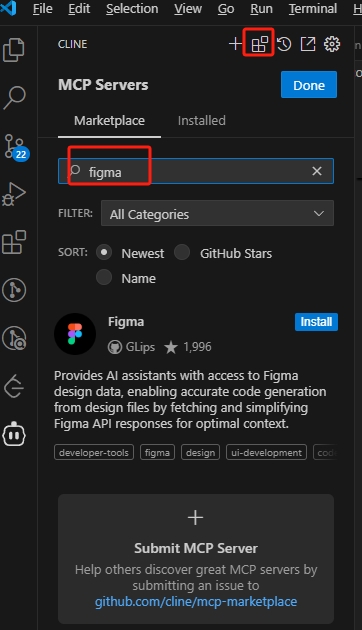
6、如果安装不好,也可以去https://github.com/MatthewDailey/figma-mcp;自行下载,然后网站提示安装即可(一般就是下载完,npm install就可以了);
7、获取figma的key,去官网中就到setting中的security中获取;地址https://help.figma.com/hc/en-us/articles/8085703771159-Manage-personal-access-tokens;
8、前面的步骤都比较简单,重点是配置mcpServers,官网给的macOS环境下的配置
{
“mcpServers”: {
“figma-developer-mcp”: {
“command”: “npx”,
“args”: [“-y”, “figma-developer-mcp”, “–stdio”],
“env”: {
“FIGMA_API_KEY”: “
}
}
}
}
按照这个配置在windows下是不行的;
网上有说按以下配置,但是我这里没有配置成功
{
“mcpServers”: {
“figma-developer-mcp”: {
“command”: “cmd”,
“args”: [“/c”,“npx”,“-y”, “figma-developer-mcp”, “–stdio”],
“env”: {
“FIGMA_API_KEY”: “
}
}
}
}
9、下面是已经成功的配置
{
“mcpServers”: {
“figma-developer-mcp”: {
“command”: “node”,
“args”: [
“D:/Figma-Context-MCP-main/dist/index.js”,
“–figma-api-key=你的figmaApiKey”,
“-y”,
“figma-developer-mcp”,
“–stdio”
],
“env”: {
“FIGMA_API_KEY”: “你的figmaApiKey”
}
}
}
};
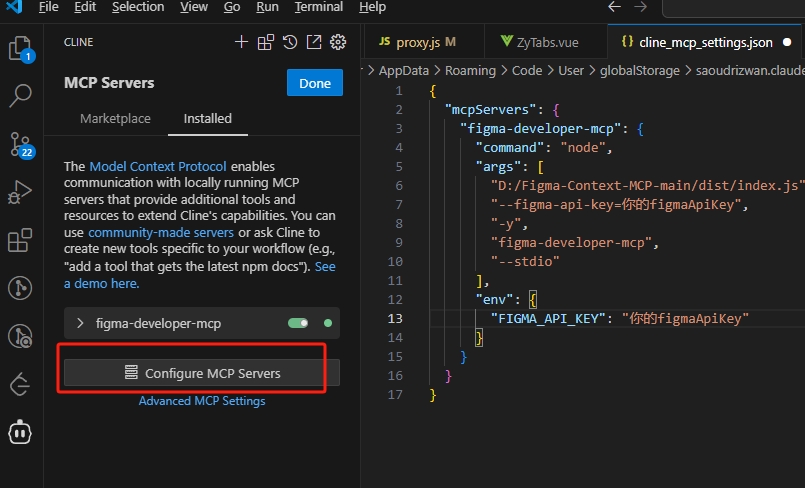
其中D:/Figma-Context-MCP-main/dist/index.js为安装编译完后的文件地址;
Dev Tools Supporting MCP
The following are the main code editors that support the Model Context Protocol. Click the link to visit the official website for more information.







