
Word Mcp
What is Word Mcp
word_mcp is a Model Context Protocol (MCP) server designed for manipulating and processing Word documents. It provides a comprehensive set of tools for creating, editing, converting Word documents, supporting format conversion, complex text search and replace, document merging, data extraction, document comparison, and document quality assessment.
Use cases
Use cases for word_mcp include automating document generation, performing bulk edits on multiple documents, converting documents for compatibility, extracting structured data from reports, comparing different versions of documents, and assessing the quality of written content.
How to use
To use word_mcp, you can access its various tools through API calls. Each tool allows you to perform specific operations on Word documents, such as creating new documents, reading existing ones, editing content, converting formats, and more. Detailed instructions for each tool are available in the documentation.
Key features
Key features of word_mcp include: creating and editing Word documents, converting between formats (e.g., DOCX, PDF, TXT, HTML), complex text search and replace, document merging, data extraction, document comparison, and quality assessment functionalities.
Where to use
word_mcp can be used in various fields such as document management systems, content creation platforms, academic research, legal documentation, and any other domain that requires extensive manipulation of Word documents.
Clients Supporting MCP
The following are the main client software that supports the Model Context Protocol. Click the link to visit the official website for more information.





Overview
What is Word Mcp
word_mcp is a Model Context Protocol (MCP) server designed for manipulating and processing Word documents. It provides a comprehensive set of tools for creating, editing, converting Word documents, supporting format conversion, complex text search and replace, document merging, data extraction, document comparison, and document quality assessment.
Use cases
Use cases for word_mcp include automating document generation, performing bulk edits on multiple documents, converting documents for compatibility, extracting structured data from reports, comparing different versions of documents, and assessing the quality of written content.
How to use
To use word_mcp, you can access its various tools through API calls. Each tool allows you to perform specific operations on Word documents, such as creating new documents, reading existing ones, editing content, converting formats, and more. Detailed instructions for each tool are available in the documentation.
Key features
Key features of word_mcp include: creating and editing Word documents, converting between formats (e.g., DOCX, PDF, TXT, HTML), complex text search and replace, document merging, data extraction, document comparison, and quality assessment functionalities.
Where to use
word_mcp can be used in various fields such as document management systems, content creation platforms, academic research, legal documentation, and any other domain that requires extensive manipulation of Word documents.
Clients Supporting MCP
The following are the main client software that supports the Model Context Protocol. Click the link to visit the official website for more information.
Content
word_mcp: Word 文档 MCP 服务器
Overview 概述
一个模型上下文协议服务器,用于操作和处理 Word 文档
此服务器提供了一系列工具,用于创建、编辑、转换Word文档,支持格式转换、复杂文本查询替换、文档合并,提取数据,文档对比,文档质量评估功能
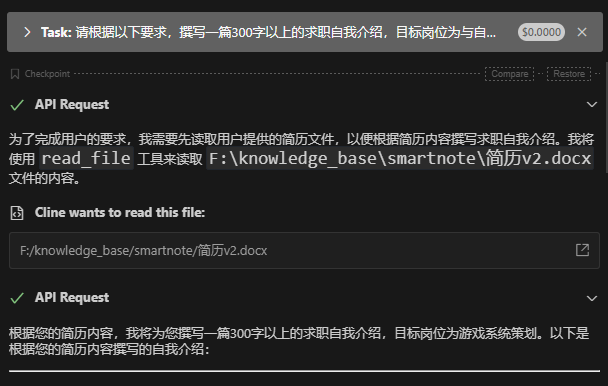
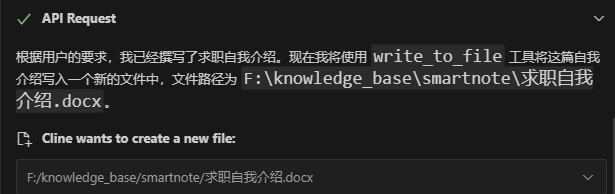
Example 示例
Tools 工具
-
create_txt_file- 创建一个新的 TXT 文件
-
create_word_document- 创建一个新的 Word 文档
-
read_word_document- 从 Word 文档中读取内容
-
get_word_document_info- 查询 Word 文档的基本信息
-
add_text_to_word_document- 向 Word 文档添加文本内容
-
set_paragraph_format- 设置 Word 文档中指定段落的文本格式
-
set_paragraph_spacing- 设置 Word 文档中指定段落的间距
-
insert_image_into_word_document- 在 Word 文档中插入图片
-
insert_table_into_word_document- 在 Word 文档中插入表格
-
edit_table_cell- 编辑 Word 文档中表格的单元格内容
-
save_word_as_pdf- 将 Word 文档保存为 PDF 格式
-
convert_word_to_format- 将 Word 文档转换为指定格式文件,支持格式包括 [“docx”, “pdf”, “txt”, “html”]
-
convert_to_word- 将指定格式文件转换为 Word 文档,支持格式包括 [“docx”, “pdf”, “txt”, “html”]
-
close_word_document- 关闭 Word 文档,可选是否保存更改
-
edit_paragraph_text- 编辑 Word 文档中指定段落的文本内容
-
find_and_replace_text- 在 Word 文档中查找并替换文本
-
delete_paragraph- 删除 Word 文档中指定的段落
-
insert_table_of_contents- 在 Word 文档中插入目录
-
add_header_and_footer- 为 Word 文档添加页眉和页脚
-
set_page_layout- 设置 Word 文档的页面布局
-
merge_word_documents- 合并多个 Word 文档
-
complex_query_document- 复杂查询 Word 文档(不限于文本)
-
complex_replace_document- 复杂替换 Word 文档
-
extract_document_info文档提取函数- 辅助函数:
save_to_jsonsave_to_csv - 段落提取:提取文档中的各个段落,转换为结构化数据格式
- 表格提取:提取文档中的表格,转换为结构化数据格式
- 图片提取:提取文档中的图片,转换为结构化数据格式
- 标题提取:提取文档中的各级标题
- 文本提取:提取文档中的文本内容
- 关键词提取:提取文档中的关键词
- 辅助函数:
-
compare_documents文档对比函数- 文档对比:比较两个或多个文档的内容差异,识别新增、删除或修改的部分
- 一致性检查:检查多个文档之间的一致性
-
assess_document_quality文档质量评估函数- 辅助函数:
calculate_readability,count_syllables - 可读性评估:评估文档的可读性,识别复杂的句子和段落
- 一致性评估:评估文档中格式和内容的一致性
- 辅助函数:
Installation 安装
-
将 MCP 服务器的代码仓库克隆到您的本地机器:
git clone https://github.com/M87shaonv/word_mcp.git cd word_mcp -
安装依赖项
使用 pip/pip3 安装所需的 Python 包:pip install -e 项目路径 pip3 install -e 项目路径 -
配置环境变量(可选)
您可以配置以下环境变量来自定义服务器行为:变量名 描述 默认值 WORD_MCP_PATH文件操作的默认目录(例如:保存文档的位置) 用户的桌面
Linux/Mac
    # 永久设置环境变量
    nano ~/.bashrc
    # 文件末尾添加以下内容
    export WORD_MCP_PATH="/path/to/output"
    # 刷新环境变量
    source ~/.bashrc
Windows
    # 设置系统级别的环境变量
    set WORD_MCP_PATH="C:\path\to\output" /M
- 启动服务器
使用以下命令启动 MCP 服务器测试是否正常运行:
    # 启动服务器
    python word_mcp.py
    # 如果在启动服务器时出现模块导入错误,尝试使用以下命令更新依赖项:
    uv run word_mcp.py
    # 使用mcp命令启动服务器可在浏览器中访问 测试是否正常运行
    mcp dev word_mcp.py
注意:如果使用的是虚拟环境,请确保在启动服务器之前激活虚拟环境
使用mcp server配置,直接添加到cline_mcp_setting.json文件中
 #
    "wordmcp": {
          "command": "uv",
          "args": [
            "--directory",
            "下载的word_mcp项目路径",
            "run",
            "word_mcp.py"
          ]
        }
Dev Tools Supporting MCP
The following are the main code editors that support the Model Context Protocol. Click the link to visit the official website for more information.







