
Xautoflow
What is Xautoflow
xAgent is a mobile-first, multi-agent AI system that utilizes advanced language models to facilitate real-time chat, coding, and finance tasks through LangGraph workflows and the MCP architecture.
Use cases
Use cases include automated customer support chats, coding help for developers, financial analysis for investors, and any scenario where multi-agent interactions enhance productivity.
How to use
Users can interact with xAgent via its mobile application, utilizing its various agents for tasks such as chatting, coding assistance, and financial analysis. The system supports real-time communication and modular task execution.
Key features
Key features include secure JWT authentication, profile management, a real-time chat agent, a coding agent for code generation and debugging, a finance agent for stock strategies, WebSocket communication, and a modular architecture using MCP and LangGraph.
Where to use
xAgent can be used in various domains including customer support, software development, financial services, and any area requiring real-time communication and task automation.
Clients Supporting MCP
The following are the main client software that supports the Model Context Protocol. Click the link to visit the official website for more information.





Overview
What is Xautoflow
xAgent is a mobile-first, multi-agent AI system that utilizes advanced language models to facilitate real-time chat, coding, and finance tasks through LangGraph workflows and the MCP architecture.
Use cases
Use cases include automated customer support chats, coding help for developers, financial analysis for investors, and any scenario where multi-agent interactions enhance productivity.
How to use
Users can interact with xAgent via its mobile application, utilizing its various agents for tasks such as chatting, coding assistance, and financial analysis. The system supports real-time communication and modular task execution.
Key features
Key features include secure JWT authentication, profile management, a real-time chat agent, a coding agent for code generation and debugging, a finance agent for stock strategies, WebSocket communication, and a modular architecture using MCP and LangGraph.
Where to use
xAgent can be used in various domains including customer support, software development, financial services, and any area requiring real-time communication and task automation.
Clients Supporting MCP
The following are the main client software that supports the Model Context Protocol. Click the link to visit the official website for more information.
Content
xAgent

Extensible Multitasking Agentic System
Table of Contents
- Table of Contents
- Introduction
- Features
- Tech Stack
- Architecture
- Installation
- Project Preview
- Support
Introduction
xAgent is a modular, real-time, intelligent multi-agent mobile application that leverages state-of-the-art language models and clean architecture principles to help users perform tasks across domains like chat, finance, coding, and emailing. The system uses WebSocket communication, LangGraph workflows, and the MCP (Model Context Protocol) design pattern for scalable agent interactions.
Features
- Secure authentication with JWT
- Profile management with protected routes
- Realtime Chat Agent for general-purpose conversations
- Coding Agent for code generation, debugging, and explanation
- Finance Agent for applying stock strategies and financial analysis
- WebSocket-based real-time communication between agents and backend
- MCP (Model Context Protocol) architecture for modular agent design
- LangGraph based workflow orchestration for stateful task execution
- Clean Architecture and SOLID principles in Flutter frontend
- LLM-powered intelligence using Gemini and LLaMA models
Tech Stack
| Frontend | Backend | Others |
|---|---|---|
Dart |
Python |
Git |
Flutter |
FastAPI |
Ollama |
Bloc |
Supabase |
Meta Llama |
GetIt |
LangChain |
Gemini |
fpDart |
LangGraph |
MCP |
Architecture
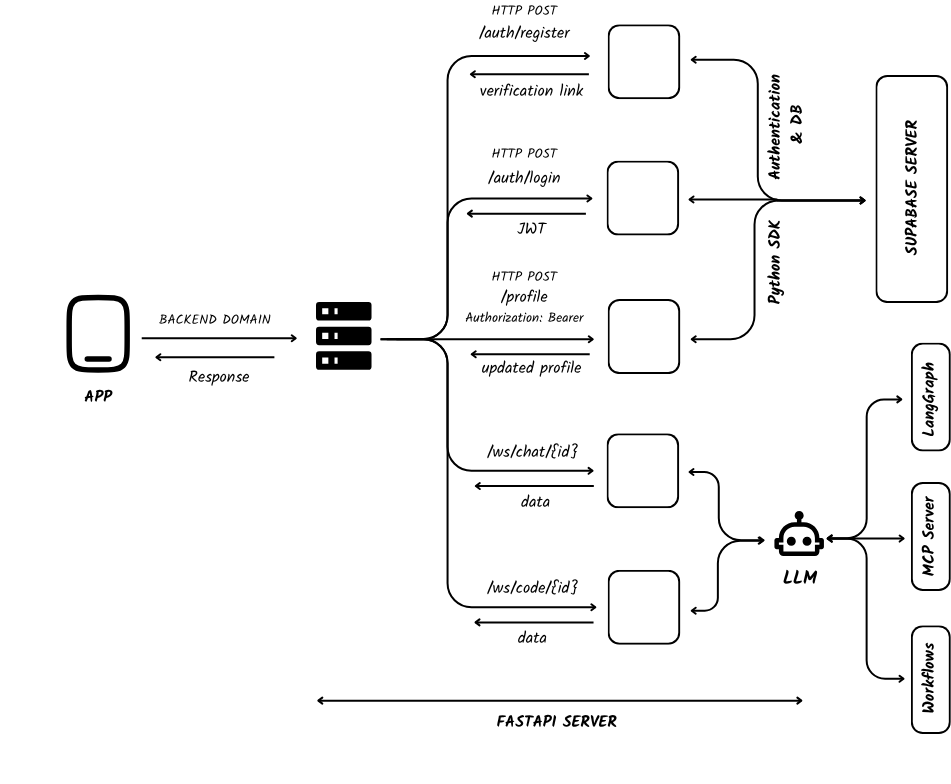
- The Flutter frontend handles UI interactions and sends/receives data over WebSocket.
- The FastAPI backend acts as the central coordinator, processing real-time messages, managing authentication, and routing requests to agents.
- Agents are modular, LLM-powered components using the Model Context Protocol (MCP) pattern.
- LangGraph is used to orchestrate workflows for certain agents.
- Supabase is used for user authentication and profile data storage via its Python SDK, directly in FastAPI.
Installation
Follow these steps to set up the project locally.
Prerequisites
Make sure you have the following installed:
- Flutter SDK (v3.x or later)
- Python (v3.10+)
- Supabase account
- Git & a code editor
Clone the repository:
git clone https://github.com/anshRS/xautoflow.git
cd xautoflow
Backend Setup
Create the virtual environment:
cd server
python -m venv venv
Once created a virtual environment, activate it:
On Windows run:
venv\Scripts\activate
On Unix or MacOS, run:
source venv/bin/activate
Add the dependencies as:
pip install -r requirements.txt
Create a .env file from the provided example:
cp .env.example .env
Then start the backend server:
fastapi dev main.py
Frontend Setup
Ensure your mobile device or emulator is connected properly.
cd client
flutter pub get
flutter run
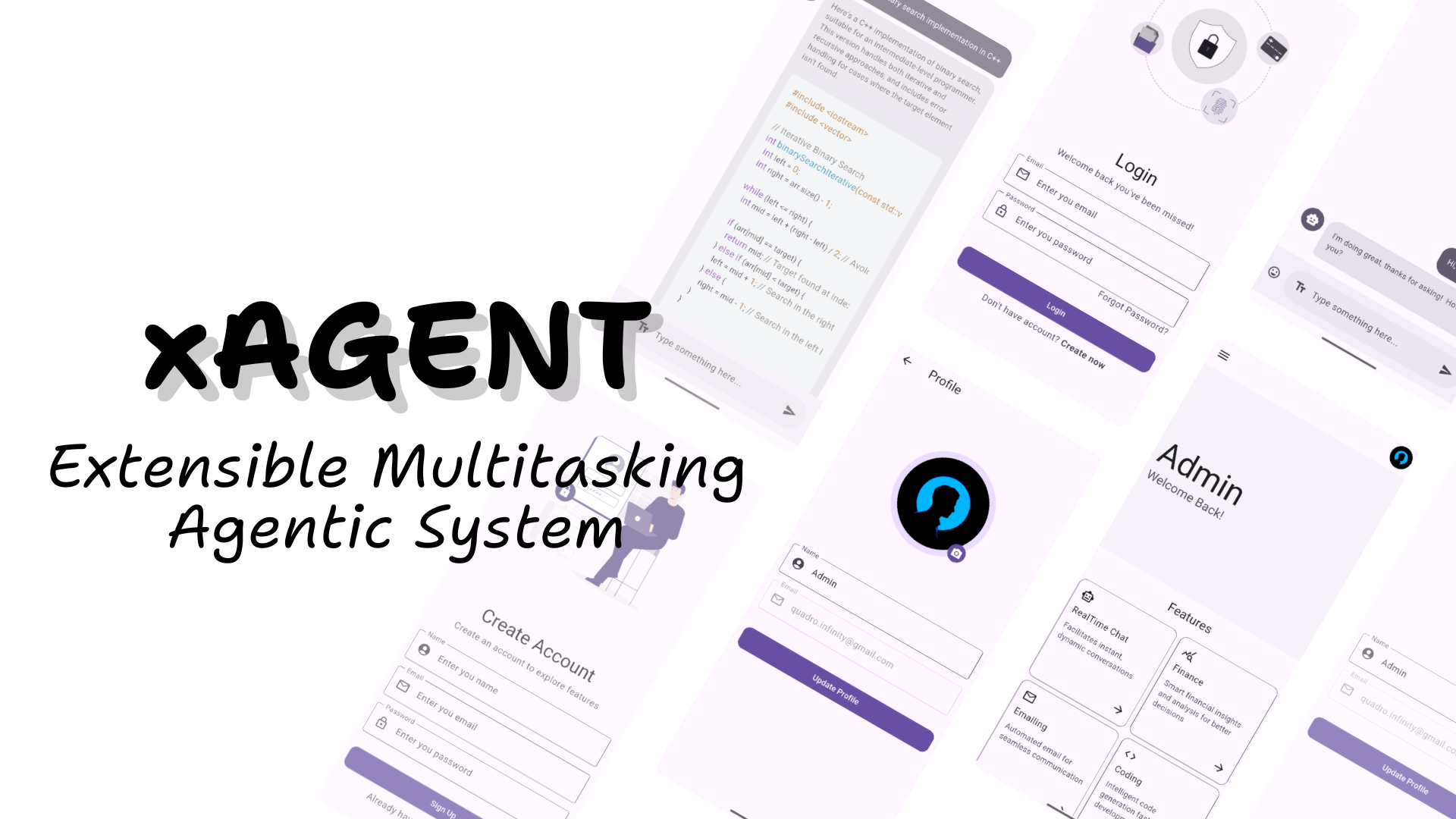
Project Preview
Demo video showing the working of the application is provided under assets/demo.mp4.
Support
If you find the project useful or interesting, please consider giving it a ⭐️! Your support is greatly appreciated and helps others discover this project.
Dev Tools Supporting MCP
The following are the main code editors that support the Model Context Protocol. Click the link to visit the official website for more information.







