
Xpilot Mcp Library
What is Xpilot Mcp Library
The xpilot-mcp-library is a library designed for implementing MCP Servers for xPilot, facilitating the integration of context into large language models (LLMs) through the Model Context Protocol (MCP).
Use cases
Use cases include handling API requests and responses for MultiversX, providing CLI tools for Python and Rust SDKs, and enabling developers to create custom implementations for specific needs.
How to use
To use xpilot-mcp-library, clone the repository, install the necessary dependencies for each server, and configure the mcp_settings.json file to specify server paths and settings. Ensure to monitor the configuration for updates.
Key features
Key features include multiple server implementations (e.g., MultiversX API Service, Python SDK CLI, Rust SDK CLI), a structured configuration file for easy management, and the ability to extend functionality through templates.
Where to use
xpilot-mcp-library can be used in applications that require context provision to LLMs, particularly in blockchain environments and for integrating various SDKs and APIs.
Clients Supporting MCP
The following are the main client software that supports the Model Context Protocol. Click the link to visit the official website for more information.





Overview
What is Xpilot Mcp Library
The xpilot-mcp-library is a library designed for implementing MCP Servers for xPilot, facilitating the integration of context into large language models (LLMs) through the Model Context Protocol (MCP).
Use cases
Use cases include handling API requests and responses for MultiversX, providing CLI tools for Python and Rust SDKs, and enabling developers to create custom implementations for specific needs.
How to use
To use xpilot-mcp-library, clone the repository, install the necessary dependencies for each server, and configure the mcp_settings.json file to specify server paths and settings. Ensure to monitor the configuration for updates.
Key features
Key features include multiple server implementations (e.g., MultiversX API Service, Python SDK CLI, Rust SDK CLI), a structured configuration file for easy management, and the ability to extend functionality through templates.
Where to use
xpilot-mcp-library can be used in applications that require context provision to LLMs, particularly in blockchain environments and for integrating various SDKs and APIs.
Clients Supporting MCP
The following are the main client software that supports the Model Context Protocol. Click the link to visit the official website for more information.
Content
xPilot MCP Server Library
The Model Context Protocol is an open protocol that standardizes how applications provide context to LLMs. xPilot can use MCP servers to provide context to the underlying model and add new tools and resources the model can use to complete tasks and requests.
Repo Structure
/
├── servers/                     # Server implementations
├── templates/                   # Server templates
└── mcp_settings.json.example    # Example configuration file for xPilot
This repository contains MCP Server implementations for xPilot in the servers directory.
NOTE: The initial release contains limited functionality. Feel free to contribute in extending them or creating new implementations for other use cases by starting from one of the available templates.
Getting Started
Prerequisites for server use
- Node.js for running the servers
- Python for the SDK CLI tools
- Rust for the Rust SDK CLI
- MultiversX mxpy Python SDK CLI
- MultiversX sc-meta Rust SDK CLI
Installation
-
Clone the repository (xPilot uses this default path:
[HOME]/Documents/xPilot/mcp):cd [HOME]/Documents/xPilot/mcp git clone https://github.com/unievo/xpilot-mcp-library.git -
Install dependencies using the following command in each server’s directory:
cd [HOME]/Documents/xPilot/mcp/servers/{server_name} npm install -
Configure xPilot’s MCP Server library:
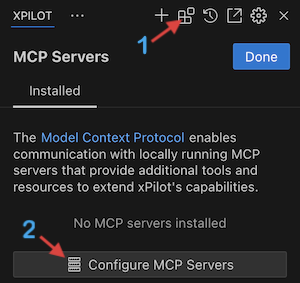
The Configure MCP Servers button will open xPilot’s
mcp_settings.jsonconfiguration file. You can copy and paste the contents of the mcp_settings.json.example file into xPilot’s configuration file.[Important]: Make sure to update the paths to the server files in the configuration file so node can run them.
Replace[HOME]with the actual path to your home directory.For example:
[HOME]/Documents/xPilot/mcp/servers/mx-api-service/index.jsOn Mac/Linux: /Users/{username}/Documents/xPilot/mcp/servers/mx-api-service/index.js On Windows: C:\Users\{username}\Documents\xPilot\mcp\servers\mx-api-service\index.jsxPilot monitors the configuration file for changes and will automatically update the servers when the configuration is updated.
Available MCP Servers
The implementation includes the following servers:
- MultiversX API Service: Implementation handling MultiversX API service requests and responses
- MultiversX Python SDK CLI: Resources explaining CLI tools implemented in Python (mxpy)
- MultiversX Rust SDK CLI: Resources explaining the Rust SDK CLI tools (sc-meta)
Configuration
The mcp_settings.json file contains server configurations for each server. The configuration structure is as follows:
{
  "mcpServers": {
    "mx-api-service": {
      "command": "node",
      "args": ["path/to/index.js"],
      "env": {},
      "disabled": false,
      "autoApprove": []
    }
    // Similar configuration for other servers in the configuration file
  }
}
Configuration Options
command: The command to run the server (e.g.,node)args: Arguments to pass to the commandenv: Environment variables for the server (API keys, etc.)disabled: Boolean flag to enable/disable the serverautoApprove: List of auto-approved actions
Contributing
Contributions are welcome! Please feel free to submit a Pull Request.
Dev Tools Supporting MCP
The following are the main code editors that support the Model Context Protocol. Click the link to visit the official website for more information.







