
Yamcp
What is Yamcp
YAMCP (YAM-C-P) is a command-line tool designed for organizing and managing MCP servers as local workspaces. It connects multiple MCP servers, both local and remote, into a unified workspace for AI applications.
Use cases
Use cases for YAMCP include creating a workspace for coding, design, or research, managing connections for AI applications like Cursor, Claude, and Windsurf, and simplifying server communication log management.
How to use
To use YAMCP, install it via npm with ‘npm install -g yamcp’. You can import servers from a configuration file or add them manually. Create workspaces for different functionalities and run them in your AI applications using ‘yamcp run
Key features
Key features of YAMCP include the ability to create dedicated workspaces for various AI applications, centralized logging for easier monitoring and debugging, and seamless connection to multiple MCP servers.
Where to use
YAMCP is applicable in fields that utilize AI applications, such as software development, design, research, and any domain requiring organized access to multiple MCP servers.
Clients Supporting MCP
The following are the main client software that supports the Model Context Protocol. Click the link to visit the official website for more information.





Overview
What is Yamcp
YAMCP (YAM-C-P) is a command-line tool designed for organizing and managing MCP servers as local workspaces. It connects multiple MCP servers, both local and remote, into a unified workspace for AI applications.
Use cases
Use cases for YAMCP include creating a workspace for coding, design, or research, managing connections for AI applications like Cursor, Claude, and Windsurf, and simplifying server communication log management.
How to use
To use YAMCP, install it via npm with ‘npm install -g yamcp’. You can import servers from a configuration file or add them manually. Create workspaces for different functionalities and run them in your AI applications using ‘yamcp run
Key features
Key features of YAMCP include the ability to create dedicated workspaces for various AI applications, centralized logging for easier monitoring and debugging, and seamless connection to multiple MCP servers.
Where to use
YAMCP is applicable in fields that utilize AI applications, such as software development, design, research, and any domain requiring organized access to multiple MCP servers.
Clients Supporting MCP
The following are the main client software that supports the Model Context Protocol. Click the link to visit the official website for more information.
Content
🍠 YAMCP - A Model Context Workspace Manager
YAMCP (YAM-C-P) is a command-line tool for organizing and managing MCP servers as local workspaces. It seamlessly connects to multiple MCP servers, local or remote, grouping them into a unified workspace exposed as Yet Another MCP server (YAM) for AI applications. You can create dedicated workspaces based on specific functionality (e.g., a YAM workspace for coding, design, research, …) or based on the AI apps that consume servers (e.g., a YAM for Cursor, Claude, Windsurf) or any other combination in between. In addition, it simplifies monitoring and debugging MCP servers by centralizing all server communication logs in a single store, eliminating the need to dig through each AI client app’s logs separately.
Import and Create Workspaces
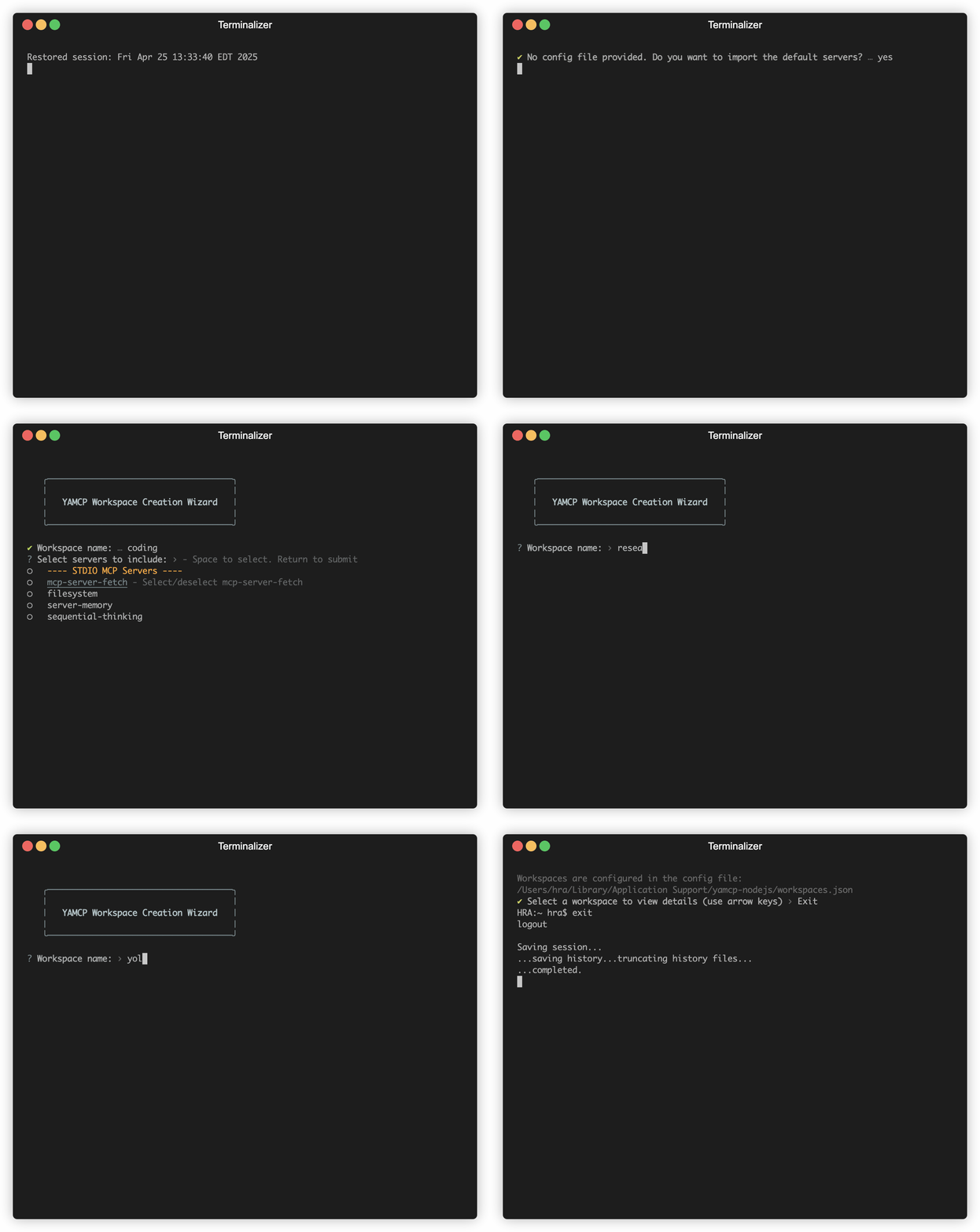
Connect All Bundled Servers in a Workspace to Your AI Apps with One Config
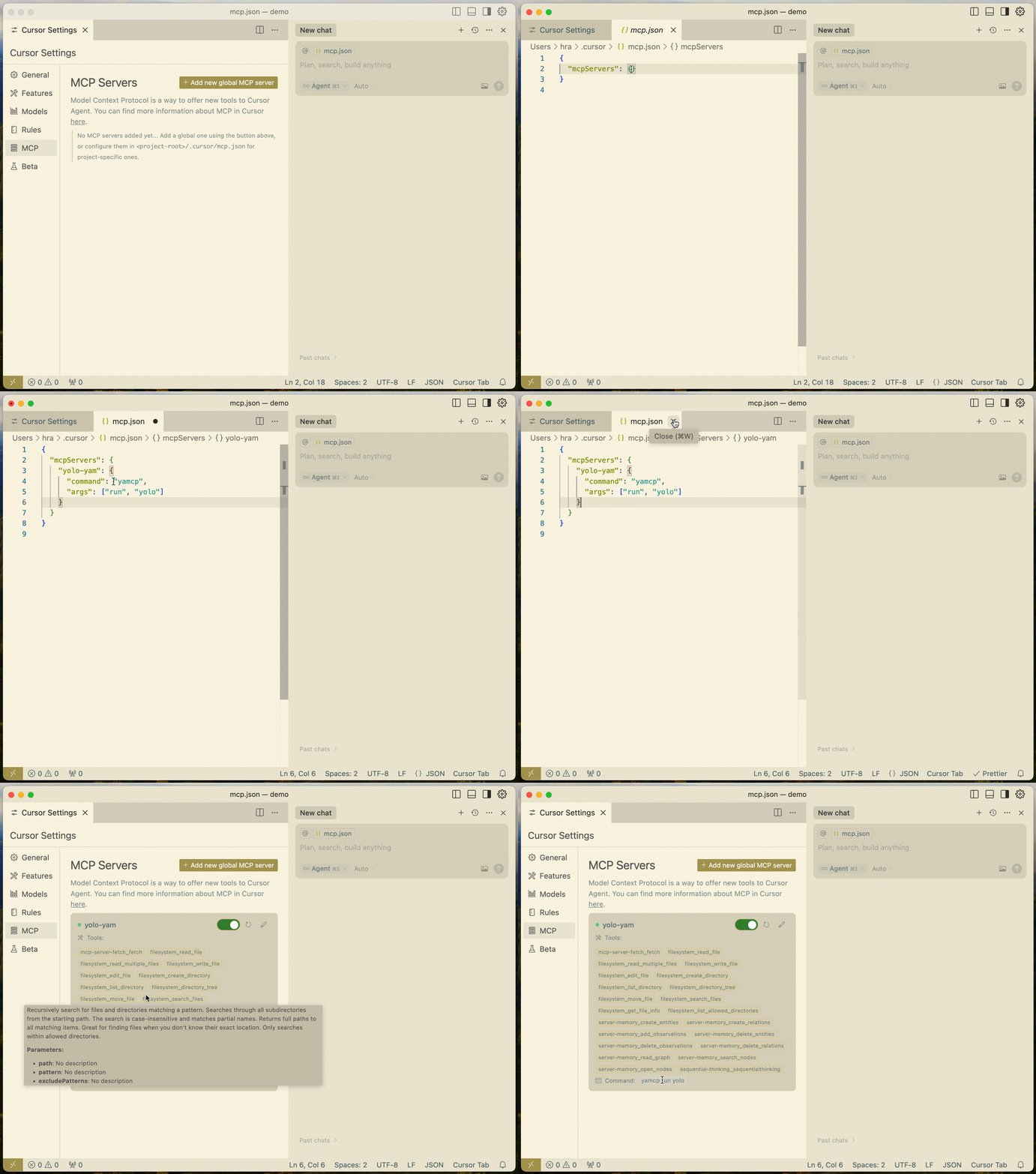
🚀 Quick Start
# Install YAMCP
npm install -g yamcp  # or use npx yamcp

# Import servers (choose one)
yamcp server import [config]    # import servers from config file (see src/example-servers.json for format)
yamcp server add                # or add manually

# create workspaces (e.g. a yam for coding, design, data, ...)
yamcp yam create

# Run workspace in your AI app
yamcp run <yam-workspace-name>
🔑 Key Concepts
- MCP Servers: Remote or local servers that provide Model Context Protocol services
- Workspaces (YAMs): Collections of MCP servers grouped together to be shared with AI Apps (e.g. a workspace for coding, writing, design, magic making!)
- Gateway: A local MCP server that manages connections to configured MCP servers in a workspace and exposes them through a unified server to AI App’s MCP clients
With YAMCP, you can:
- Create workspaces to group MCP servers by AI application (e.g. Cursor, Claude, GitHub Copilot)
- Group servers by workflow purpose (e.g. software development, data science, technical writing)
- Connect AI apps to a single gateway that provides access to all workspace servers
- Manage and monitor multiple MCP server connections through a unified interface
- Track all server communications with detailed logging and debugging capabilities
Top-Level Commands
yamcp [command] [subcommand] [flags]
Available top-level commands:
server- Manage MCP providersyam- Manage workspaces (yams)run- Run the gateway with a workspacelog- View the server log location
🔧 Mcp Server Management Commands
Server Commands
yamcp server add      # Add a new MCP server (interactive)
yamcp server list     # List all configured servers and their status
yamcp server remove   # Remove a server configuration
yamcp server import   # Import server configurations from a JSON file
🍠 Yam Workspace Management Commands
Workspace Commands
yamcp yam create      # Create a new workspace (interactive)
yamcp yam list        # List all workspaces or show specific workspace details
yamcp yam edit        # Modify an existing workspace configuration
yamcp yam scan            # Scan workspaces
yamcp yam delete          # Delete a workspace
Runtime Commands
yamcp run <yam-workspace-name>   # Start the gateway with specified workspace
yamcp log                    # View server communication logs
✅ Command Reference
| Command | Description | Example |
|---|---|---|
server add |
Add a new MCP server | yamcp server add |
server list |
List configured servers | yamcp server list |
server remove |
Remove a server | yamcp server remove [name] |
server import |
Import server config | yamcp server import [config] |
yam create |
Create workspace | yamcp yam create |
yam list |
List workspaces | yamcp yam list |
yam list --name |
Show workspace details | yamcp yam list --name my-workspace |
yam edit |
Edit workspace | yamcp yam edit |
yam scan |
Scan workspace | yamcp yam scan [workspace-name] |
yam delete |
Delete workspace | yamcp yam delete [workspace-name] |
run |
Start gateway | yamcp run <workspace-name> |
log |
View logs | yamcp log |
🖥️ YAMCP UI (created by @eladcandroid)
YAMCP UI provides an intuitive web interface to manage your MCP servers and workspaces through a universal dashboard.
# Run directly with npx (recommended)
npx yamcp-ui

# Or install globally
npm install -g yamcp-ui
yamcp-ui
Refer to the project repo for full documentation: https://github.com/eladcandroid/yamcp-ui.
🏗️ System Architecture
graph TB
    CLI[CLI Commands]
    GW[McpGateway]
    GS[GatewayServer]
    GR[GatewayRouter]
    LOG[Logger]
    STORE[(Store)]
    AI_APP[AI App]

    %% CLI Command Flow
    CLI -->|manages| STORE
    CLI -->|runs| GW

    %% Gateway Components
    GW -->|uses| GS
    GW -->|uses| GR
    GW -->|logs| LOG

    %% Server & Router
    GS -->|stdio transport| AI_APP
    GR -->|connects to| SERVERX
    GR -->|connects to| SERVERY

    %% Data Store
    STORE -->|loads config| GW

    %% External MCP Servers
    subgraph "Workspace Servers"
        SERVERX["Server x (Stdio)"]
        SERVERY["Server y (SSE)"]
    end
    %% Store Components
    subgraph "Configuration Store"
        PROVIDERS[(Provider Config)]
        WORKSPACES[(Workspace Config)]
    end
    STORE --- PROVIDERS
    STORE --- WORKSPACES

    classDef primary fill:#2374ab,stroke:#2374ab,color:#fff
    classDef secondary fill:#ff7e67,stroke:#ff7e67,color:#fff
    classDef store fill:#95b8d1,stroke:#95b8d1,color:#fff

    class GW,GS,GR primary
    class CLI,AI_APP secondary
    class STORE,PROVIDERS,WORKSPACES store
The diagram shows the main components of the YAMCP system:
- CLI Commands: User interface for managing servers and workspaces
- McpGateway: Core component that coordinates the Gateway Server and Router
- GatewayServer: Handles communication with AI Apps via stdio transport
- GatewayRouter: Manages connections to configured MCP servers
- Logger: Provides consolidated logging for all components
- Store: Manages configuration for providers and workspaces
- MCP Servers: Both local (stdio) and remote (SSE) servers that provide MCP services
🪪 Security Audits

Dev Tools Supporting MCP
The following are the main code editors that support the Model Context Protocol. Click the link to visit the official website for more information.







