
Yamcp Ui
What is Yamcp Ui
yamcp-ui is a web-based dashboard designed for managing YAMCP (Yet Another MCP) servers and workspaces. It provides an intuitive interface for users to interact with their MCP environments.
Use cases
Use cases for yamcp-ui include managing multiple MCP servers in a development environment, monitoring server performance and logs, creating and configuring workspaces for different projects, and providing a user-friendly interface for team collaboration on MCP-related tasks.
How to use
To use yamcp-ui, you can run it directly with npx by executing ‘npx yamcp-ui’ in your terminal, or install it globally using ‘npm install -g yamcp-ui’ followed by ‘yamcp-ui’. The dashboard will be accessible at http://localhost:8765.
Key features
Key features of yamcp-ui include server management (add, edit, delete MCP servers), workspace management (create and manage MCP configurations), a real-time dashboard for statistics and system status, log viewing capabilities, a modern UI with dark/light mode support, and secure localhost-only access with CORS protection.
Where to use
yamcp-ui can be used in various fields that require management of model context protocols, such as software development, data analysis, and any application that utilizes MCP servers for workspace management.
Clients Supporting MCP
The following are the main client software that supports the Model Context Protocol. Click the link to visit the official website for more information.





Overview
What is Yamcp Ui
yamcp-ui is a web-based dashboard designed for managing YAMCP (Yet Another MCP) servers and workspaces. It provides an intuitive interface for users to interact with their MCP environments.
Use cases
Use cases for yamcp-ui include managing multiple MCP servers in a development environment, monitoring server performance and logs, creating and configuring workspaces for different projects, and providing a user-friendly interface for team collaboration on MCP-related tasks.
How to use
To use yamcp-ui, you can run it directly with npx by executing ‘npx yamcp-ui’ in your terminal, or install it globally using ‘npm install -g yamcp-ui’ followed by ‘yamcp-ui’. The dashboard will be accessible at http://localhost:8765.
Key features
Key features of yamcp-ui include server management (add, edit, delete MCP servers), workspace management (create and manage MCP configurations), a real-time dashboard for statistics and system status, log viewing capabilities, a modern UI with dark/light mode support, and secure localhost-only access with CORS protection.
Where to use
yamcp-ui can be used in various fields that require management of model context protocols, such as software development, data analysis, and any application that utilizes MCP servers for workspace management.
Clients Supporting MCP
The following are the main client software that supports the Model Context Protocol. Click the link to visit the official website for more information.
Content
YAMCP UI Dashboard
A beautiful web-based dashboard for YAMCP (Yet Another MCP) - A Model Context Protocol workspace manager.
Overview
YAMCP UI provides an intuitive web interface to manage your MCP servers, workspaces, and configurations. Built as a standalone npm package that integrates seamlessly with YAMCP.
Demo
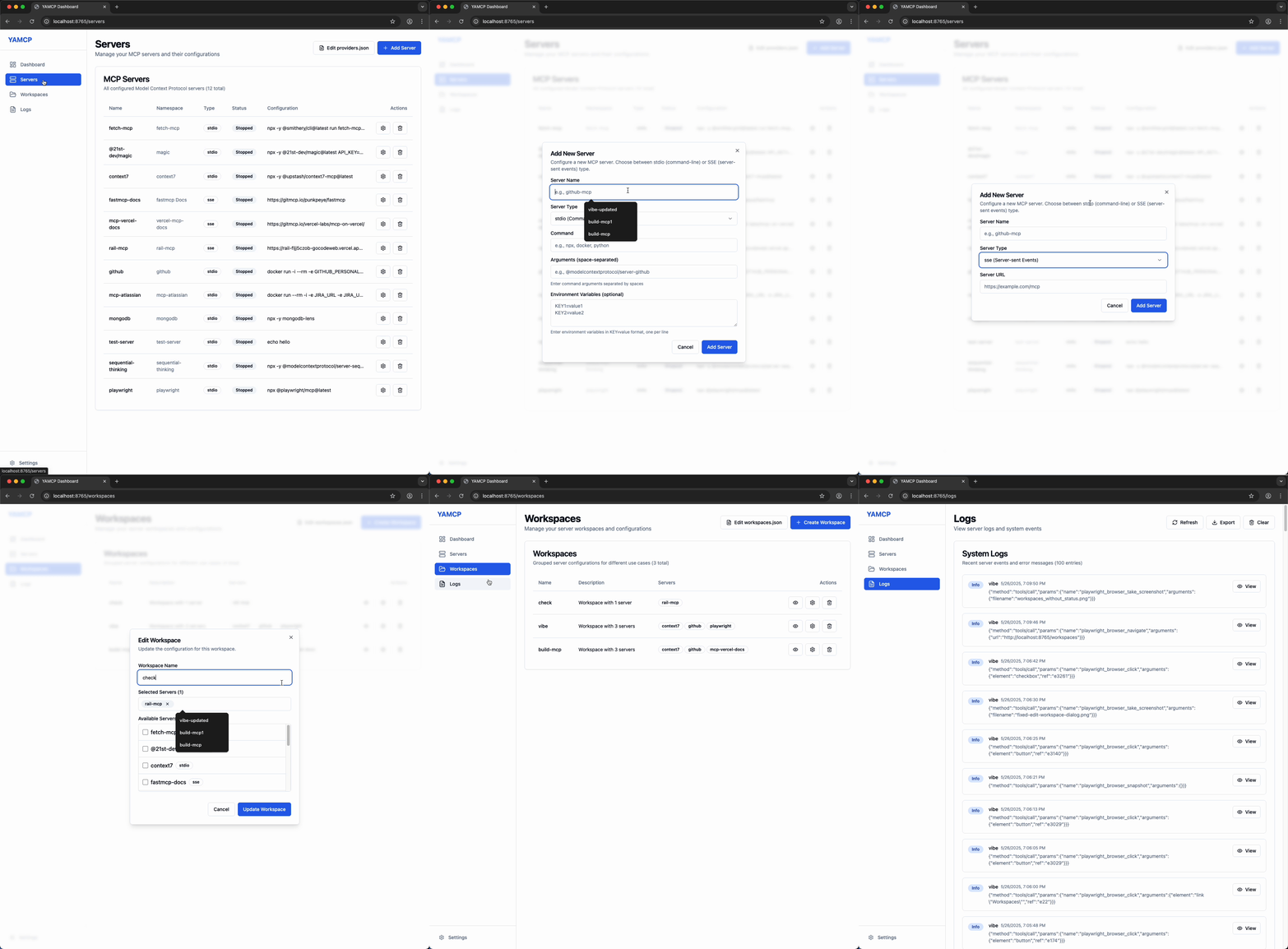
Features
- 🎛️ Server Management: Add, edit, and delete MCP servers
- 📁 Workspace Management: Create and manage workspaces with MCP configurations
- 📊 Real-time Dashboard: View statistics and system status
- 📝 Log Viewing: Monitor server logs and download log files
- 🎨 Modern UI: Beautiful interface with dark/light mode support
- 🔒 Secure: Localhost-only access with CORS protection
Installation & Usage
# Run directly with npx (recommended)
npx yamcp-ui

# Or install globally
npm install -g yamcp-ui
yamcp-ui
The dashboard will be available at http://localhost:8765
Prerequisites
- Node.js 18.0.0 or higher
- YAMCP package (will be automatically installed if missing)
Automatic YAMCP Installation
If YAMCP is not installed, yamcp-ui will offer to install it automatically:
⚠️  yamcp is not installed globally.

Would you like me to install yamcp for you? (Y/n):
Simply press Enter or type ‘y’ to install the latest version of YAMCP.
Development
# Clone the repository
git clone https://github.com/eladcandroid/yamcp-ui.git
cd yamcp-ui

# Install dependencies
npm install

# Start development server
npm run dev

# Build for production
npm run build
Technology Stack
- Frontend: React 18, TypeScript, Tailwind CSS
- UI Components: Radix UI, Lucide React
- Backend: Express.js
- Build Tool: Vite
- Charts: Recharts
Credits
Created by
Elad Cohen
LinkedIn: https://www.linkedin.com/in/eladgocode/
Built on YAMCP by
Hamid Alipour
GitHub: https://github.com/hamidra
YAMCP Repository: https://github.com/hamidra/yamcp
License
MIT License - see LICENSE file for details.
Contributing
Contributions are welcome! Please feel free to submit a Pull Request.
Support
If you encounter any issues, please file them in the GitHub Issues section.
Dev Tools Supporting MCP
The following are the main code editors that support the Model Context Protocol. Click the link to visit the official website for more information.







