
Yandex Maps Mcp
What is Yandex Maps Mcp
Yandex Maps MCP is a server designed for rendering maps and providing geocoding APIs for Yandex Maps. It allows users to convert addresses into geographic coordinates and vice versa, as well as render maps as images.
Use cases
Use cases include integrating map functionalities in websites, creating location-based services, visualizing geographical data, and enhancing user experience in applications that require location information.
How to use
To use Yandex Maps MCP, you need to set up API keys for geocoding and static map rendering. After cloning the repository and installing dependencies, you can run the server and utilize the provided tools for geocoding and map rendering.
Key features
Key features include address to coordinates conversion (geocoding), coordinates to address conversion (reverse geocoding), and rendering maps as PNG images with optional placemarks.
Where to use
Yandex Maps MCP can be used in various fields such as web development, mobile applications, logistics, real estate, and any application that requires mapping and location services.
Clients Supporting MCP
The following are the main client software that supports the Model Context Protocol. Click the link to visit the official website for more information.





Overview
What is Yandex Maps Mcp
Yandex Maps MCP is a server designed for rendering maps and providing geocoding APIs for Yandex Maps. It allows users to convert addresses into geographic coordinates and vice versa, as well as render maps as images.
Use cases
Use cases include integrating map functionalities in websites, creating location-based services, visualizing geographical data, and enhancing user experience in applications that require location information.
How to use
To use Yandex Maps MCP, you need to set up API keys for geocoding and static map rendering. After cloning the repository and installing dependencies, you can run the server and utilize the provided tools for geocoding and map rendering.
Key features
Key features include address to coordinates conversion (geocoding), coordinates to address conversion (reverse geocoding), and rendering maps as PNG images with optional placemarks.
Where to use
Yandex Maps MCP can be used in various fields such as web development, mobile applications, logistics, real estate, and any application that requires mapping and location services.
Clients Supporting MCP
The following are the main client software that supports the Model Context Protocol. Click the link to visit the official website for more information.
Content
Yandex Maps MCP Server
MCP Server for the Yandex Maps API.
“Show me the map of Berlin”
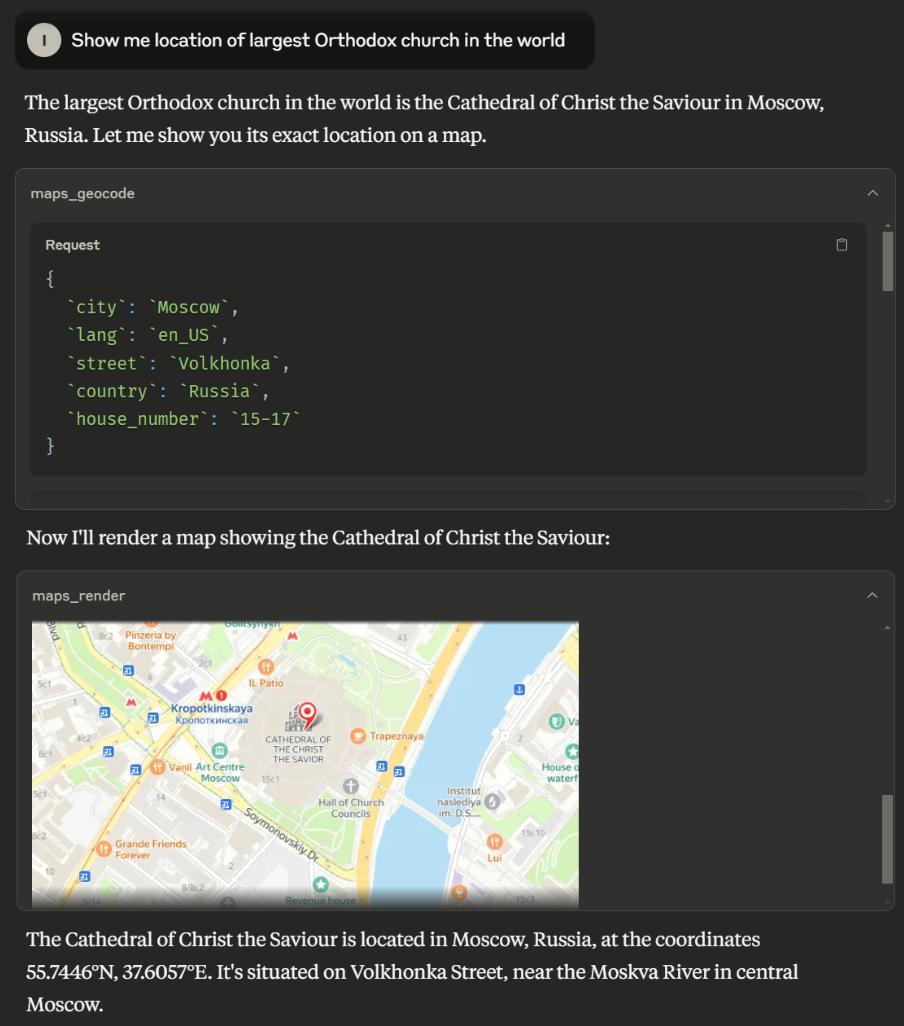
“Show me location of …”
Tools
-
maps_geocode- Convert address to coordinates
- Inputs:
country(string) - The country namelang(string) - Language code (e.g., ‘ru_RU’, ‘en_US’)state(string, optional) - The state, region or province namecity(string, optional) - The city or locality namedistrict(string, optional) - The district or neighborhood within the citystreet(string, optional) - The street namehouse_number(string, optional) - The house or building number
- Returns: location, formatted_address, address_components
-
maps_reverse_geocode- Convert coordinates to address
- Inputs:
latitude(number)longitude(number)lang(string) - Language code (e.g., ‘ru_RU’, ‘en_US’)
- Returns: location, formatted_address, address_components
-
maps_render- Render a map as a png image
- Inputs:
latitude(number) - Latitude coordinate of map centerlongitude(number) - Longitude coordinate of map centerlatitude_span(number) - Height of map image in degreeslongitude_span(number) - Width of map image in degreeslang(string) - Language code (e.g., ‘ru_RU’, ‘en_US’)placemarks(array, optional) - Array of placemarks to display on the map with style “pm2rdm”- Each placemark should have
latitudeandlongitudeproperties
- Each placemark should have
- Returns: PNG image of the map
Setup
API Keys
You’ll need two Yandex Maps API keys:
- “JavaScript and Geocoder API” key for geocoding functions
- Static API key for map rendering
To generate API keys:
- Open https://developer.tech.yandex.ru/ and authorize
- Click “Connect APIs”. Choose “JavaScript and Geocoder API” and fill the form
- Navigate to API’s dashboard page and copy API key there
- Repeat from step 2 for Static API.
Local Run
- Clone the repository
- Install dependencies:
npm install - Set your API keys:
export YANDEX_MAPS_API_KEY="your-geocoder-api-key" export YANDEX_MAPS_STATIC_API_KEY="your-static-api-key" - Build server
npm run build - Run the server:
node dist/index.js
Usage with Claude Desktop
Add the following to your claude_desktop_config.json:
{
  "mcpServers": {
    "yandex-maps": {
      "command": "node",
      "args": [
        "path/to/index.js"
      ],
      "env": {
        "YANDEX_MAPS_API_KEY": "<YOUR_GEOCODER_API_KEY>",
        "YANDEX_MAPS_STATIC_API_KEY": "<YOUR_STATIC_API_KEY>"
      }
    }
  }
}
Known Limitations
Yandex Maps Places API has no free tier, which means that LLMs cannot retrieve organization addresses and coordinates through the Yandex Maps MCP. It can only geocode places whose addresses or coordinates are already known to the model or retrieved from other sources such as explicit user input, Web Search, or third-party MCPs.
License
This project is licensed under the MIT License - see the LICENSE file for details.
Dev Tools Supporting MCP
The following are the main code editors that support the Model Context Protocol. Click the link to visit the official website for more information.







