
Yoktez Mcp
What is Yoktez Mcp
Yoktez-mcp is an MCP Server designed for the Turkish Thesis Database, facilitating access to the YÖK National Thesis Center through a standard MCP interface.
Use cases
Use cases include enabling LLM applications to perform thesis searches, retrieve thesis documents, and extract metadata for academic research, as well as integrating with other tools for enhanced data processing.
How to use
To use yoktez-mcp, install Python 3.11 and ensure it is added to your system PATH. You can then integrate it with applications like Claude Desktop or other MCP clients such as 5ire using the fastmcp install command or manual configuration.
Key features
Key features include detailed thesis search capabilities based on various criteria, retrieval of thesis documents in processed Markdown format, metadata extraction from thesis detail pages, and PDF permission checks for inaccessible or unpublished theses.
Where to use
Yoktez-mcp can be used in academic research, educational institutions, and any application requiring access to the Turkish thesis database for research or analysis purposes.
Clients Supporting MCP
The following are the main client software that supports the Model Context Protocol. Click the link to visit the official website for more information.





Overview
What is Yoktez Mcp
Yoktez-mcp is an MCP Server designed for the Turkish Thesis Database, facilitating access to the YÖK National Thesis Center through a standard MCP interface.
Use cases
Use cases include enabling LLM applications to perform thesis searches, retrieve thesis documents, and extract metadata for academic research, as well as integrating with other tools for enhanced data processing.
How to use
To use yoktez-mcp, install Python 3.11 and ensure it is added to your system PATH. You can then integrate it with applications like Claude Desktop or other MCP clients such as 5ire using the fastmcp install command or manual configuration.
Key features
Key features include detailed thesis search capabilities based on various criteria, retrieval of thesis documents in processed Markdown format, metadata extraction from thesis detail pages, and PDF permission checks for inaccessible or unpublished theses.
Where to use
Yoktez-mcp can be used in academic research, educational institutions, and any application requiring access to the Turkish thesis database for research or analysis purposes.
Clients Supporting MCP
The following are the main client software that supports the Model Context Protocol. Click the link to visit the official website for more information.
Content
YokTez MCP: YÖK Ulusal Tez Merkezi için MCP Sunucusu
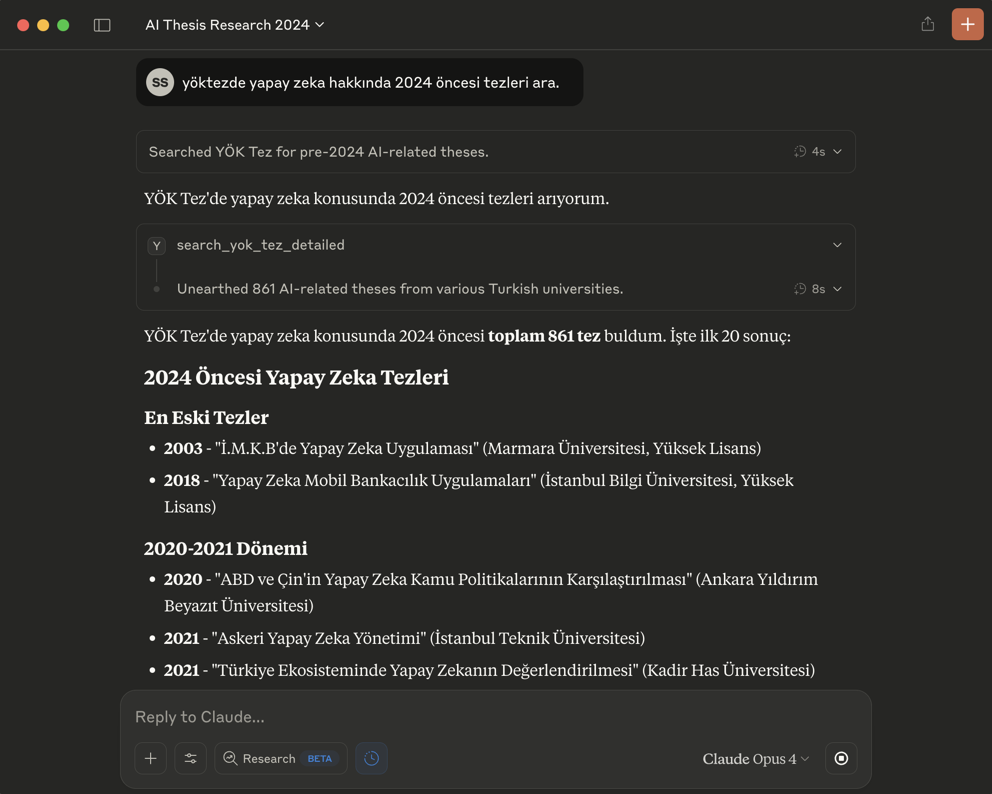
Bu proje, Yükseköğretim Kurulu (YÖK) Ulusal Tez Merkezi’ne erişimi kolaylaştıran bir FastMCP sunucusu oluşturur. Bu sayede, YÖK Tez Merkezi’nden tez arama ve tezlerin PDF içeriklerini Markdown formatında getirme işlemleri, Model Context Protocol (MCP) destekleyen LLM (Büyük Dil Modeli) uygulamaları (örneğin Claude Desktop veya 5ire) ve diğer istemciler tarafından araç (tool) olarak kullanılabilir hale gelir.
🎯 Temel Özellikler
- YÖK Ulusal Tez Merkezi’ne programatik erişim için standart bir MCP arayüzü.
- Aşağıdaki yetenekler:
- Detaylı Tez Arama: Başlık, yazar, danışman, üniversite, enstitü, anabilim/bilim dalı, tez türü, yıl aralığı, izin durumu, tez numarası, konu, dizin ve özet metni gibi çeşitli kriterlere göre tez arama.
- Tez Belgesi Getirme: Belirli bir tezin PDF içeriğini, PDF sayfa bazında, işlenmiş Markdown formatında getirme.
- Metadata Çıkarımı: Tez detay sayfalarından başlık, yazar, yıl, özet gibi önemli üst verilerin çıkarılması.
- PDF İzin Kontrolü: Erişilemeyen veya yayın izni olmayan tezler için uygun bildirim.
- Karar metinlerinin LLM’ler tarafından daha kolay işlenebilmesi için Markdown formatına çevrilmesi.
- Claude Desktop uygulaması ile
fastmcp installkomutu (veya manuel yapılandırma) kullanılarak kolay entegrasyon. - YokTez MCP 5ire gibi Claude Desktop haricindeki MCP istemcilerini de destekler.
🚀 Claude Haricindeki Modellerle Kullanmak İçin Çok Kolay Kurulum (Örnek: 5ire için)
Bu bölüm, YokTez MCP aracını 5ire gibi Claude Desktop dışındaki MCP istemcileriyle kullanmak isteyenler içindir.
- Python Kurulumu: Sisteminizde Python 3.11 kurulu olmalıdır. Kurulum sırasında “Add Python to PATH” (Python’ı PATH’e ekle) seçeneğini işaretlemeyi unutmayın. Buradan 3.11 sürümünü indirebilirsiniz.
- Git Kurulumu (Windows): Bilgisayarınıza git yazılımını indirip kurun. “Git for Windows/x64 Setup” seçeneğini indirmelisiniz.
uvKurulumu:- Windows Kullanıcıları (PowerShell): Bir CMD ekranı açın ve bu kodu çalıştırın:
powershell -ExecutionPolicy ByPass -c "irm https://astral.sh/uv/install.ps1 | iex" - Mac/Linux Kullanıcıları (Terminal): Bir Terminal ekranı açın ve bu kodu çalıştırın:
curl -LsSf https://astral.sh/uv/install.sh | sh
- Windows Kullanıcıları (PowerShell): Bir CMD ekranı açın ve bu kodu çalıştırın:
- Microsoft Visual C++ Redistributable (Windows): Bazı Python paketlerinin doğru çalışması için gereklidir. Buradan indirip kurun.
- İşletim sisteminize uygun 5ire MCP istemcisini indirip kurun.
- 5ire’ı açın. Workspace -> Providers menüsünden kullanmak istediğiniz LLM servisinin API anahtarını girin.
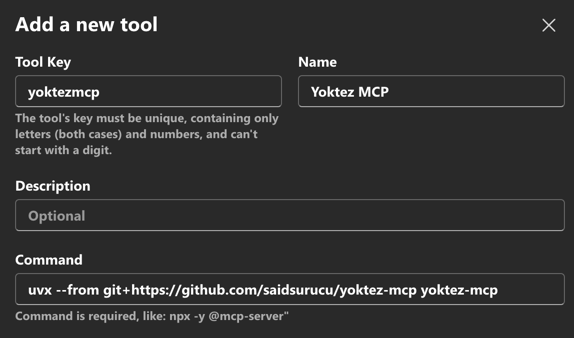
- Tools menüsüne girin. +Local veya New yazan butona basın.
- Tool Key:
yoktezmcp - Name:
YokTez MCP - Command:
uvx --from git+https://github.com/saidsurucu/yoktez-mcp yoktez-mcp - Save butonuna basarak kaydedin.
- Tool Key:
- Şimdi Tools altında YokTez MCP’yi görüyor olmalısınız. Üstüne geldiğinizde sağda çıkan butona tıklayıp etkinleştirin (yeşil ışık yanmalı).
- Artık YokTez MCP ile konuşabilirsiniz.
⚙️ Claude Desktop Manuel Kurulumu
-
Ön Gereksinimler: Python,
uv, (Windows için) Microsoft Visual C++ Redistributable’ın sisteminizde kurulu olduğundan emin olun. Detaylı bilgi için yukarıdaki “5ire için Kurulum” bölümündeki ilgili adımlara bakabilirsiniz. -
Claude Desktop Settings -> Developer -> Edit Config.
-
Açılan
claude_desktop_config.jsondosyasınamcpServersaltına ekleyin: -
Claude Desktop’ı kapatıp yeniden başlatın.
🛠️ Kullanılabilir Araçlar (MCP Tools)
Bu FastMCP sunucusu LLM modelleri için aşağıdaki araçları sunar:
-
search_yok_tez_detailed: YÖK Ulusal Tez Merkezi’nde çeşitli detaylı kriterleri kullanarak tez araması yapar.- Parametreler:
tez_ad,yazar_ad_soyad,danisman_ad_soyad,universite_ad,enstitu_ad,anabilim_dal_ad,bilim_dal_ad,tez_no,konu_basliklari,dizin_terimleri,ozet_metni,tez_turu,izin_durumu,tez_durumu,dil,enstitu_grubu,yil_baslangic,yil_bitis,page,results_per_page. - Döndürdüğü Değer:
YokTezSearchResult(sayfalanmış tez özeti listesi, toplam sonuç sayısı vb. içerir)
- Parametreler:
-
get_yok_tez_document_markdown: Belirli bir YÖK tezinin PDF içeriğini, istenen PDF sayfasına göre Markdown formatında getirir.- Parametreler:
detail_page_url(tez detay sayfası URL’si),page_number(istenen PDF sayfa numarası). - Döndürdüğü Değer:
YokTezDocumentMarkdown(sayfanın Markdown içeriği, toplam sayfa sayısı, metadata vb. içerir)
- Parametreler:
📜 Lisans
Bu proje MIT Lisansı altında lisanslanmıştır. Detaylar için LICENSE dosyasına bakınız.
Dev Tools Supporting MCP
The following are the main code editors that support the Model Context Protocol. Click the link to visit the official website for more information.







