
Youtube Mcp Server
What is Youtube Mcp Server
youtube_mcp_server is a simple MCP SSE server designed to query YouTube videos based on topics or video titles using the ezmcp framework.
Use cases
Use cases include building applications that recommend videos based on user interests, creating educational tools that fetch relevant video content, and developing marketing tools that analyze video trends by topic.
How to use
To use youtube_mcp_server, set the required environment variables including your YouTube API key, application version, and port. You can then query YouTube videos by sending requests to the server with specific topics or keywords.
Key features
Key features include the ability to search for YouTube videos by topic or title, support for the YouTube Data API, and the option to construct video URLs from the returned video IDs.
Where to use
youtube_mcp_server can be used in various fields such as content creation, digital marketing, and educational platforms where video content needs to be searched and retrieved based on specific topics.
Clients Supporting MCP
The following are the main client software that supports the Model Context Protocol. Click the link to visit the official website for more information.





Overview
What is Youtube Mcp Server
youtube_mcp_server is a simple MCP SSE server designed to query YouTube videos based on topics or video titles using the ezmcp framework.
Use cases
Use cases include building applications that recommend videos based on user interests, creating educational tools that fetch relevant video content, and developing marketing tools that analyze video trends by topic.
How to use
To use youtube_mcp_server, set the required environment variables including your YouTube API key, application version, and port. You can then query YouTube videos by sending requests to the server with specific topics or keywords.
Key features
Key features include the ability to search for YouTube videos by topic or title, support for the YouTube Data API, and the option to construct video URLs from the returned video IDs.
Where to use
youtube_mcp_server can be used in various fields such as content creation, digital marketing, and educational platforms where video content needs to be searched and retrieved based on specific topics.
Clients Supporting MCP
The following are the main client software that supports the Model Context Protocol. Click the link to visit the official website for more information.
Content
Youtube MCP server
MCP server to query youtube videos by topic / video title
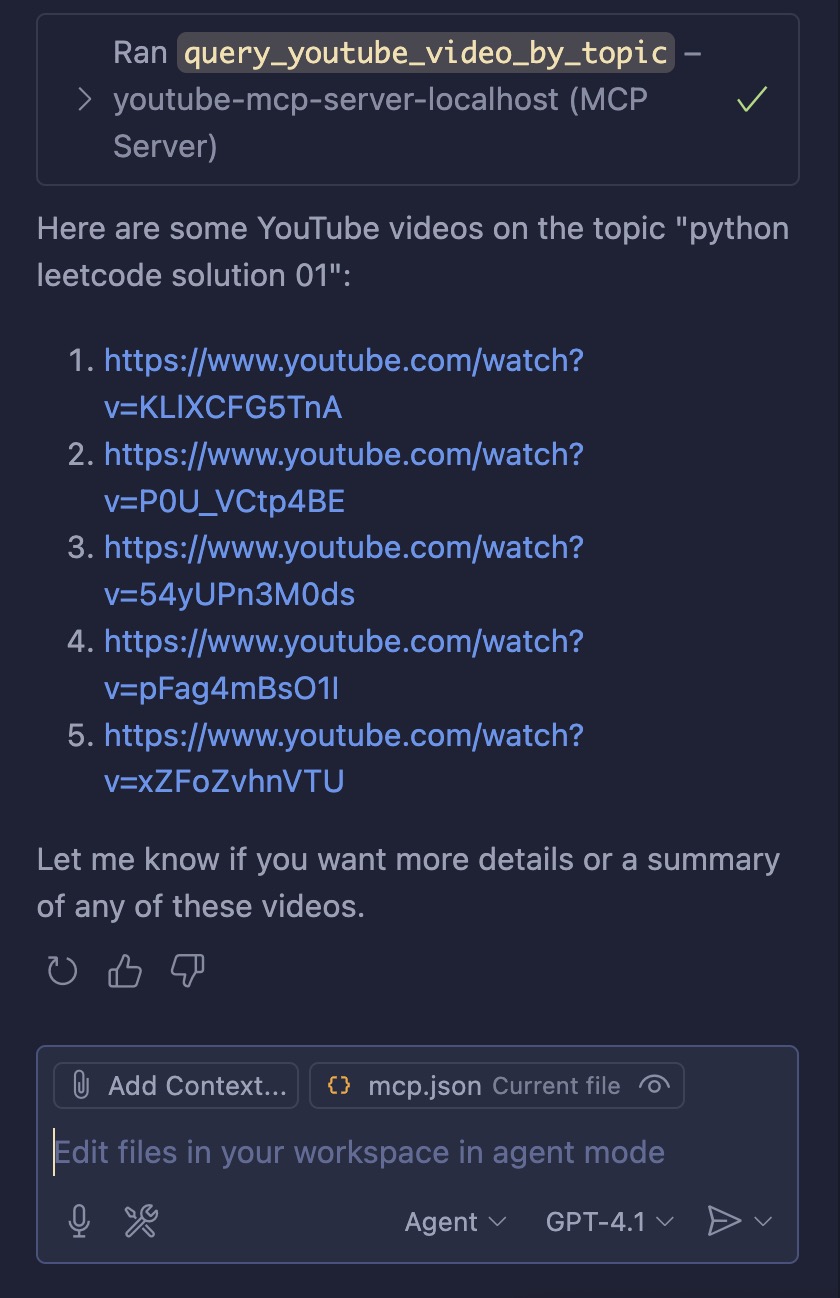
How to Setup
You need the following env variables
YOUTUBE_API_KEY=<your_youtube_api_key>
APP_VERSION="1.0.0"
APP_PORT=8000
Querying YouTube Videos by Topic Using URLs
To query YouTube for videos related to a specific topic and obtain their URLs, you have several options, primarily centered around the YouTube Data API.
YouTube Data API Approach
The most robust and official way to search for YouTube videos by topic is to use the YouTube Data API’s search.list endpoint. This allows you to specify a query term (the topic) and receive a list of matching videos, including their URLs. Here’s how it works:
- You make a request to the search.list endpoint with parameters such as q (your topic keyword), type=video, and part=snippet.
- The API returns a JSON response containing video IDs.
- You can construct the video URL using the format:
https://www.youtube.com/watch?v=VIDEO_ID
# curl command
GET https://www.googleapis.com/youtube/v3/search?part=snippet&q=YOUR_TOPIC&type=video&key=YOUR_API_KEY
Constructing the Video URL:
Each video in the response has an id.videoId field.
The URL for a video is: https://www.youtube.com/watch?v=VIDEO_ID
Topic-based Filtering
The search.list endpoint also supports a topicId parameter for more precise topic filtering,
but this requires knowing the specific topic ID in advance.
For general keyword searches, just use the q parameter.
Direct YouTube URL Search (Without API)
If you want to search directly via a URL (without using the API), you can use YouTube’s web search:
Dev Tools Supporting MCP
The following are the main code editors that support the Model Context Protocol. Click the link to visit the official website for more information.







