
Yunxin Mcp Server
What is Yunxin Mcp Server
yunxin-mcp-server is a tool designed for Yunxin clients who want to leverage large models to handle functionalities and data related to Yunxin IM/RTC. It provides a suite of tools for accessing and analyzing IM/RTC-related features and data.
Use cases
Use cases include sending operational messages, analyzing historical message data for operational insights, monitoring RTC room performance, and checking online user fluctuations to ensure service reliability.
How to use
To use yunxin-mcp-server, refer to the provided documentation, specifically the ‘how_to_use’ section. Users can utilize various tools for sending messages, querying message history, and analyzing statistics.
Key features
Key features include sending one-on-one and group messages, querying message history, retrieving daily statistics, analyzing RTC room member information, monitoring video/audio stuttering rates, and checking online user counts.
Where to use
yunxin-mcp-server can be used in various fields such as customer support, data analysis, real-time communication monitoring, and operational management within applications that utilize IM/RTC functionalities.
Clients Supporting MCP
The following are the main client software that supports the Model Context Protocol. Click the link to visit the official website for more information.





Overview
What is Yunxin Mcp Server
yunxin-mcp-server is a tool designed for Yunxin clients who want to leverage large models to handle functionalities and data related to Yunxin IM/RTC. It provides a suite of tools for accessing and analyzing IM/RTC-related features and data.
Use cases
Use cases include sending operational messages, analyzing historical message data for operational insights, monitoring RTC room performance, and checking online user fluctuations to ensure service reliability.
How to use
To use yunxin-mcp-server, refer to the provided documentation, specifically the ‘how_to_use’ section. Users can utilize various tools for sending messages, querying message history, and analyzing statistics.
Key features
Key features include sending one-on-one and group messages, querying message history, retrieving daily statistics, analyzing RTC room member information, monitoring video/audio stuttering rates, and checking online user counts.
Where to use
yunxin-mcp-server can be used in various fields such as customer support, data analysis, real-time communication monitoring, and operational management within applications that utilize IM/RTC functionalities.
Clients Supporting MCP
The following are the main client software that supports the Model Context Protocol. Click the link to visit the official website for more information.
Content
yunxin-mcp-server
- 如果你是云信的客户,并且希望通过大模型来处理云信IM/RTC相关的功能和数据,那么yunxin-mcp-server可能适合你
- yunxin-mcp-server提供了一系列的工具,来访问和分析云信IM/RTC相关的功能和数据
- 如果你对当前提供的工具有什么建议,或者有其他的工具需求,欢迎留言告诉我们!
- 有任何问题欢迎联系云信技术支持,或者添加微信
hdnxttl
架构图
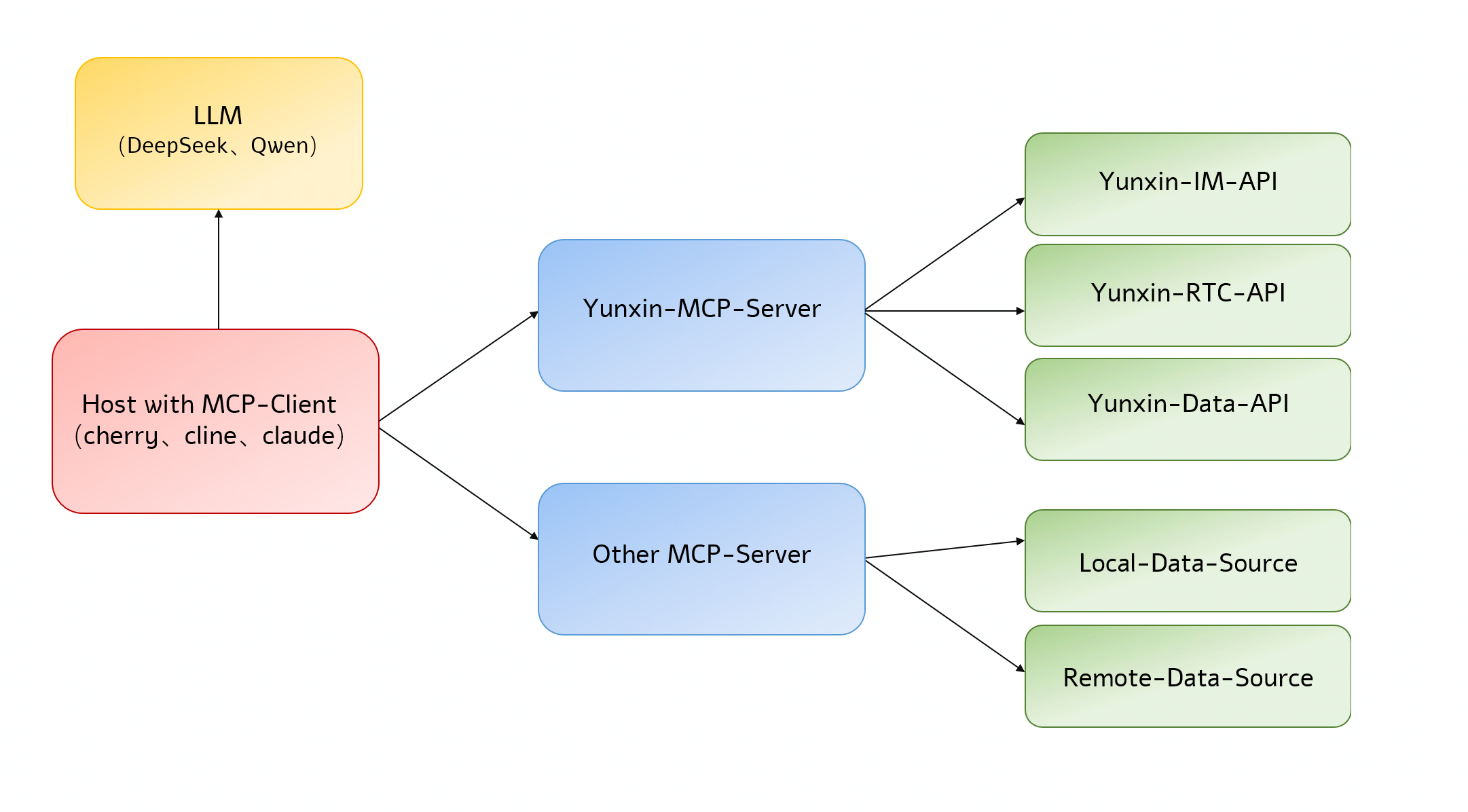
如何使用
示例:how_to_use
介绍文章:微信公众号
工具集合
send_p2p_msg/send_team_msg
- 功能:发送单聊/群聊消息
- 说明:根据发送方accid和接收方accid,发送一条单聊文本消息;根据发送方accid和群tid,发送一条群聊文本消息
- 场景:发送运营类消息
- 示例:send_msg
query_p2p_msg_history/query_team_msg_history
- 功能:查询单聊/群聊历史消息
- 说明:根据发送方accid和接受方accid,以及时间戳范围,查询历史消息;根据accid和群tid,以及时间戳范围,查询群聊历史消息
- 场景:分析历史消息辅助运营
- 示例:query_msg
query_application_im_daily_stats
- 功能:查询应用IM每日统计数据
- 说明:当前包括:日活、上下行消息量、累积的文件存储量、抄送(次数、成功率和平均耗时)、第三方回调(次数、成功率和平均耗时)
- 场景:分析每日统计数据,检查服务是否有异常
- 示例:query_application_im_daily_stats
query_rtc_room_members/query_rtc_room_members_by_uids
- 功能:查询rtc房间的成员信息
- 说明:查询一个rtc房间中的成员信息,可以查询所有成员,也可以指定uid列表查询部分成员,可以查询成员在线时长、所在的地区和运营商、设备信息等
- 场景:分析rtc房间基本信息
- 示例:query_rtc_room_members
query_rtc_room_stuck_rate/query_rtc_room_user_stuck_rate
- 功能:查询房间音视频卡顿率指标,可以是房间级别或者uid级别
- 说明:查询某个或者某几个房间的卡顿率
- 场景:查询房间卡顿率,监控线上服务
- 示例:query_rtc_room_stuck_rate
query_rtc_room_top_20
- 功能:按照指标获取 Top 20 的房间,根据 Top 20 房间查询近 30 分钟其它相关指标
- 说明:支持指标:通话用户数、用户平均进房时长、视频卡顿率、音频卡顿率、音频网络延时、视频网络延时
- 场景:监控系统整体运行状况
- 示例:query_rtc_room_top_20
query_rtc_quality_distribution
- 功能:查询指标实时多维度分布
- 说明:支持的维度:操作系统、国家、省份、sdk版本、网络;支持的指标:5s 进房成功率、音频卡顿率、视频卡顿率
- 场景:监控系统整体运行状况
- 示例:query_rt_quality_distribution
query_im_online_connect_latest/query_im_online_connect
- 功能:查询在线人数
- 说明:支持查询最新的在线人数,也支持根据时间范围查询在线人数,允许查询最近7天的数据,每次查询最多8小时
- 场景:分析在线人数波动情况
- 示例:query_online_connect
query_im_msg_latest/query_im_msg
- 功能:查询上下行消息量,1分钟一个点
- 说明:支持查询最近n分钟的上下行消息量,也支持根据时间范围查询上下行消息量,允许查询最近7天的数据,每次查询最多8小时
- 场景:分析上下行消息的波动情况
- 示例:query_im_msg
query_im_api_stats/query_im_api_stats_last
- 功能:查询api调用情况,包括调用数量、平均响应时间、错误码情况,1分钟一个点
- 说明:支持查询最近n分钟的api调用情况,也支持根据时间范围查询,允许查询最近7天的数据,每次查询最多8小时;支持查询api的整体情况,也支持查询单个接口的情况
- 场景:分析api调用的情况
- 示例:query_im_api_stats
query_im_sdk_stats/query_im_sdk_stats_last
- 功能:查询sdk调用情况,包括调用数量、平均响应时间、错误码情况,1分钟一个点
- 说明:支持查询最近n分钟的sdk调用情况,也支持根据时间范围查询,允许查询最近7天的数据,每次查询最多8小时;支持查询api的整体情况,也支持查询单个接口的情况(目前支持以下接口级别的统计:登录、单聊消息、群聊消息、系统通知、聊天室消息)
- 场景:分析sdk调用的情况
- 示例:query_im_sdk_stats
Dev Tools Supporting MCP
The following are the main code editors that support the Model Context Protocol. Click the link to visit the official website for more information.







