
Zen Syllabus Mcp
What is Zen Syllabus Mcp
zen-syllabus-mcp is an implementation of the MCP server designed to utilize the content from ZEN University syllabus, providing a structured way to access and interact with educational resources.
Use cases
Use cases for zen-syllabus-mcp include recommending courses for students aiming to become frontend engineers, providing detailed course consultation based on specific requirements, and integrating with AI tools for enhanced educational support.
How to use
To use zen-syllabus-mcp, install Node.js version 20 or higher, clone the repository or download it as a ZIP file. Then, run ‘npx tsc’ in the console to build the project. Configure Claude Desktop or VSCode to point to the built index.js file and restart the application to start using the server.
Key features
Key features of zen-syllabus-mcp include integration with Claude Desktop and VSCode, the ability to recommend subjects based on user queries, and support for detailed course consultation based on enrollment requirements.
Where to use
zen-syllabus-mcp can be used in educational institutions, particularly in universities, to facilitate access to course syllabi and enhance the learning experience for students and educators.
Clients Supporting MCP
The following are the main client software that supports the Model Context Protocol. Click the link to visit the official website for more information.





Overview
What is Zen Syllabus Mcp
zen-syllabus-mcp is an implementation of the MCP server designed to utilize the content from ZEN University syllabus, providing a structured way to access and interact with educational resources.
Use cases
Use cases for zen-syllabus-mcp include recommending courses for students aiming to become frontend engineers, providing detailed course consultation based on specific requirements, and integrating with AI tools for enhanced educational support.
How to use
To use zen-syllabus-mcp, install Node.js version 20 or higher, clone the repository or download it as a ZIP file. Then, run ‘npx tsc’ in the console to build the project. Configure Claude Desktop or VSCode to point to the built index.js file and restart the application to start using the server.
Key features
Key features of zen-syllabus-mcp include integration with Claude Desktop and VSCode, the ability to recommend subjects based on user queries, and support for detailed course consultation based on enrollment requirements.
Where to use
zen-syllabus-mcp can be used in educational institutions, particularly in universities, to facilitate access to course syllabi and enhance the learning experience for students and educators.
Clients Supporting MCP
The following are the main client software that supports the Model Context Protocol. Click the link to visit the official website for more information.
Content
ZEN大学シラバスMCPサーバー実装
ZEN大学シラバスのコンテンツを利用できるようMCPを実装したもの。
使い方
Node.jsをインストールする。
Node.jsのバージョンは20以上を使用すること。
このリポジトリをクローンするか、ZIPでダウンロードして展開する。
コンソールで開き、以下のコマンドを実行する。
npm install
npx tsc
でビルド。Macはコンソールで実行権限をつける。 chmod 755 build/index.js
Claude Desktopでの設定
Claude Desktopをインストールする。
VSCodeのエディタがインストール前提だが、
code $env:AppData\Claude\claude_desktop_config.json
で設定ファイルを開く。Macは、
code ~/Library/Application\ Support/Claude/claude_desktop_config.json
以下のように書き換えて設定。
{
  "mcpServers": {
    "get-subjects": {
      "command": "node",
      "args": [
        "C:\\Users\\sifue\\workspace\\zen-syllabus-mcp\\build\\index.js"
      ]
    }
  }
}build/index.jsのパスは適宜変更すること。
Macでは、
{
  "mcpServers": {
    "get-subjects": {
      "command": "node",
      "args": [
        "/Users/sifue/workspace/zen-syllabus-mcp/build/index.js"
      ]
    }
  }
}nvmなどのNode.jsのバージョン管理システムを利用している場合以下のようにnodeを指定する。
{
  "mcpServers": {
    "get-subjects": {
      "command": "/Users/soichiro_yoshimura/.nvm/versions/node/v22.14.0/bin/node",
      "args": [
        "/Users/soichiro_yoshimura/workspace/zen-syllabus-mcp/build/index.js"
      ]
    }
  }
}このようになる。build/index.jsのパスは適宜変更すること。
設定後はClaude Desktopを再起動。
「ZEN大学のシラバスMCPを利用して、フロントエンドエンジニアになるためのオススメの科目をあげてください」
で検証。
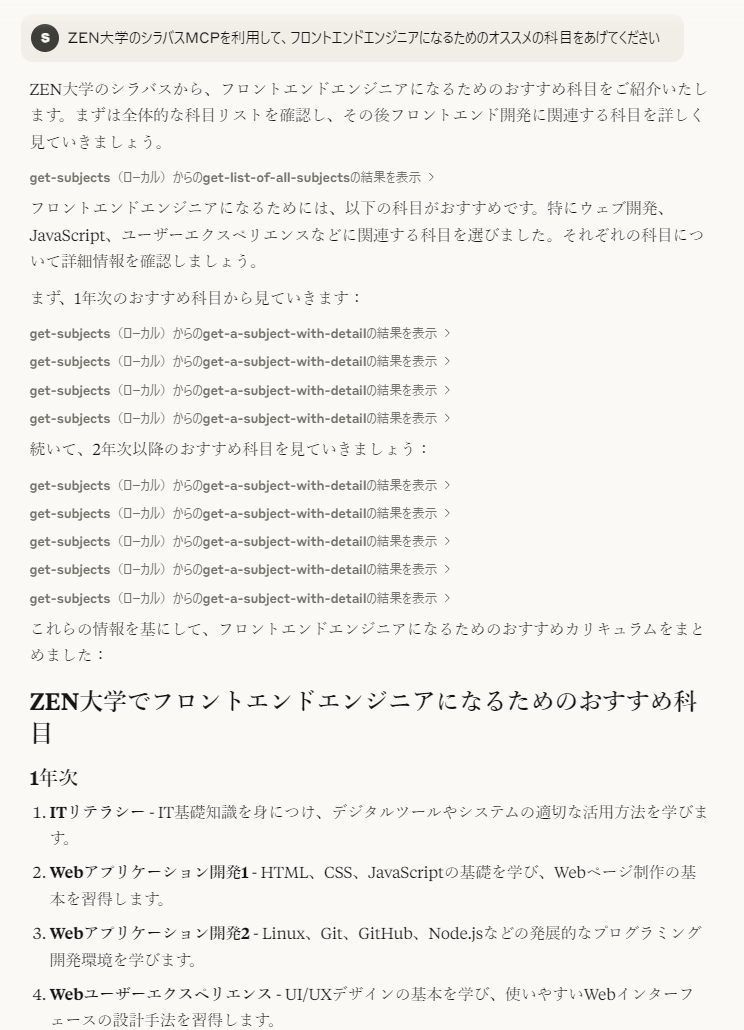
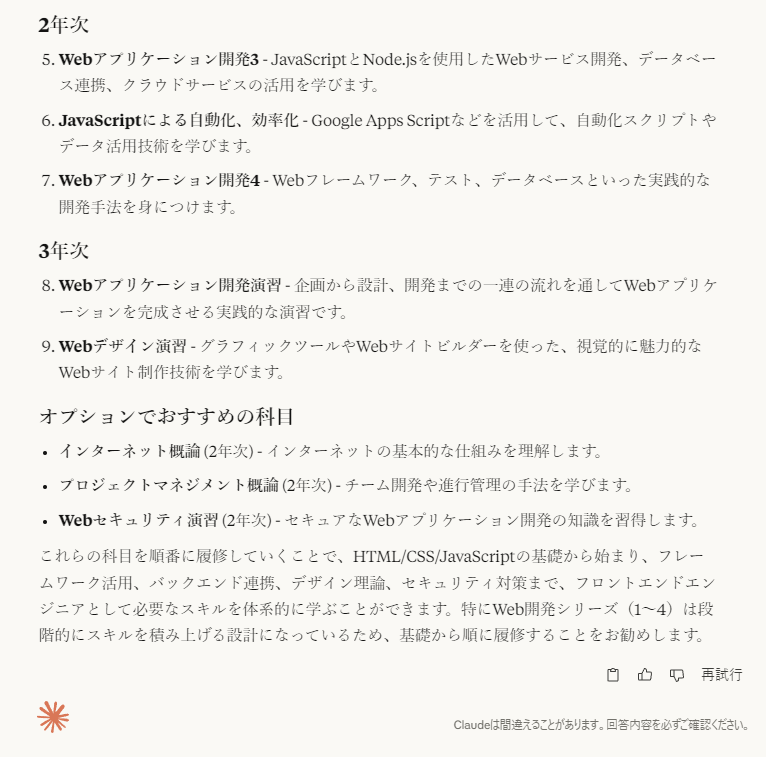
このようになる。履修要件を設定すれば細かな履修相談も可能。
VSCodeの設定
【未検証】いずれGitHub Copilot でAIエージェントが利用できるようなると利用できるらしい(現在はプレビュー版のみ)。
mcpで設定を検索して以下をsetting.jsonに設定。パスは適宜変更すること。jsonのweatherの上に起動ボタンが現れるので起動しておく。
{
  "mcpServers": {
    "get-subjects": {
      "command": "node",
      "args": [
        "C:\\Users\\sifue\\workspace\\zen-syllabus-mcp\\build\\index.js"
      ]
    }
  }
}
設定後はGitHub Copilotで
「ZEN大学のシラバスMCPを利用して、フロントエンドエンジニアになるためのオススメの科目をあげてください」
で検証。履修要件を設定すれば細かな履修相談も可能。
サーバー実装時の動作確認
詳しくは、TypeScript SDKのClientの実装を参照。
node build/index.js
でサーバーを起動。
node .\build\client.js
でクライアントを起動して実行。
クライアントは検証したいコードに合わせて書き換え、その後、
npx tsc
でビルドして再度クライアントを実行する。
参考
Dev Tools Supporting MCP
The following are the main code editors that support the Model Context Protocol. Click the link to visit the official website for more information.







