
Zotero Mcp Server
What is Zotero Mcp Server
Zotero MCP Server is a Model Context Protocol (MCP) server designed to allow MCP clients, such as Anthropic Claude App and potentially others, to interact with a local Zotero repository. It provides programmatic access to manage and search your Zotero library.
Use cases
Zotero MCP Server can be used by researchers and academics to streamline their workflow by integrating Zotero with various applications, enabling easier access to research materials and notes.
How to use
To use Zotero MCP Server, first install the required dependencies using ‘pip install -e .’. Then, create a ‘.env’ file in the root directory with your Zotero API key and user ID. Finally, configure the server in your MCP client application as per the provided instructions.
Key features
Key features of Zotero MCP Server include the ability to search for papers by tags, retrieve paper details and attached notes, add notes to papers, and request summaries of papers.
Where to use
undefined
Clients Supporting MCP
The following are the main client software that supports the Model Context Protocol. Click the link to visit the official website for more information.





Overview
What is Zotero Mcp Server
Zotero MCP Server is a Model Context Protocol (MCP) server designed to allow MCP clients, such as Anthropic Claude App and potentially others, to interact with a local Zotero repository. It provides programmatic access to manage and search your Zotero library.
Use cases
Zotero MCP Server can be used by researchers and academics to streamline their workflow by integrating Zotero with various applications, enabling easier access to research materials and notes.
How to use
To use Zotero MCP Server, first install the required dependencies using ‘pip install -e .’. Then, create a ‘.env’ file in the root directory with your Zotero API key and user ID. Finally, configure the server in your MCP client application as per the provided instructions.
Key features
Key features of Zotero MCP Server include the ability to search for papers by tags, retrieve paper details and attached notes, add notes to papers, and request summaries of papers.
Where to use
undefined
Clients Supporting MCP
The following are the main client software that supports the Model Context Protocol. Click the link to visit the official website for more information.
Content
Zotero MCP Server
A MCP (Model Context Protocol) server to let your MCP clients (e.g. Anthropic Claude App, Goose, possibly vscode Cline too) interact with your local Zotero repository. This server enables programmatic access to your Zotero library, allowing you to search papers, manage notes, and more.
Note: If you don’t want to set up API keys, see the SQLite database server option below.
Setup
- Install dependencies:
pip install -e .
- Create a
.envfile in the root directory with your Zotero credentials:
ZOTERO_API_KEY=your_api_key_here
ZOTERO_USER_ID=your_user_id_here
You can get your Zotero API key and user ID from Zotero’s settings page.
Integration with Anthropic Desktop App
To integrate with the Anthropic Desktop app, add the following configuration to ~/Library/Application Support/Claude/claude_desktop_config.json:
{
  "mcpServers": {
    "zotero-mcp-server": {
      "command": "uv",
      "args": [
        "--directory",
        "/Users/swairshah/work/research/zotero-mcp",
        "run",
        "python",
        "-m",
        "zotero_mcp.server"
      ]
    }
  }
}
If this gives an error like
{"method":"initialize","params":{"protocolVersion":"2024-11-05","capabilities":{},"clientInfo":{"name":"claude-ai","version":"0.1.0"}},"jsonrpc":"2.0","id":0}
  error: unexpected argument '--directory' found
Then use the following config, make sure to do uv venv; source .venv/bin/activate; uv pip install ".[dev]" to make sure the server can be run with all dependencies.
{
  "mcpServers": {
    "zotero-mcp-server": {
      "command": "bash",
      "args": [
        "-c",
        "cd /Users/shahswai/personal/zotero-mcp-server && source .venv/bin/activate && python -m zotero_mcp.server"
      ]
    }
  }
}
Alternative: Direct SQLite Database Access
If you prefer to bypass the Zotero API entirely and work directly with the SQLite database, use zotero_mcp/db_server.py. This approach gives you full control over your Zotero data without API limitations. Note that you’ll need to close Zotero completely before using this method since SQLite locks the database when Zotero is running.
Claude MCP config for the SQLite version:
{
  "mcpServers": {
    "zotero-mcp-server": {
      "command": "uv",
      "args": [
        "--directory",
        "/Users/swair/work/code/zotero-mcp-server",
        "run",
        "python",
        "-m",
        "zotero_mcp.db_server"
      ]
    }
  }
}
Example Usage
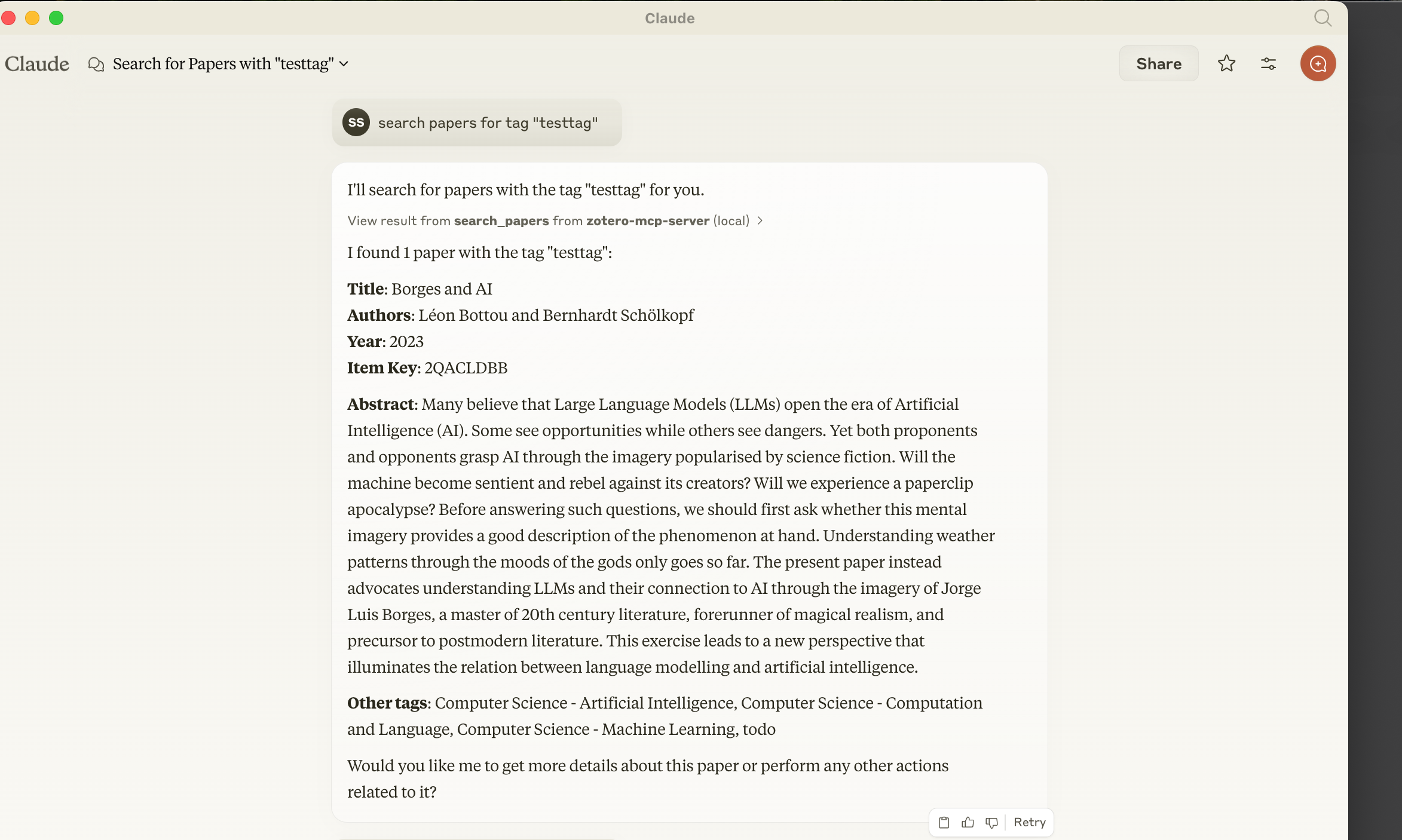
The server allows you to:
- Search papers by tags
- Get paper details and attached notes
- Add notes to papers
- Request paper summaries
Dev Tools Supporting MCP
The following are the main code editors that support the Model Context Protocol. Click the link to visit the official website for more information.







